Hello, world of Dynamo!
Dynamo release 4.1 is here, with improvements ranging from substantial geometry performance gains to new nodes to quality-of-life refinements that make graph-building smoother. While this is a lighter release when it comes to new features, know that we are working behind the scenes on some really exciting stuff! This includes Dynamo Switchboard, an early expression of Dynamo as a Service. If you attended DevCon, you probably saw a sneak peek! Read on to find out more about it and other exciting updates.
TL:DR
- Geometry performance: targeted improvements to PolyCurve operations, curve proximity, and topology allocation, with real-world gains up to 91%
- New NurbsCurve nodes: PeriodicControlPoints and PeriodicKnots for accurate CAD interoperability
- Package Manager improvements: See which version is installed from package search, copy compatibility info from an earlier version when publishing a package, and identify Dynamo team packages with the new Autodesk icon
- Easily navigate large graphs: Use the Home and End buttons to navigate to the sides of graphs
- Clearer Transform node docs: Geometry.Transform and CoordinateSystem.Transform now say what they actually do
- Smarter pin behavior: Pins survive reconnection, copy/paste, and inline watch node deletion
- Comprehensive bug fixes: Pan/zoom crashes resolved, plus a deep sweep of note-pinning edge cases
- .NET 10 backport releases
- Dynamo as a Service update: Switchboard available in closed beta
What is Dynamo and its flavors?
What is Dynamo Core?
Dynamo Core is a collection of bundled components that consist of the graphical interface, the compute engine, the scripting language DesignScript, and the out-of-the-box nodes that are not specific to another program like Revit or Civil 3D.
What is Dynamo for <INSERT HOST HERE>?
Dynamo for [Revit, Civil 3D, FormIt, Advance Steel, Alias or Robot Structural Analysis] is a collection of host-specific nodes that work with Dynamo Core and run inside of said host.
What is Dynamo Sandbox?
Dynamo Sandbox is for package developers and other folks working with Dynamo code who want to stay up to date with the latest and greatest stuff coming out. Sandbox is Dynamo’s “Core” functionality distributed in a way that doesn’t interfere with other Dynamo installations and doesn’t require any other applications (except for a few windows components and some optional extras). You can read more about this distinction here.
So, what’s dropping with Dynamo 4.1?
Geometry, faster than ever
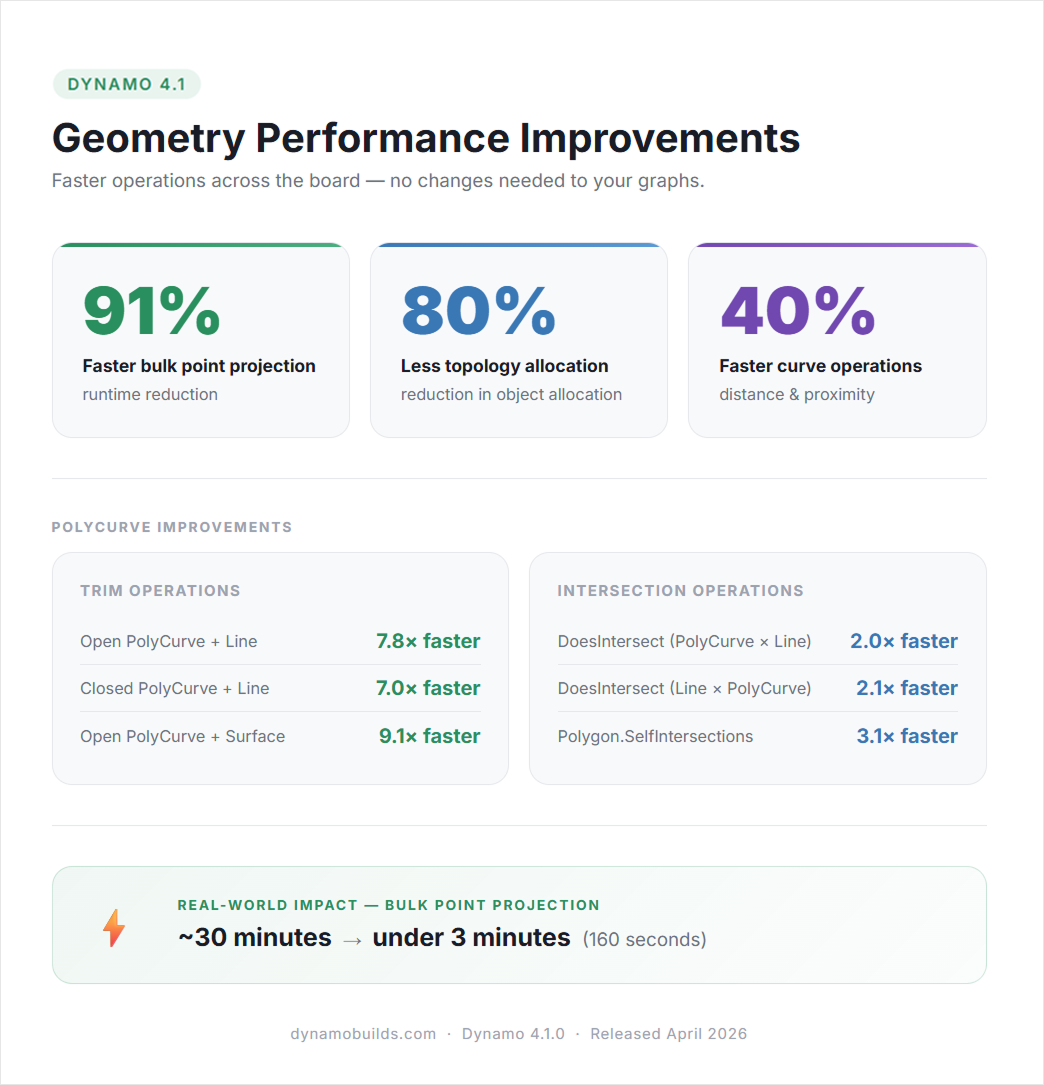
Building upon our geometry optimizations from Dynamo 4.0, 4.1 is even smoother. This release includes a focused set of improvements to how Dynamo handles common geometry operations, and the numbers speak for themselves.
Curve distance and proximity operations are now 40% faster, and we’ve achieved an 80% reduction in topology object allocation, which means less memory churn during geometry-heavy graph runs.
For users working with PolyCurve intersections, the improvements are even more dramatic.
- Operations like DoesIntersect are now 2–3x faster.
- SelfIntersections on complex shapes runs 3.1x faster than before.
Perhaps the most striking gain is in PolyCurve trim:
- Trimming an open PolyCurve with a line is now 7.8x faster (87% reduction in runtime).
- A closed PolyCurve + line comes in at 7.0x faster.
- Trimming with a surface is 9.1x faster.
These were operations that used to generate significant overhead for each curve segment. That overhead is now largely gone.
The headline real-world result: Bulk point projection went from ~30 minutes to under 3 minutes — a 91% reduction in runtime — with no changes required to your graphs.
These gains come from lower-level work in how geometry objects are processed and allocated. You benefit automatically.
Two new nodes for NurbsCurve periodic properties
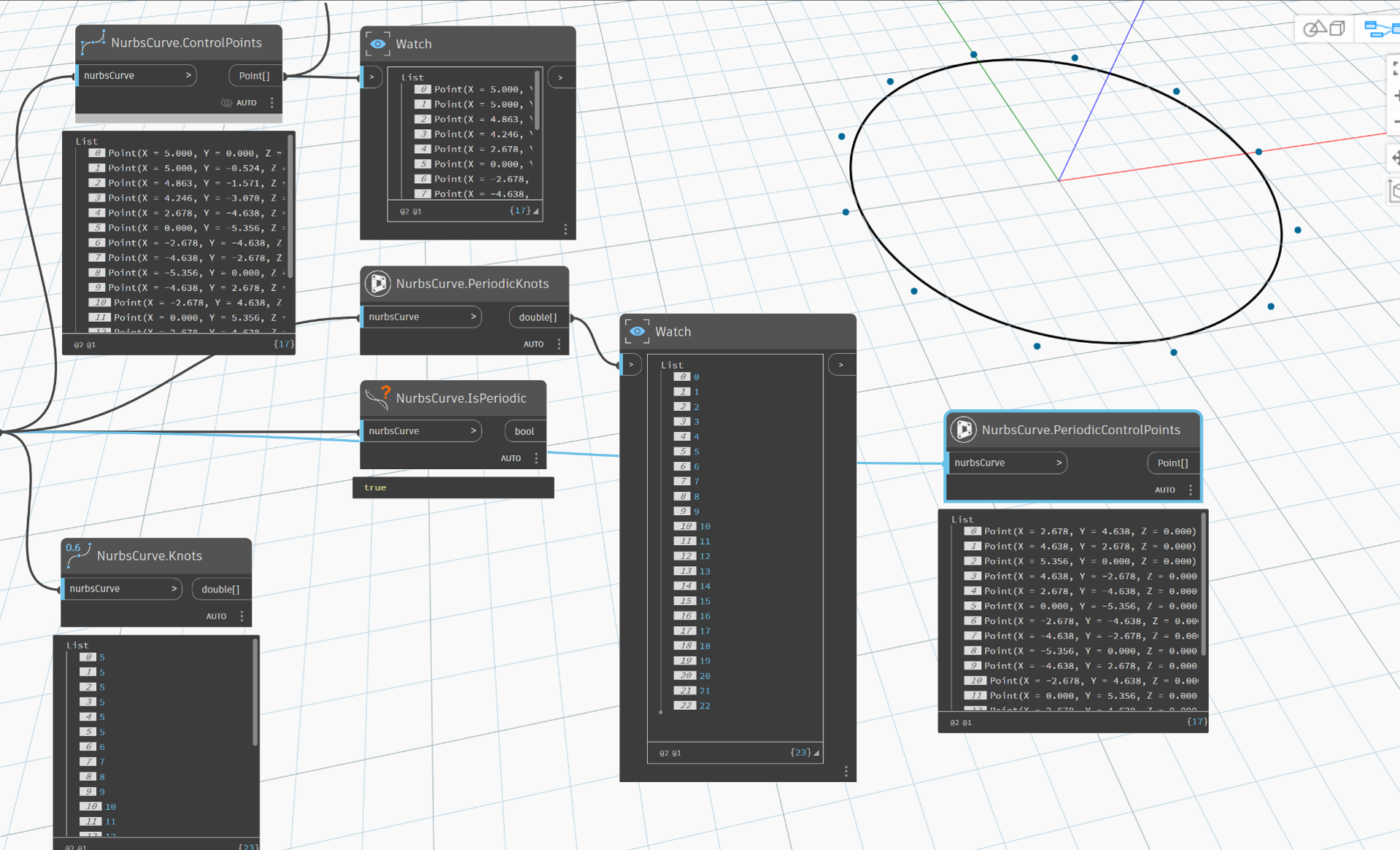
We’ve added two new nodes for working with periodic NurbsCurves:
- NurbsCurve.PeriodicControlPoints returns the true periodic control points of a NurbsCurve.
- NurbsCurve.PeriodicKnots returns the unclamped knot vector.
These nodes expose properties that the standard ControlPoints and Knots nodes don’t correctly represent for closed/periodic curves. If you’re working on workflows that require accurate CAD round-tripping, particularly with Alias, these nodes give you the data you need.
Continued Improvement of Node Help Documentation
In 4.1, improved documentation includes updates to Geometry.Transform and CoordinateSystem.Transform, where descriptions and input names were revised to better match the actual behavior of the nodes.
Quality-of-life improvements
Package Manager improvements
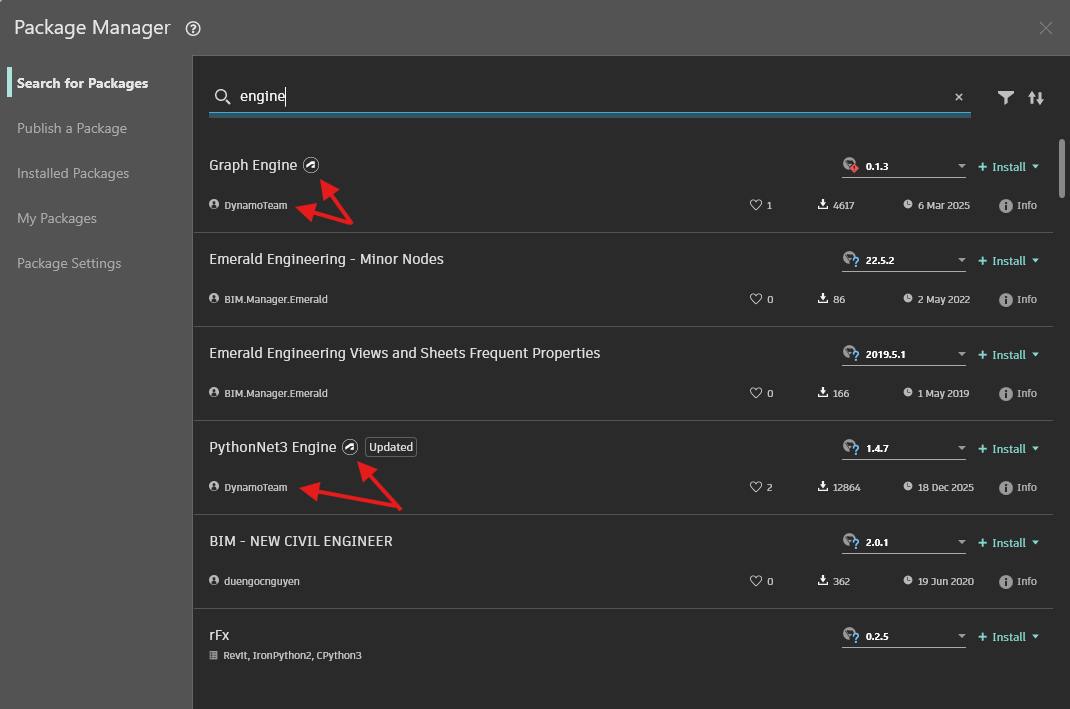
Autodesk badge for team-maintained packages
Packages maintained by the Dynamo team in the Package Manager now display an Autodesk badge, so you can quickly identify packages that are officially supported by the team.
See your installed package version while searching
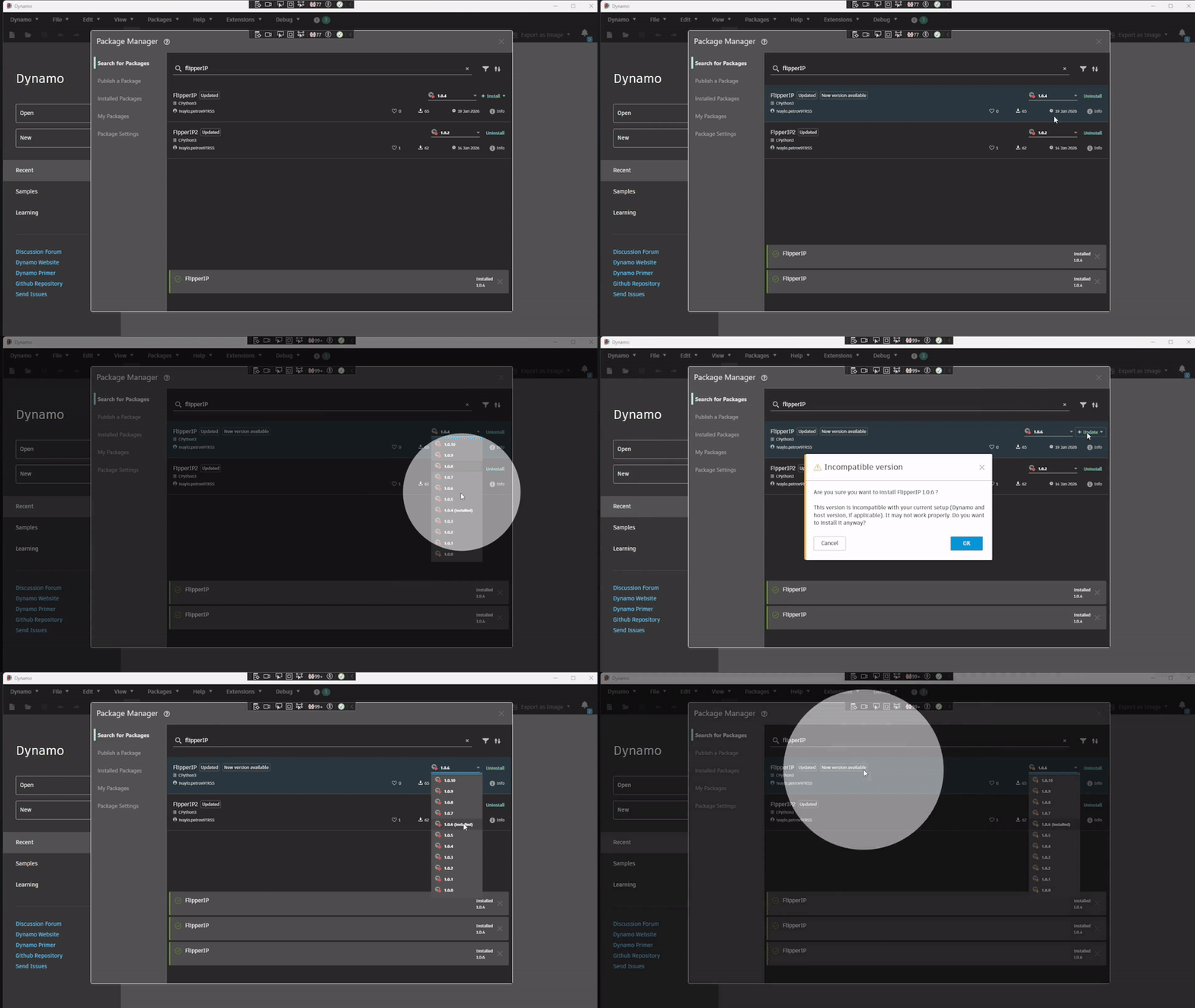
When you search for packages, the Search tab now shows which version of a package you already have installed. No more opening the Installed tab separately to cross-reference; the information is right there while you browse.
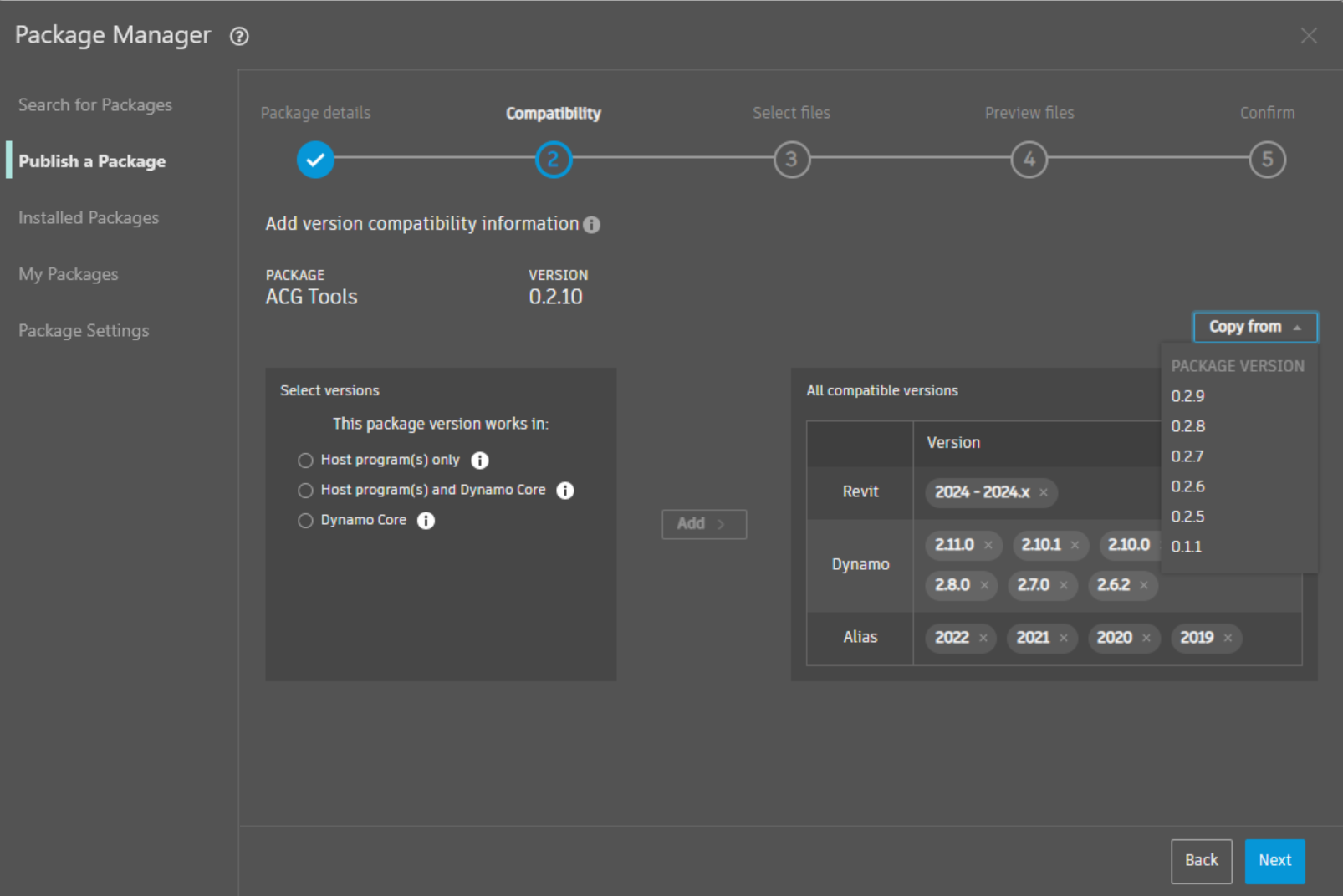
Copy compatibility information from a previous version
When uploading a new version of a package, you can choose to copy compatibility information from a previous version. This handy shortcut helps you avoid having to pick several versions manually.
Put a pin in it: Improvements to pins
Pins stay put when you reconnect ports
Previously, reconnecting a port would cause any pins attached to it to disappear. Now pins survive the reconnection: They stay right where you put them so you don’t have to re-pin things after rewiring your graph.
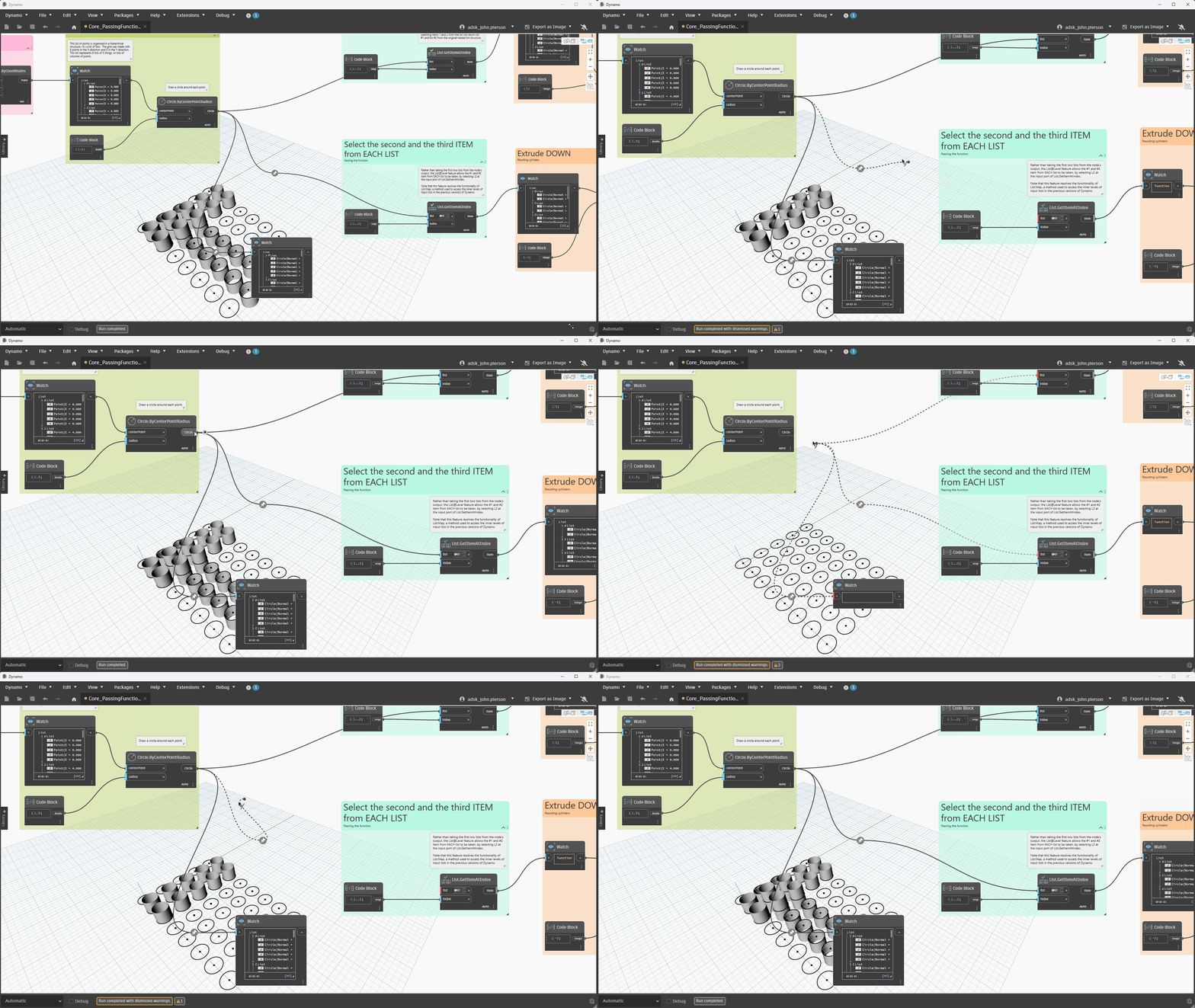
Copy/paste brings pins along
When you copy and paste nodes, any pins you’ve placed on selected ports come along for the ride. Your pin layout is part of your work; it should travel with your nodes.
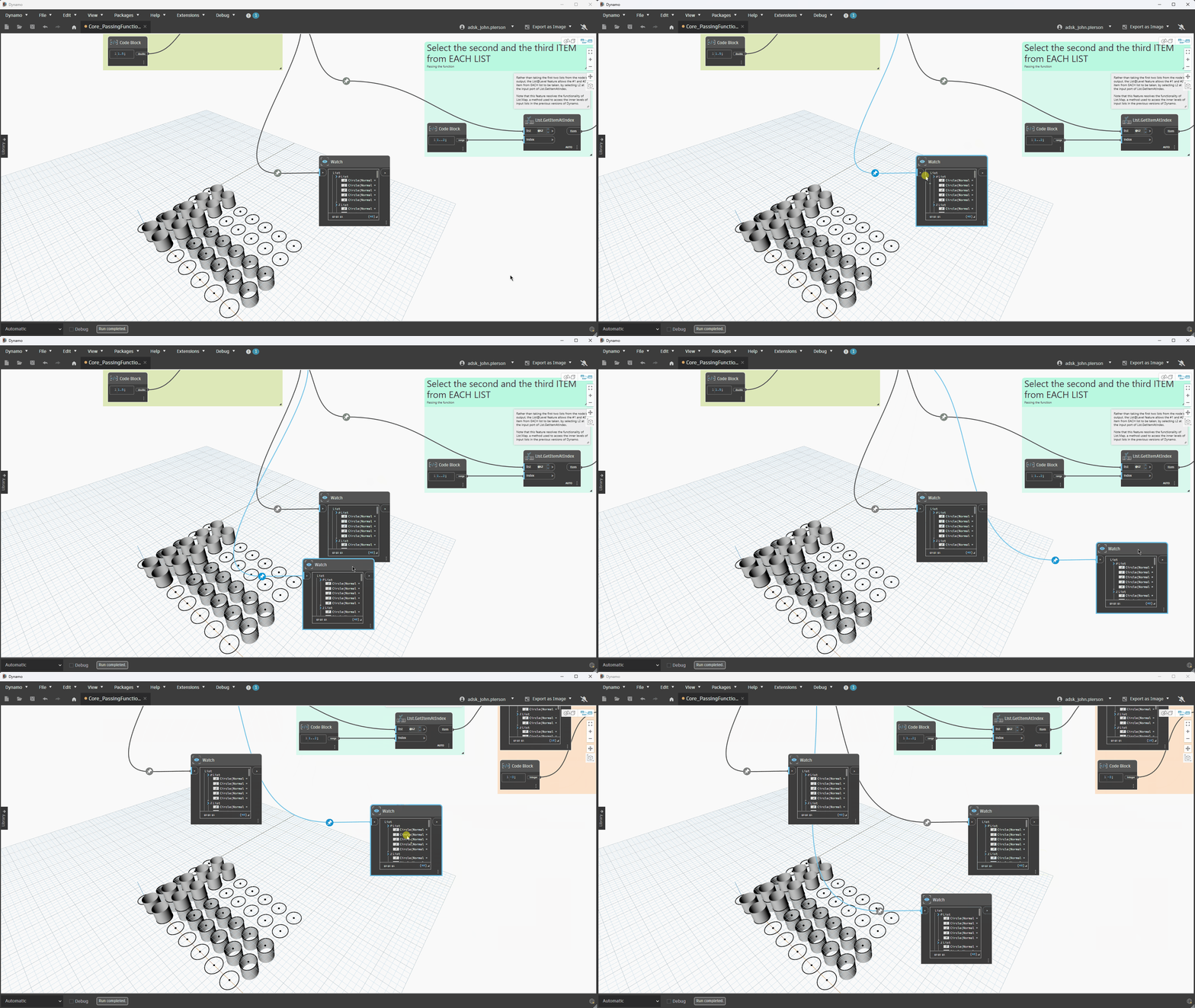
Deleting an inline Watch node preserves the wire
Removing an inline Watch node used to sever the wire it sat on, forcing you to manually reconnect the nodes on either side. Now deleting the Watch node keeps the wire intact, so your graph stays connected without extra cleanup.
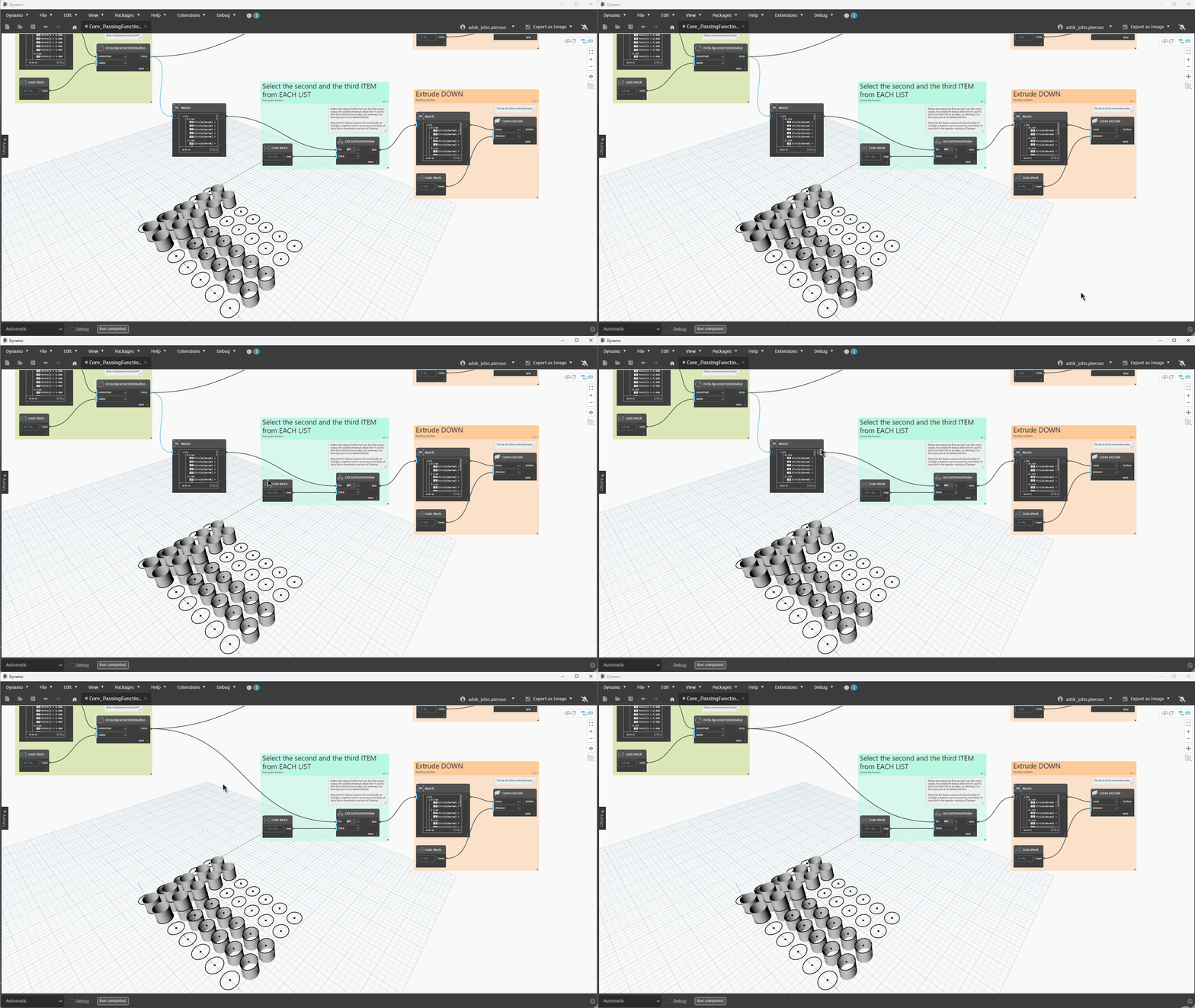
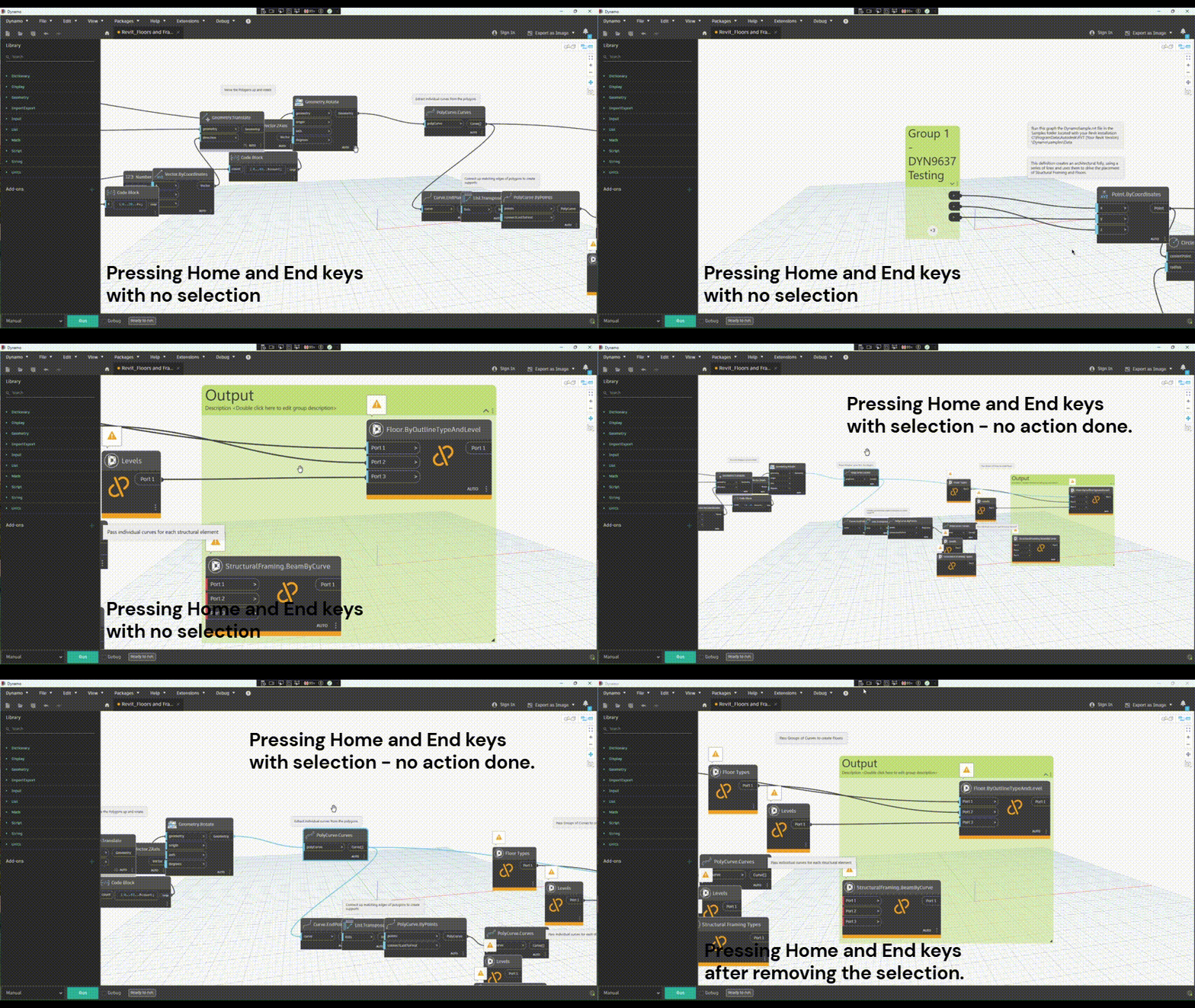
Easily navigate large graphs with Home and End
Working on a wide graph? Press Home to jump to the leftmost node on the canvas, or End to jump to the rightmost. It’s a quick way to orient yourself on complex graphs without hunting around with the pan tool.
Customize your default node group styles
Node groups have always been a great way to organize your canvas, but until now the default style was fixed. In 4.1, you can edit, remove, or reset your default group styles under Preferences > Visual Styles > Groups, so all your groups can look the way you want them to.
Documentation Browser auto-sync
The Documentation Browser provides node help and other information in a convenient side panel, available under Extensions. When you trigger node help by right-clicking a node and selecting Help (shortcut: F1), a new auto-sync setting automatically updates the Documentation Browser to match whichever node is currently selected on the canvas. This setting is toggled on by default under Preferences > Features > Documentation Browser.
Voronoi and Delaunay tessellation improvements
For users doing computational geometry work, surface tessellation with Voronoi diagrams and Delaunay triangulations is now more reliable. The algorithm has been updated with a relative edge-length filter and better handling of out-of-range UV inputs, which means fewer unexpected results at the edges of your surfaces.
Other Updates and a New Thing
Autodesk Assistant (Alpha) and DynamoMCP
The Autodesk Assistant(Alpha) is ongoing and the team has added quite a few new features in time for DevCon. To gain access, express interest here: https://feedback.autodesk.com/DynamoAgenticAlpha
Introducing Dynamo Switchboard
Dynamo Switchboard is a new tool that lets you run Dynamo graphs in the cloud, without needing Dynamo open on your machine. Select a graph, point it at one or more Revit models, and let it run. Switchboard handles the execution, tracks the jobs in progress, and delivers the results back to you, including an experimental graph visualization that shows your graph’s structure alongside its outputs.
One of Switchboard’s most powerful capabilities is parallel batch execution: You can run the same graph across multiple Revit models simultaneously, rather than waiting for each to finish before starting the next. For teams managing automation at scale, this is a meaningful shift in what’s possible.
Learn more about what it can do today and how to use it in this blog post and join the early access beta here.
Bug fixes
Pan/zoom crashes on large graphs
Two distinct crashes that occurred during rapid pan/zoom when editing large graphs have been resolved.
A deep sweep of note-pinning bugs
What started as a fix for a single issue — pinning a note to a node couldn’t be undone — turned into a comprehensive overhaul of note-pinning reliability. In the process of resolving that bug, we uncovered and fixed 10 additional related issues, including:
- Silent failures where pinning appeared to work but didn’t
- Cases where redo of a pin could corrupt the undo stack
- Pinned notes getting lost when undoing group operations or node deletion
- Notes not restoring correctly on file load
- Selection state not clearing properly after unpin operations
- A race condition in pin/unpin timing
All of these are now fixed, and all undo and redo work correctly and reliably for all note-pinning actions.
For the full list of fixes, see the release notes.
.NET 10 backport support is here
Keeping in line with Microsoft’s guidance for .NET 10 support, backport releases have been made available for Dynamo 3.3.2 and 3.7.0. These builds are available on dynamobuilds.com website or the GitHub build page.
Cool stuff! How can I get my hands on Dynamo 4.1?
Dynamo 4.1 will be made available in our host integrations at a future date and can be explored right now through the dynamobuilds.com website or the GitHub build page – available in the Sandbox version of Dynamo. Then, drop us a line on the forum!
For the full scoop, check out the release notes
For more information on other minor features, bug fixes, and known issues in Dynamo 4.1, take a look at the release notes!
With each release, Dynamo grows more capable, and that’s only possible because of our community. Every improvement we make is for you, and we rely on your ideas, feedback, and inspiration to keep moving forward. Curious to see what else we’re working on? Visit the Dynamo Roadmap, take a look at current and upcoming work, and let us know what you think.
The Dynamo Team