Hello friends of Dynamo,
If you have ever opened Dynamo with a clear goal in mind and found yourself running the same graph across multiple models, keeping an eye on longer runs, or coordinating automation alongside your day-to-day work in Revit, you have likely felt the need for a more flexible way to run that work.
Dynamo is incredibly capable on the desktop. At the same time, some workflows benefit from being able to run outside your active session, especially when they are repetitive, long-running, or applied across multiple files.
We have been exploring that space for a while. Today we are inviting you to try something new: Dynamo Switchboard, an early access beta that lets you run Dynamo graphs using cloud compute so you can keep working while your automation runs separately.
This post is a practical overview. When you join the beta, you will get deeper documentation on setup, inputs, outputs, and backend-specific behavior.
Why Switchboard exists
Most Dynamo users already have strong workflows. What we consistently hear is a need for more flexibility in how and where those workflows run.
Examples we see often:
- Running the same graph across multiple models
- Kicking off a job and moving on to other work
- Managing longer-running automations alongside active modeling sessions
Switchboard is our first big step toward decoupling automation from your desktop session: You stay in Dynamo to author and configure, and the cloud carries the run. In future, this also opens the door to scheduling runs or triggering them based on events, so the work can happen when it needs to, not just when you’re at your desk.
We want to be good community members and set expectations with kindness: Switchboard isn’t trying to replace desktop Dynamo for every workflow. It is a new way to run certain jobs in the cloud, and that comes with a few “not quite the same as my laptop” realities. Think of it less like swapping your whole toolbox, and more like adding a second workbench for the tasks that are too heavy, too repetitive, or too parallel for one session.
What Switchboard is
Dynamo Switchboard is a view extension, installed as a package for recent Dynamo builds, that opens a panel inside Dynamo. From that panel, you can pick a .dyn file, set up inputs, and send the graph to a cloud runner—similar in spirit to Dynamo Player, but built for remote execution and, depending on the path you choose, batching across models.
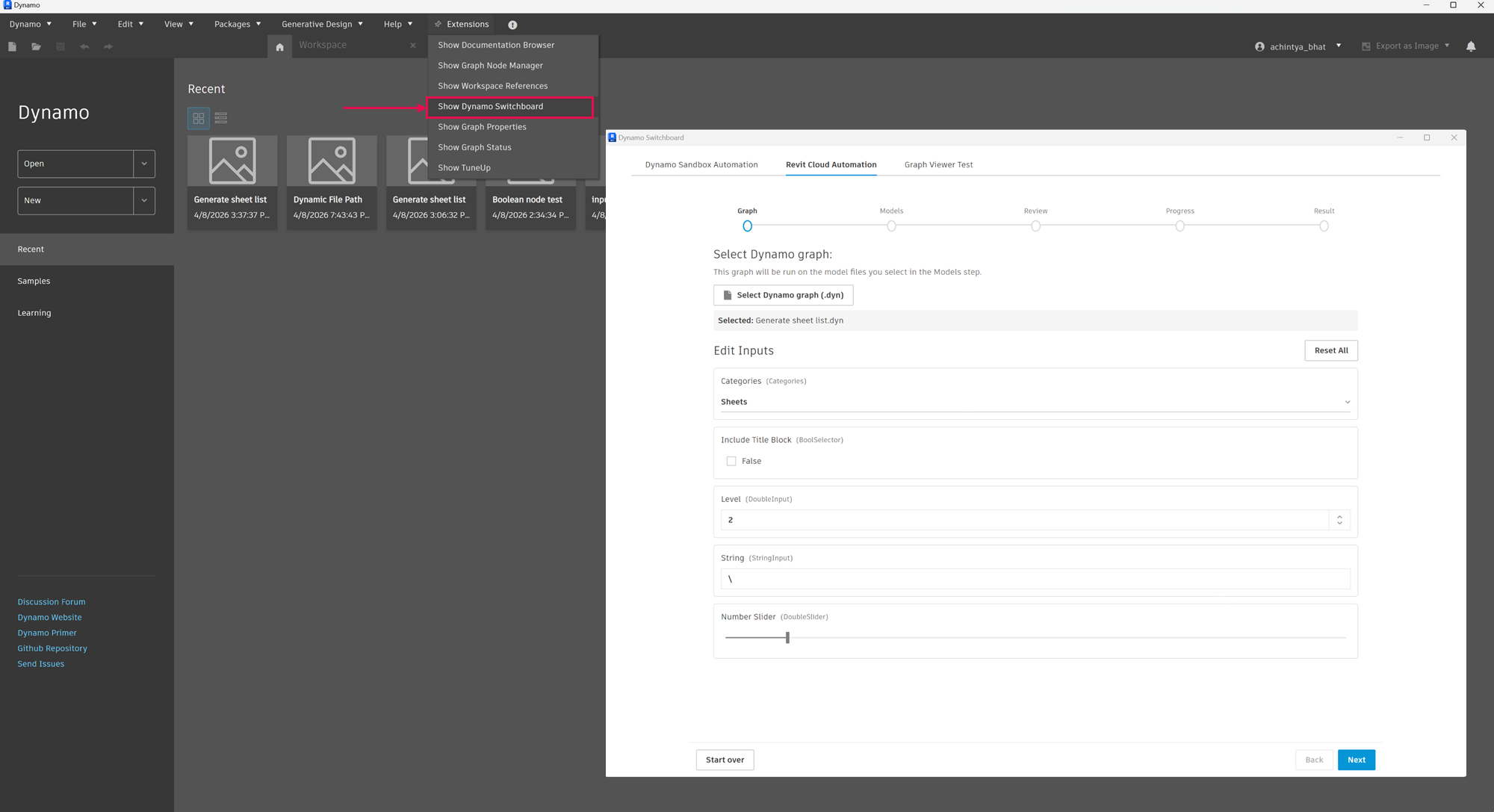
You will see a simple step-by-step flow: choosing your graph, reviewing inputs, selecting models when needed, watching progress, and downloading results. Under the hood, Switchboard packages your graph, applies your inputs, submits jobs to the selected backend, tracks execution, and returns results.
Two doors, one goal: Pick the backend that matches your graph
Switchboard is not one anonymous “cloud button.” It connects to two different execution environments, because not every Dynamo graph needs the same thing.
1) DaaS Sandbox: “Core Dynamo,” no Revit session
This path runs your graph in a headless Dynamo runtime in the cloud. Think geometry computations and data management workflows that feel like pure Dynamo work, without loading a host model.
It is a strong fit when you want fast iteration on graph logic, computational design explorations, or data processing that does not need Revit and Civil 3D APIs on the other end of the wire.
2) Revit Design Automation: Revit in the cloud, driven by Dynamo
This path runs your graph inside a managed Revit process in the cloud. You bring one or more Revit models, Switchboard lines up the work, and each model can run as its own parallel job.
This is the path for model fidelity and Revit API workflows: updating parameters, creating or cleaning elements, generating views, exporting deliverables, and the thousand small Revit tasks that are perfect for Dynamo—if only you could run them without blocking your desk.
If you are comparing mentally to desktop Dynamo: The cloud paths are powerful, but they are still a subset of everything your laptop can do.
What can you use it for today?
Here are four practical reasons teams get excited, taken straight from how people already use Dynamo, just with less friction:
- Batch across models. Run once, touch many .rvt files—standards checks, template setup sweeps, parameter cleanup, and anything else you would rather not do model-by-model.
- Unattended runs. Kick off a job and step away. Switchboard is built around the idea that automation should not require you to stand guard over the screen.
- Long-running work. Big cleanup passes, large view regeneration, multi-export jobs—the kinds of tasks that steal an afternoon locally.
- Heavy geometry and spatial logic at scale. Clearance checks, adjacency tests, room and volume relationships—workloads where Dynamo shines and where freeing your session matters.
What Switchboard is not for (yet)
Just as important as what works well is being clear about current limitations. Based on early usage, a few patterns do not translate well today:
- Interactive, UI-driven workflows
Graphs that depend on selecting elements, clicking in Revit, or reacting to the model during execution will not behave the same way in the cloud. - “Find and highlight in model” scenarios
A common expectation is to run a check and open the model with elements highlighted. Today, Switchboard is better suited for generating reports or structured outputs rather than visual feedback directly in the model. - Exploratory or debugging-heavy runs
If your workflow depends on node previews, watch nodes, or step-by-step inspection, the current experience will feel limited compared to desktop Dynamo. - Graphs with implicit inputs
Workflows that rely on prior selections in Revit or remembered state will not be supported unless you serialize the data using Data.Remember node or something. - Unsupported environments or APIs
Certain Revit UI APIs, packages, or Python configurations may not be supported depending on the backend.
Beta means real and evolving
We are sharing Switchboard early because real workflows and feedback will shape it fastest.
The workflows that succeed today tend to be explicit and deterministic. If you can describe your graph as “given these inputs, produce this result,” you are in a strong position.
You should also expect some beta realities:
- Inputs need to be clearly defined (similar to Dynamo Player)
- Output and log format is not as cleanly structured as what you are used in Dynamo desktop.
- The graph viewer is Experimental and only shows warning states of nodes and not the output bubble
- Packages and Python support vary
- Runs operate within time and system limits
We are actively working toward:
- Better visibility into outputs and execution
- Clearer summaries of what changed
- Improved validation before runs
- Stronger guidance and onboarding
How to get started
- Join the early access beta (linked here) and install the DynamoSwitchboard package for the supported Dynamo version (detailed documentation available to download with Beta package).
- Open Switchboard from the Dynamo Extensions menu.
- Choose your backend, upload your .dyn, walk the steps, and run.
When you are in, start with a small graph you know well, then stretch into batching and heavier workloads as you get comfortable. That progression is the fastest way to build intuition and the fastest way for us to learn what to improve first.
Note: Currently works in Dynamo 3.6 and Revit 2026. It does not support Civil 3D as of today, but that will change as we continue to work on this.
Closing
Dynamo has always been a bridge between design intent and repeatable action. Switchboard is our next step across that bridge: Keep authoring where you love to author, and let the cloud carry the runs that do not need to live on your machine.
We cannot wait to see what you automate and what you ask for next.
The Dynamo Team