Introduction
Recently, Autodesk announced Dynamo’s connectivity with Forma, which immediately sparked my ‘nerd senses’ and sent my mind racing with possibilities and questions.
Recognizing the potential, I’ve undertaken a deep dive into exploring this new connection. Driven by my own curiosity, and encouraged by the Dynamo team, I will share my discoveries with you through this blog series. The goal is to not only demonstrate the technical connections, but to also inspire you to envision how these integrations can maximize your own workflows.
Throughout this blog series, expect detailed findings, fully functional scripts, and comprehensive documentation on how to flex values and inputs to create building configurations of your own. Let’s begin!
Entering a new era of connectivity
For nearly half of my 26-year career, I’ve navigated the intersection of traditional design-bid-build construction and the exciting world of Industrialized Construction. While I’ve often pushed the boundaries of traditional design tools to meet the unique demands of designing for industrialized construction (DFMA) (a topic for another time!), my true passion lies in leveraging Dynamo and Revit to build powerful Building Configurators. See examples of Building Configurators later on in this post, and here is a list of good FAQ.
Autodesk’s announcement of Dynamo’s connectivity with Forma sparked some initial questions:
- Can my carefully crafted Dynamo logic and rules reach beyond Revit and influence the early conceptual design phase in Forma?
- What new possibilities does this unlock for scaling up my existing logic and data connections?
- What data can be extracted and injected to advance my design and Building Configurator services?
- And the big one: What are the methods for creating and extracting unit data in Forma that can directly feed into and advance my Revit-driven logic?
I’ll be exploring the answers to these questions throughout this blog series, and I know the answers are 100% WORTH EXPLORING because this new relationship maximizes the utilization of your company’s design logic, a.k.a. your company’s DNA. No matter if you’re a design–bid–build firm or a volumetric builder, envision the ability to apply your firm’s proprietary design logic in the earliest stages of a project using Forma, guided by the same Dynamo scripts that will later generate detailed documentation in Revit. Now that’s connectivity!
For the AEC companies that need to maintain a higher set of standards and rules, this end-to-end workflow shows how your company can strategically drive the overall design process and deliver high-quality design outcomes while utilizing one data set.
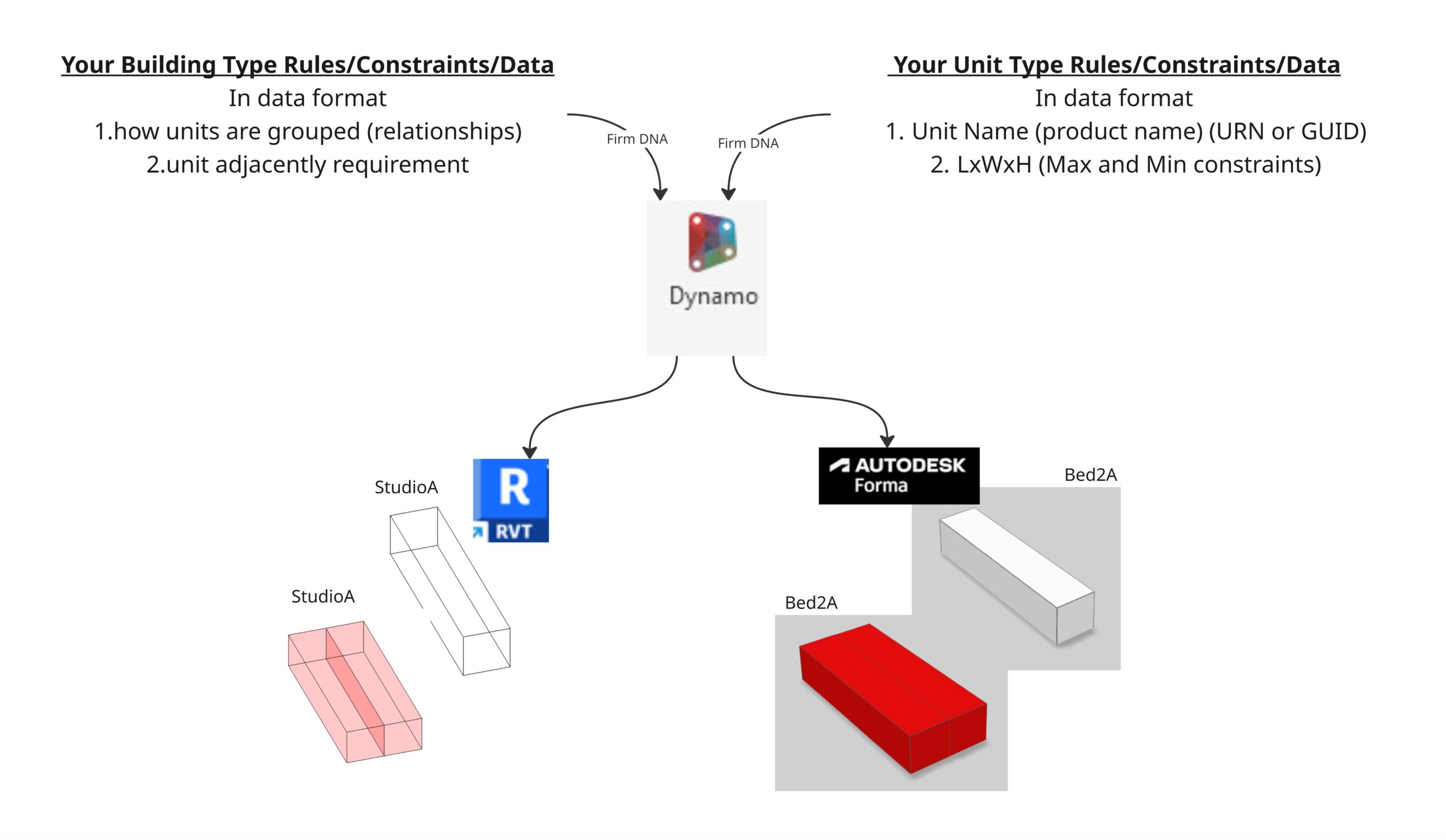
Question: can dynamo orchestrate Forma and Revit design rules
Mapping your firm’s DNA between Forma and Revit with Dynamo
To lay the groundwork, let’s define the core concept: A Building Configurator is essentially an automated design modeling system. You provide inputs, and it uses specific design principles and rules to generate the building geometry (via the API). A Building Configurator is an intelligent tool that enables users to generate comprehensive building designs based on a limited set of inputs, yielding a multitude of valuable outputs tailored to specific requirements.
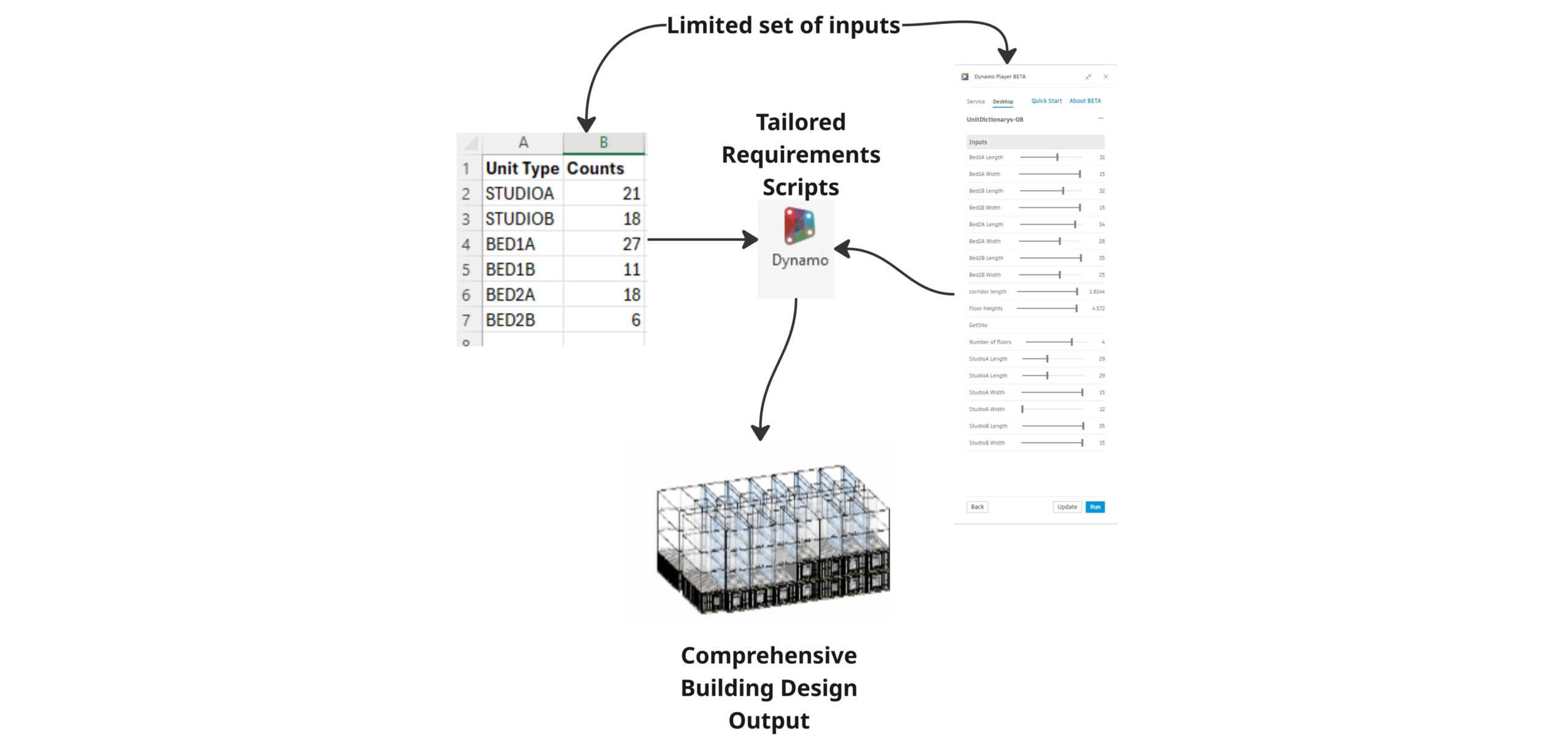
Simple Configurator Set up
Mapping requirements to Dynamo Player in Forma
In the next post, the initial exploration will focus on a residential apartment Building Configurator, where Dynamo orchestrates the DNA, manipulating design parameters and building behaviors across the conceptual design environment of Forma and the detailed modeling capabilities of Revit. This example will be simplified, but it will lay the foundation for understanding more complex applications while exploring these new connections between our design tools.
Building Configurator examples from the past
The true power of API-driven configurators lies in their ability to enforce consistent modeling practices. This modeling consistency is the “secret sauce” that ensures accurate and reliable data for all downstream processes, a crucial advantage for companies with strict data requirements. It’s a direct byproduct of generating models programmatically.
To further familiarize yourself with Building Configurators, here are a few examples to explore:
AU 2023 Configurator: From Mass Model to Fabrication Model
The AU 2023 configurator was designed to ingest any architectural model and automatically generate a comprehensive framing Bill of Materials (BOM) using our company’s proprietary products, design logic, shipping logic, and manufacturing logic. This automation was essential, saving several team members three weeks of manual work on each project.
Beyond the BOM, the tool produces a detailed design model with accurate product placement. This allows customers to review more projects earlier in the process, before engaging the team’s full resources.
SFCD Configurator: Sales Configurator & Mass Customization at Scale
This configurator empowers our sales team to rapidly configure buildings based on strict product and construction rules. From basic constraints like maximum and minimum building lengths to complex logic such as wall panel selection driven by nested product placement (e.g., openings), it ensures accuracy from the start. The Configurator section of the video starts at 57 minutes in.
The result? A precisely configured model for wall panel fabrication, structural connections, fasteners, and construction models. This single tool transforms a multi-day, multi-person effort into a task completed in under an hour with the push of a button.
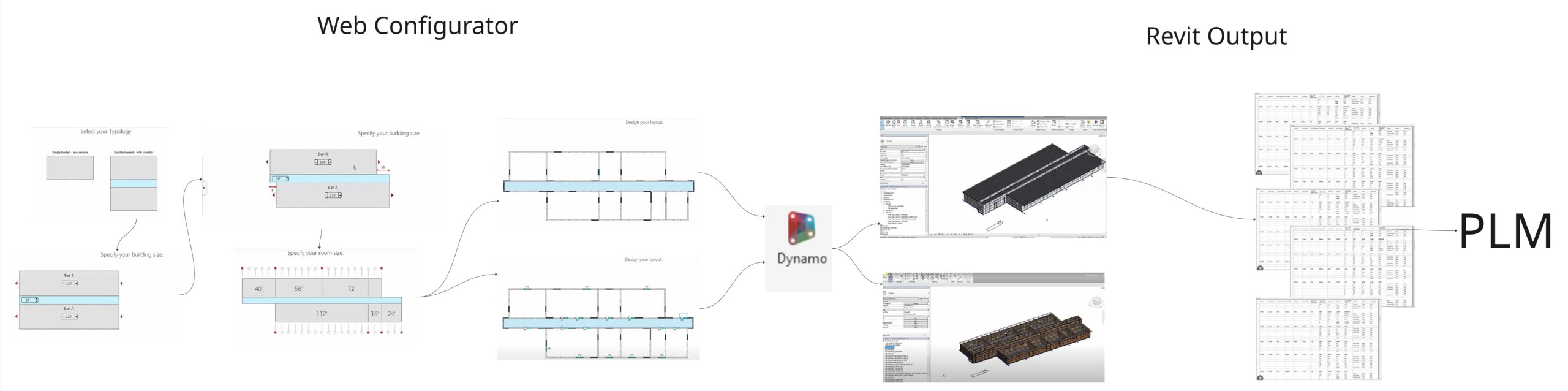
Web to Revit Sales Configurator
Toward seamless integration
A few years ago, I was sent on the road with a bunch of geniuses to interview global companies utilizing AEC design technologies in extraordinary ways (how I got this job is another story). Listening to their specific concerns in design, documentation, fabrication, installation, and construction changed everything for me. These discussions consistently reinforced one core truth: While we have an abundance of powerful tools, the quest for truly seamless integration remains.
That’s precisely why the “marriage” of Forma and Dynamo feels so significant. It’s not just another link in the chain; it’s an intuitive fit with the potential to genuinely unify valuable workflows.
Having explored what a Building Configurator entails and glimpsed the exciting possibilities of linking Dynamo logic to other applications, here’s a preview of what’s next:
- I will explain the simplified design logic and how it’s enforced.
- I will explain what authoring methods we have in Forma via Dynamo.
- I will share scripts that allow you to build your own configurations in Forma.
- Along with documentation explaining the scripts, their inputs, and outputs.
Homework before the next post:
- Loosely understand what a Building Configurator is and ways it can work for you.
This post is the first step into my deep dive, and I’ve already encountered a few moments that made me think, “hell yeah!” The sheer power of weaving Dynamo’s design logic into a robust tool like Forma is immense, and when you consider Dynamo’s tenured relationship with Revit… we are on the cusp of something truly transformative. Let’s embark on this discovery together. I’m excited to share what I uncover!
Come read Part 02 in the series to continue the journey.