Guest post by Dynamo Hackathon 2024 winners Ayman Saleh, Enrique Galicia, and Jordana de Castro Rosa
Introduction
EcoMatic is an innovative tool that revolutionizes material creation in the Architecture, Engineering, and Construction (AEC) industry by combining artificial intelligence (AI) and automation with sustainability practices. Developed during the Dynamo Hackathon at Autodesk University 2024, this solution showcases how AI-driven tools can empower designers to create materials efficiently while embedding carbon emission data, helping the AEC industry address the challenge of carbon emissions.
EcoMatic automates the material creation process using Stable Diffusion within Dynamo, generating high-quality materials for Revit and Civil 3D. It seamlessly integrates carbon footprint data from 2050 Materials, allowing architects, engineers, and designers to make informed and sustainable decisions without adding complexity to their workflows.
Our team—Ayman Saleh, Enrique Galicia, and Jordana de Castro Rosa—each brought unique strengths. Though we started as strangers, we quickly bonded over a shared vision. Jordana’s mastery of AI integration and design workflows identified the critical problem, mapped the solution, and delivered the compelling pitch. Enrique’s exceptional dedication, speed, and expertise in coding and Dynamo development transformed ideas into a real product. Ayman, with 16 years of construction experience and a background in design automation, provided invaluable support and ensured our solution was both practical and robust. In the fast-paced hackathon environment, we collaborated effectively, connected with others, and empathized with the AEC community’s needs, creating a solution that addresses real-world challenges.
Challenges in the AEC Industry
The AEC industry accounts for nearly 40% of global carbon emissions, with 11% directly related to materials embodied carbon.
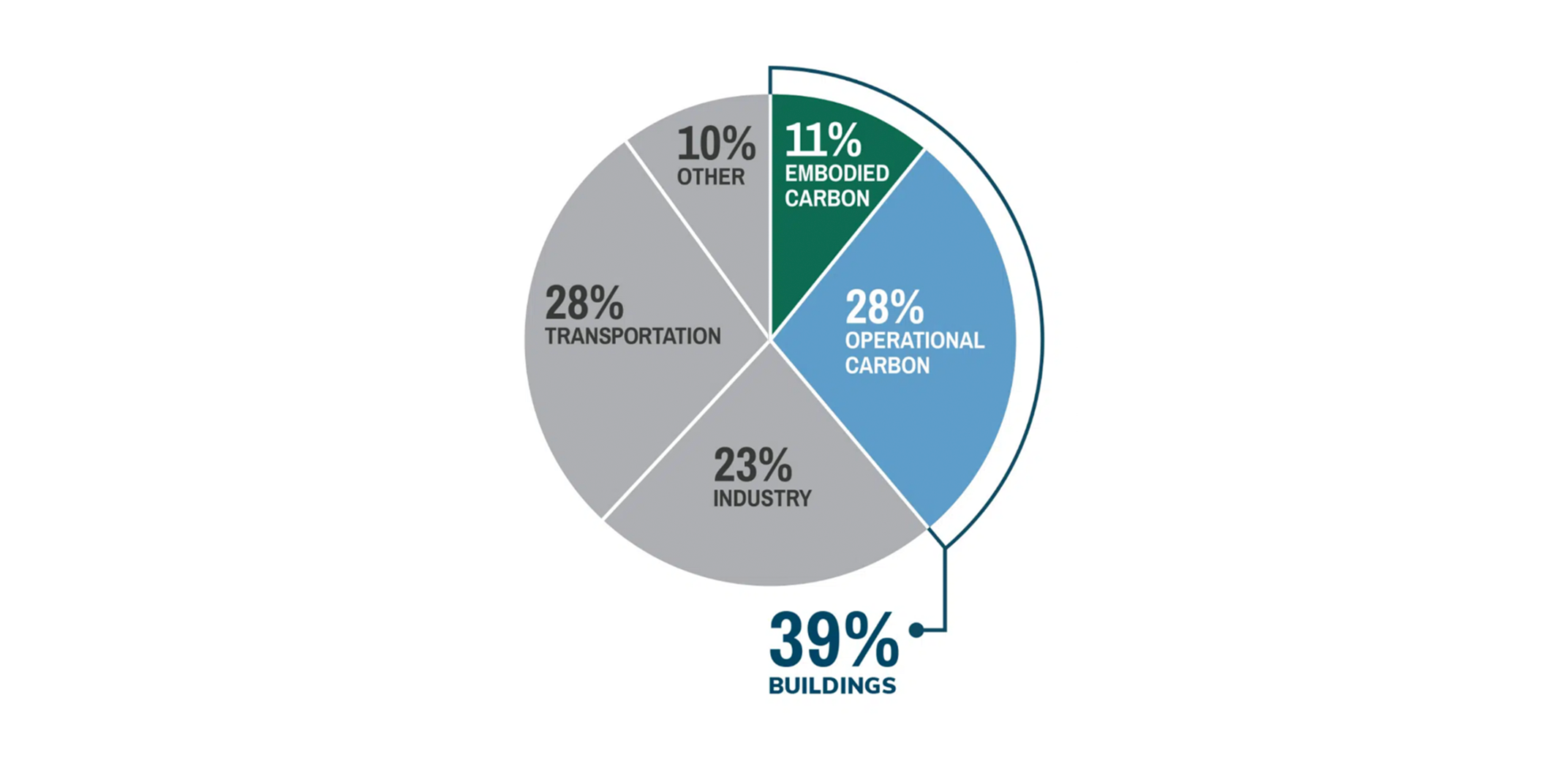 In addition to environmental concerns, traditional workflows in material selection and creation present several challenges:
- Time-consuming searches for material data across disconnected libraries.
- Manual creation of materials, prone to human error.
- Low-resolution textures with watermarks, affecting visual quality.
- Loss of material data when transitioning between design tools (e.g., IFC workflows).
- Limited sustainability data, hindering designers from making informed eco-conscious decisions.
EcoMatic addresses these issues by automating material creation while embedding carbon emission data, ensuring a smooth workflow across different platforms.
How EcoMatic Works
EcoMatic transforms traditional workflows through AI-driven material creation and automated carbon data integration. The tool can generate multiple materials simultaneously by extracting information from specification sheets, streamlining workflows for large-scale projects. Below is an in-depth look at how EcoMatic functions.
- Generating AI-Driven Materials from Text Prompts: Designers input text prompts in Dynamo, such as “polished marble with a glossy finish.” EcoMatic uses Stable Diffusion models to generate high-quality, corresponding textures. This AI-driven process ensures the textures are watermark-free, customizable, and suitable for visualization within Revit, Civil 3D, or any other authoring tool connected to Dynamo.
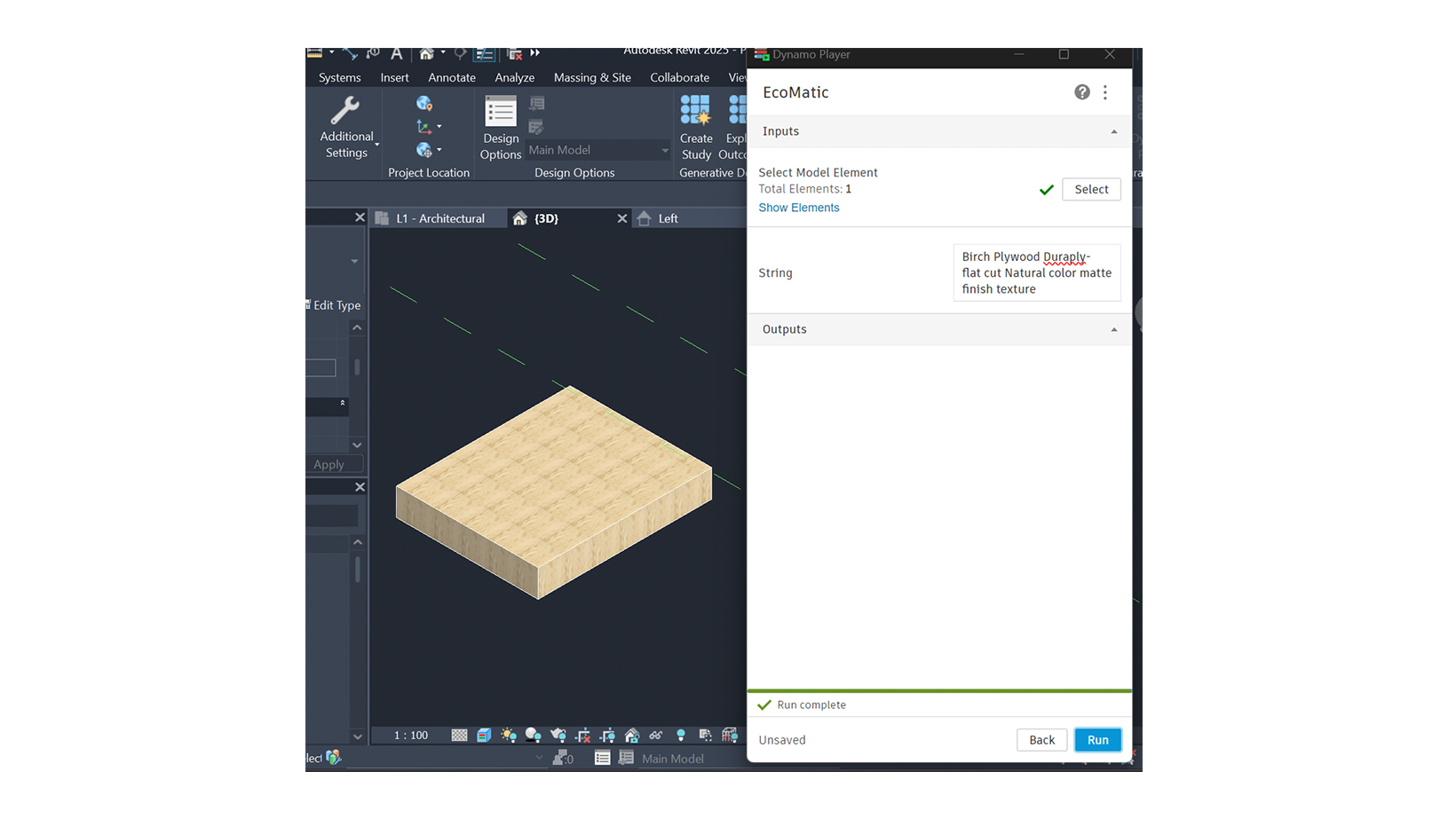
E.g., material description prompt
- Batch Material Generation from Specification Sheets: EcoMatic excels at bulk material creation by reading specification documents (specs). Designers can upload spec sheets containing material descriptions, and the system automatically extracts key data points to create multiple materials at once.
-
- Data Extraction: EcoMatic identifies properties such as material composition, finish, color, and durability directly from the spec sheets.
- Automated Generation: Each extracted material description is converted into AI-generated textures and BIM materials.
- Batch Assignment: The generated materials are automatically assigned to relevant objects within Revit or Civil 3D, minimizing manual input and ensuring consistency across models.
This batch generation feature enables architects and engineers to create and assign entire material libraries in one go, dramatically reducing the time required to populate BIM models with accurate, eco-friendly materials.
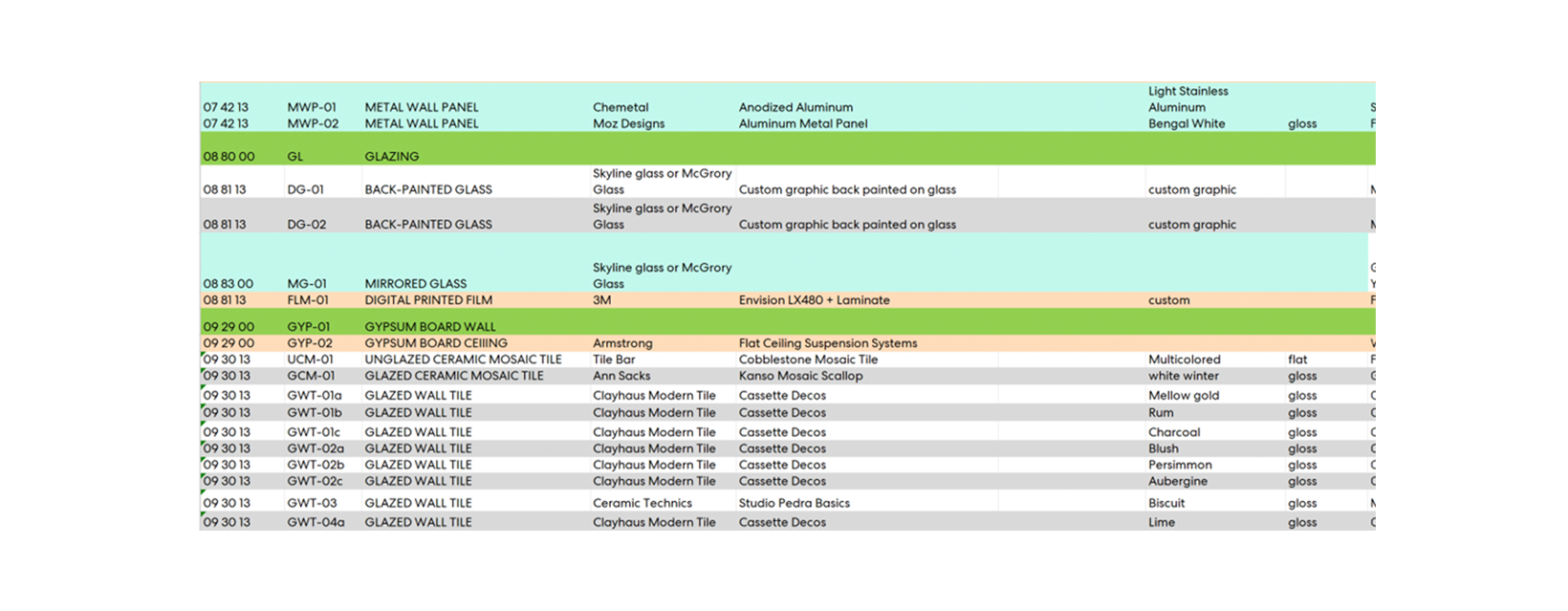
E.g., material specification documents provided by architects and used as input.
- Carbon Data Integration via the 2050 Materials API: EcoMatic seamlessly integrates carbon metrics into the generated materials. For every material created, the system retrieves embodied carbon data from the 2050 Materials database and embeds it directly within the material’s parameters. This ensures that sustainability data is always accessible for informed decision-making.

- Automated Material Assignment in Revit and Civil 3D: Once generated, materials—including textures and carbon data—are assigned to specific objects within Revit and Civil 3D models. Designers simply select the objects, and the EcoMatic script handles the material assignment automatically, eliminating the potential for human error.
With these capabilities, EcoMatic significantly enhances design efficiency while promoting sustainable practices, making it an essential tool for the modern AEC industry.
The EcoMatic Script: Technical Foundations
At the core of EcoMatic is a custom Dynamo script, designed to automate and streamline the entire material management process. Built with C# and integrated with the Stable Diffusion and 2050 Materials APIs, the script allows for real-time material creation and carbon data embedding.
Key Features of the Script
- Automated Input Handling
- The script processes text prompts or spec sheet uploads, extracting relevant data to structure material properties.
- Through custom Dynamo nodes, the data is prepared for material generation and BIM integration.
- AI-Generated Textures
- Using Stable Diffusion models, the script generates high-resolution images based on the structured material data.
- Carbon Data Integration
- An API connection with the 2050 Materials database retrieves carbon metrics for each material.
- This data is embedded into the BIM parameters, giving designers access to sustainability metrics throughout the project lifecycle.
- Automated Material Assignment
- The script automatically assigns materials to objects within Revit or Civil 3D, streamlining the design process.
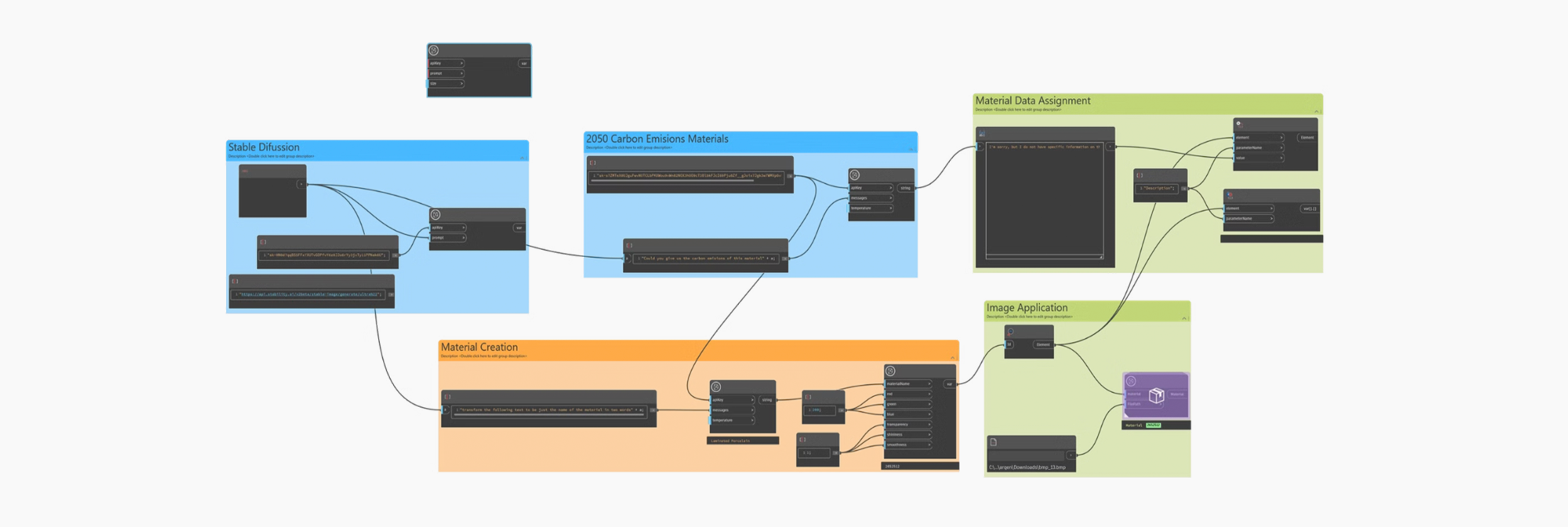
Performance Metrics: Measuring EcoMatic’s Impact
The EcoMatic solution demonstrates how technology can drive sustainability while improving efficiency. Key performance indicators include:
- Time Savings
- A significant reduction in time spent searching for and creating materials.
- Automated assignment of materials within 3D models, eliminating repetitive tasks.
- Material Quality
- AI-generated textures meet high-resolution standards, with user feedback used to track quality.
- Carbon Data Accuracy
- Integrated carbon metrics align with the latest data from 2050 Materials, helping users make data-driven design decisions.
- Interoperability Improvements
- Ensures seamless material data transfer across various software platforms.
Conclusion
Our hackathon journey emphasized that empathy, adaptability, and collaboration are as essential as technical expertise. Engaging with diverse perspectives enriched our project, enabling us to create a strategy that balanced sustainability with technological requirements.
We leveraged large language models (LLMs), Generative AI, and the 2050 API within Dynamo, extending functionality through custom C# nodes. Each milestone presented new challenges, which we tackled by managing risks and adapting based on feedback—pushing EcoMatic forward step by step.
Key Takeaways:
- Focus on a Prototype: Prioritize demonstrating potential over perfection.
- Tackle One Challenge Well: A focused solution has greater impact.
- Start the Presentation Early: Success lies in communicating your work effectively.
- Play to Team Strengths: Each member’s unique skills contribute to success.
- Empathize and Listen: Understanding others’ needs creates better solutions.
- Take Risks and Aim Broad: Explore bold ideas with wide applicability.
- Enjoy and Learn: Hackathons are about growth, not just winning.
EcoMatic showcases how AI and automation can address urgent sustainability challenges in the AEC industry. By automating material creation and embedding carbon metrics, it empowers designers to make informed, eco-conscious decisions quickly and effectively. Its success at the Dynamo Hackathon proves that with the right technology and collaboration, impactful solutions can be developed within hours.
Looking ahead, EcoMatic will focus on expanding integration across platforms and refining AI models to ensure continuous improvement. As the AEC industry seeks new ways to reduce its environmental footprint, tools like EcoMatic will be essential in shaping a more sustainable future.
Future Applications
Winning first place among 12 global teams at the Dynamo Hackathon highlights the innovative potential of EcoMatic. Beyond its immediate application in Revit and Civil 3D, the same concept can be extended to:
- Material sourcing workflows for other industries
- Automated environmental assessments for regulatory compliance.
- Design automation solutions for designers seeking to reduce environmental impact while maintaining creative freedom.