With the release of Dynamo 4.0 , the Dynamo team shared that Dynamo_PythonNet3 is the new Python engine for Dynamo, based on CPython 3.11 and the Python.NET v3 library. This change is a significant moment in the ongoing evolution of Python scripting in Dynamo. The introduction of PythonNet3 marks a milestone compared to the previous CPython3 implementation (based on PythonNet 2.5). While the latter could be frustrating due to its lack of flexibility within the .NET ecosystem, PythonNet3 effectively bridges these gaps.
This new engine succeeds in the difficult task of reconciling two worlds: It offers interoperability comparable to IronPython, while finally unlocking access to the modern Python ecosystem and its powerful C-based libraries (NumPy, Pandas, etc.).
For developers still relying on IronPython 2.7, it is time to migrate. Beyond the technical advantages of PythonNet3, continuing to use the old engine poses real risks:
- Technical obsolescence: Python 2.7 has reached its end of life and is no longer maintained.
- Security: The presence of known vulnerabilities (e.g., urllib2) that will never be patched.
- Limitations: A total inability to use modern PyPI packages.
- Future uncertainty: Increasingly uncertain compatibility with future versions of .NET (9+).
Over the past few months, part of my time has been spent migrating Python nodes from IronPython2 to PythonNet3. However, as of 2024, the PythonNet3 package was not yet finalized, so I used IronPython3 as an interim step. More than a hundred scripts have thus been converted.
This blog post serves as a technical guide for Dynamo users who use Python in Dynamo, detailing the major changes, the benefits of adopting PythonNet3, and solutions to common migration obstacles.
In addition to this article, I recommend you read this previous blog post by Trygve Wastvedt.
Over the past few months, part of my time has been spent migrating Python nodes from IronPython2 to PythonNet3. However, as of 2024, the PythonNet3 package was not yet finalized, so I used IronPython3 as an interim step. More than a hundred scripts have thus been converted.
My migration was therefore carried out as follows:
IronPython2 -> IronPython3 -> PythonNet3
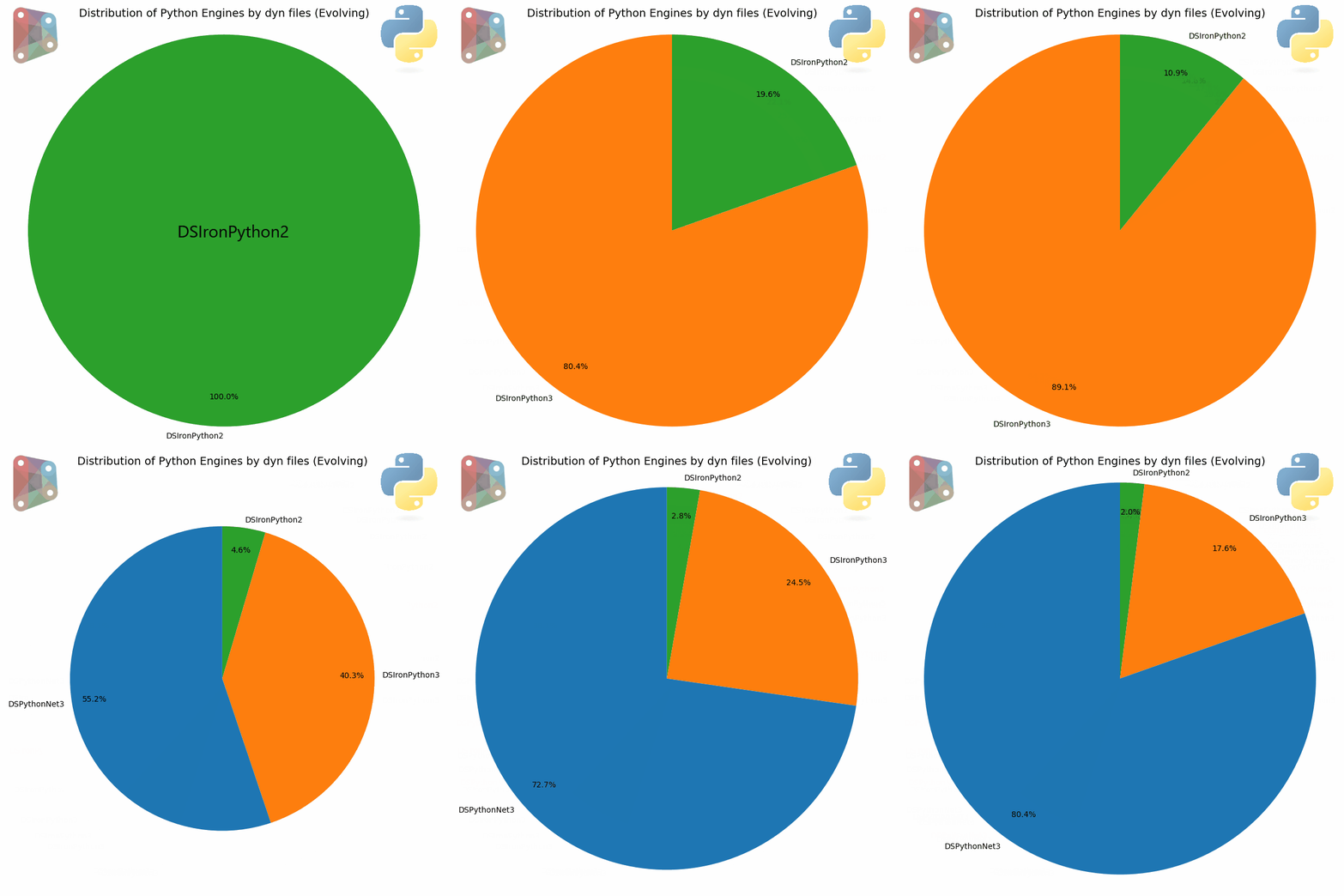
Recap of the versions available to date
| Features | IronPython 2.7 | IronPython 3 | Python.NET 2.5.x (alias CPython3) | Python.NET 3.x |
|---|---|---|---|---|
| Principal Concept | Implementing Python on .NET
(with DLR) |
Implementing Python on .NET
(with DLR) |
Gateway to CPython | Gateway to CPython |
| Python Version | Python 2.7 | Python 3.4 (currently) | Python 2.7,
Python 3.5-3.9 |
Python 3.7+ (modern) |
| .NET Support | .NET Framework & .Net Core/
.NET 6/7/8 Uncertain compatibility with future versions of .NET |
.NET Framework & .NET Core / .NET 5+ | .NET Framework (mainly) | .NET Framework & .NET Core / .NET 5+ |
| Library Compatibility | ⚠️ Weak. Incompatible with Python libraries that use C extensions. | ⚠️ Weak. Same fundamental limitation as v2.7. | ✅ Excellent. Access to the entire CPython ecosystem. | ✅ Excellent. Access to the entire modern PyPI ecosystem (NumPy, Pandas, etc.). |
| Performance | Good for pure .NET interoperability. | Good for pure .NET interoperability. | Depends on CPython. Slight overhead for calls. | Depends on CPython. Slight overhead for calls, but highly optimized. |
| Status of Python Project | ❌ Obsolete. No longer actively maintained. | ✅ Active. The modern and recommended version if you choose IronPython. | ❌ Obsolete. Replaced by version 3.x. | ✅ Active. The industry standard for Python/.NET interoperability. |
Observations on the previous CPython3 engine
The previous CPython3 engine was based on PythonNet 2.5 and had several limitations and drawbacks, including:
- Expensive conversion of .NET collections: The engine performed an automatic and implicit conversion of .NET collections to native Python lists. This approach was costly in performance due to a deep copy of the data. Additionally, changes to the Python list were not reflected in the original .NET object.
- Difficulty of implementing .NET Class Interfaces: In CPython3 (PythonNet 2.5), it was impossible to easily use .NET class interfaces.
- Problems with method overloading
- Binary and unary arithmetic operators not taken into account for C# operator methods
Iteration bug: A bug caused all instances of .NET classes to be considered Iterable, resolved in the newer version.
Migrating from Net Framework 4.x to Net Core
PythonNet3 is available from Revit 2025 as a package (called PythonNet3 Engine) and therefore runs under .NET 8+ (Core) instead of .NET Framework 4.x. This change has significant implications for interoperability and certain APIs.
Here are the most common examples I have noticed:
Access to the Global Assembly Cache (GAC)
It is now impossible to directly use the “assemblies” present in the Windows GAC (like Excel Interop or Word Interop).
Solution: Consider migrating to native Python solutions like openpyxl or the OpenXML SDK. If using Excel Interop is absolutely necessary, you must create an instance and use .NET Reflection to interact with it.
Example of using Reflection for Excel Interop (Excerpt):
import clr
import sys
import System
from System import Array
from System.Collections.Generic import List, Dictionary, IDictionary

clr.AddReference("System.Reflection")
from System.Reflection import BindingFlags

from System.Runtime.InteropServices import Marshal

clr.AddReference("System.Core")
clr.ImportExtensions(System.Linq)

xls_filePath = IN[0]
xls_SheetName = IN[1]
dict_values = {}

systemType = System.Type.GetTypeFromProgID("Excel.Application", True)
try:
    ex = System.Activator.CreateInstance(systemType)
except:
    methodCreate = next((m for m in clr.GetClrType(System.Activator)\
            .GetMethods() if "CreateInstance(System.Type)" in m.ToString()), None)
    ex = methodCreate.Invoke(None, (systemType, ))

ex.Visible = False
workbooks = ex.GetType().InvokeMember("Workbooks", BindingFlags.GetProperty ,None, ex, None)
workbook = workbooks.GetType().InvokeMember("Open", BindingFlags.InvokeMethod , None, workbooks, (xls_filePath, ))
worksheets = workbook.GetType().InvokeMember("Worksheets", BindingFlags.GetProperty ,None, workbook, None)
#
ws = worksheets.GetType().InvokeMember("Item", BindingFlags.GetProperty ,None, worksheets, (xls_SheetName,))
Changing Methods and Namespaces
Some Windows-specific or obsolete technologies have been removed or replaced by new implementations with new namespaces.
Accessing COM objects
The method Marshal.GetActiveObject() to get the running COM instance of a specified object is no longer available.
Solutions:
- Use
BindToMonikerif you know the path of the file in use. - Code a library in C# using the class structure
Marshal.GetActiveObject()
Example of using BindToMoniker:
import clr
import os
import time
import System

clr.AddReference("System.Reflection")
from System.Reflection import BindingFlags

clr.AddReference("AcMgd")
clr.AddReference("AcCoreMgd")
clr.AddReference("Autodesk.AutoCAD.Interop")

from System import *

from Autodesk.AutoCAD.Runtime import *
from Autodesk.AutoCAD.ApplicationServices import *
from Autodesk.AutoCAD.Interop import *
from Autodesk.AutoCAD.ApplicationServices import Application as acapp

changeViewCommand = "_VIEW "

adoc = Application.DocumentManager.MdiActiveDocument
currentFileName = adoc.Name
print(currentFileName)
com_doc = System.Runtime.InteropServices.Marshal.BindToMoniker(currentFileName)
args = System.Array[System.Object]([changeViewCommand])
com_doc.GetType().InvokeMember("SendCommand", BindingFlags.InvokeMethod, None, com_doc, args)

OUT = True
Migrating from IronPython2 to PythonNet3
Explicitly calling the base class constructor
Now, in Python classes that inherit from a .NET type (like Winform, WPF, DataTable, or an Interface), if you overload the method __init__, you must explicitly call the base class constructor using super().__init__(...).
Example (WinForms):
class TestForm(Form):
    def __init__(self):
        super().__init__() # add this line
        self.Font  = System.Drawing.SystemFonts.DefaultFont
        self.InitializeComponent()

    def InitializeComponent(self):
        self._buttonCancel = System.Windows.Forms.Button()
        self._buttonOK = System.Windows.Forms.Button()
        self.SuspendLayout()
Specific Syntax of .NET Class Interface Implementation
Implementing .NET Class Interfaces, which was difficult under CPython3 (PythonNet 2.5), is now fixed and made easier with Dynamo_PythonNet3.
A Python class deriving from a .NET class must have the attribute __namespace__.
Example (Implementation of ISelectionFilter):
class Custom_SelectionElem(ISelectionFilter):
    __namespace__ = "SelectionNameSpace_tEfYX0DHE"
    #
    def __init__(self, bic):
        super().__init__() # necessary  if you override the __init__ method
        self.bic = bic

    def AllowElement(self, e):
        if e.Category.Id == ElementId(self.bic):
            return True
        else:
            return False
    def AllowReference(self, ref, point):
        return True

#

class Custom_FamilyOption(IFamilyLoadOptions) :
    __namespace__ = "FamilyOptionNameSpace_tEfYX0DHE"

    def __init__(self):
        super().__init__() # necessary  if you override the __init__ method

    def OnFamilyFound(self, familyInUse, _overwriteParameterValues):
        overwriteParameterValues = True
        return (True, overwriteParameterValues)

    def OnSharedFamilyFound(self, sharedFamily, familyInUse, source, _overwriteParameterValues):
        overwriteParameterValues = True
        return (True, overwriteParameterValues)
The UI with WPF
IronPython allows the direct use of WPF thanks to a specific library (wpf ).
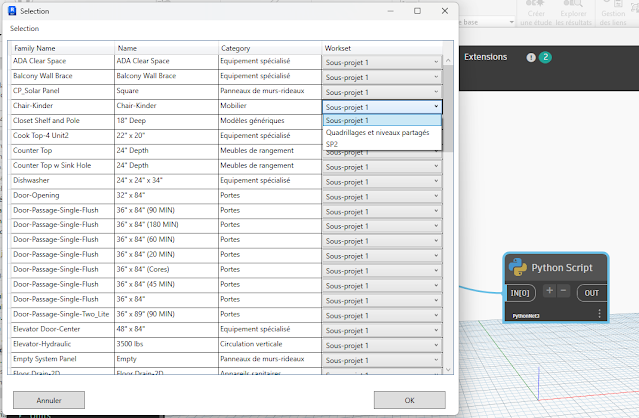
There is no similar library with PythonNet3. However, with some concessions on Binding, it is still possible to use WPF (even with the MVVM pattern) via XamlReader.Load(StringReader(xaml))
Here is an example of assigning a sub-project by Element type using the MVVM pattern:
import clr
import sys
import System
from System.Collections.ObjectModel import ObservableCollection
#import Revit API
clr.AddReference('RevitAPI')
import Autodesk
from Autodesk.Revit.DB import *
import Autodesk.Revit.DB as DB

clr.AddReference('RevitServices')
import RevitServices
from RevitServices.Persistence import DocumentManager
from RevitServices.Transactions import TransactionManager

#Get Important vars
doc = DocumentManager.Instance.CurrentDBDocument
uidoc = DocumentManager.Instance.CurrentUIApplication.ActiveUIDocument
uiapp = DocumentManager.Instance.CurrentUIApplication
app = uiapp.Application
sdkNumber = int(app.VersionNumber)

clr.AddReference('System.Data')
from System.Data import *

clr.AddReference("System.Xml")
clr.AddReference("PresentationFramework")
clr.AddReference("System.Xml")
clr.AddReference("PresentationCore")
clr.AddReference("System.Windows")
import System.Windows.Controls
from System.Windows.Controls import *
from System.IO import StringReader
from System.Xml import XmlReader
from System.Windows import LogicalTreeHelper
from System.Windows.Markup import XamlReader, XamlWriter
from System.Windows import Window, Application
from System.ComponentModel import INotifyPropertyChanged, PropertyChangedEventArgs

import time
import traceback
import itertools


class ViewModel(INotifyPropertyChanged): # INotifyPropertyChanged
    __namespace__ = "ViewModel_jhggsbUbwQpY" # rename it each edition class
    def __init__(self, elem_type, lst_Workset):
        super().__init__()
        self._elem_type = elem_type
        self._SelectValue = lst_Workset[0] # set default workset
        self._lst_Workset = ObservableCollection[DB.Workset](lst_Workset)
        #
        self._property_changed_handlers = []
        self.PropertyChanged = None

    @clr.clrproperty(DB.Element)
    def ElementType(self):
        return self._elem_type

    @clr.clrproperty(System.String)
    def Name(self):
        return self._elem_type.get_Name()

    @clr.clrproperty(System.String)
    def FamilyName(self):
        return self._elem_type.FamilyName

    def get_SelectValue(self):
        return self._SelectValue
    def set_SelectValue(self, value):
        if self._SelectValue != value:
            self._SelectValue = value
            self.OnPropertyChanged("SelectValue")
    # Add SelectValue as a clr property
    SelectValue = clr.clrproperty(DB.Workset, get_SelectValue, set_SelectValue)

    @clr.clrproperty(ObservableCollection[DB.Workset])
    def LstWorkset(self):
        return self._lst_Workset

    def OnPropertyChanged(self, property_name):
        event_args = PropertyChangedEventArgs(property_name)
        for handler in self._property_changed_handlers:
            handler(self, event_args)

    # Implementation of add/remove_PropertyChanged
    def add_PropertyChanged(self, handler):
        if handler not in self._property_changed_handlers:
            self._property_changed_handlers.append(handler)

    def remove_PropertyChanged(self, handler):
        if handler in self._property_changed_handlers:
            self._property_changed_handlers.remove(handler)


class MainWindow(Window):
    string_xaml = '''
<Window
        xmlns="http://schemas.microsoft.com/winfx/2006/xaml/presentation"
        xmlns:x="http://schemas.microsoft.com/winfx/2006/xaml"
        xmlns:d="http://schemas.microsoft.com/expression/blend/2008"
        xmlns:mc="http://schemas.openxmlformats.org/markup-compatibility/2006"
        Title="Selection"
        Height="700" MinHeight="700"
        Width="700" MinWidth="780"
        x:Name="MainWindow">
        <Window.Resources>
        </Window.Resources>
        <Grid Width="auto" Height="auto">
            <Grid.RowDefinitions>
                <RowDefinition Height="30" />
                <RowDefinition />
                <RowDefinition Height="60" />
            </Grid.RowDefinitions>
            <Label
                x:Name="label1"
                Content="Selection"
                Grid.Column="0" Grid.Row="0"
                HorizontalAlignment="Left" VerticalAlignment="Bottom"
                Margin="8,0,366.6,5"
                Width="415" Height="25" />
            <DataGrid
                x:Name="dataGrid"
                AutoGenerateColumns="False"
                ItemsSource="{Binding}"
                Grid.Column="0" Grid.Row="1"
                HorizontalAlignment="Stretch" VerticalAlignment="Stretch"
                Margin="8,3,8,7"
                SelectionUnit="Cell"
                CanUserAddRows="False">
                <DataGrid.Columns>
                    <DataGridTextColumn Header="Family Name" Binding="{Binding FamilyName}" Width="*" />
                    <DataGridTextColumn Header="Name" Binding="{Binding Name}" Width="*" />
                    <DataGridTextColumn Header="Category" Binding="{Binding ElementType.Category.Name}" Width="*" />
                    <DataGridTemplateColumn Header="Workset">
                        <DataGridTemplateColumn.CellTemplate>
                            <DataTemplate>
                                <ComboBox x:Name="Combobox"
                                    ItemsSource="{Binding LstWorkset}"
                                    DisplayMemberPath="Name"
                                    SelectedItem="{Binding SelectValue, Mode=TwoWay, UpdateSourceTrigger=PropertyChanged}"
                                    Width="200"/>
                            </DataTemplate>
                        </DataGridTemplateColumn.CellTemplate>
                    </DataGridTemplateColumn>
                </DataGrid.Columns>
            </DataGrid>
            <Button
                x:Name="buttonCancel"
                Content="Cancel"
                Grid.Column="0" Grid.Row="2"
                HorizontalAlignment="Left" VerticalAlignment="Bottom"
                Margin="18,13,0,10"
                Height="30" Width="120">
            </Button>
            <Button
                x:Name="buttonOK"
                Content="OK"
                Grid.Column="0" Grid.Row="2"
                HorizontalAlignment="Right" VerticalAlignment="Bottom"
                Margin="0,12,22,10"
                Height="30" Width="120">
            </Button>
        </Grid>
</Window>'''

    def __init__(self, lst_wkset, lst_elems):
        super().__init__()
        self._lst_wkset = lst_wkset
        self._lst_elems = lst_elems
        self._set_elemTypeId = set(x.GetTypeId() for x in lst_elems if isinstance(x, FamilyInstance))
        self._lst_elemType = [doc.GetElement(xId) for xId in self._set_elemTypeId if xId != ElementId.InvalidElementId]
        #
        #sort _lst_elemType by Name
        self._lst_elemType= sorted(self._lst_elemType, key = lambda x : x.FamilyName)
        #
       # Create an ObservableCollection of MyDataViewModel objects
        self.data = ObservableCollection[System.Object]()
        for elem in self._lst_elemType:
            self.data.Add(ViewModel(elem, self._lst_wkset))
        #
        self.pairLst = []
        #
        xr = XmlReader.Create(StringReader(MainWindow.string_xaml))
        self.winLoad = XamlReader.Load(xr)
        self.InitializeComponent()

    def InitializeComponent(self):
        try:
            self.Content = self.winLoad.Content
            #
            self.dataGrid = LogicalTreeHelper.FindLogicalNode(self.winLoad, "dataGrid")
            #
            self.buttonCancel = LogicalTreeHelper.FindLogicalNode(self.winLoad, "buttonCancel")
            self.buttonCancel.Click += self.ButtonCancelClick
            #
            self.buttonOK = LogicalTreeHelper.FindLogicalNode(self.winLoad, "buttonOK")
            self.buttonOK.Click += self.ButtonOKClick
            #
            self.winLoad.Loaded += self.OncLoad
            #
            self.dataGrid.DataContext = self.data               # Set DataContext
            self.winLoad.DataContext = self.data

        except Exception as ex:
            print(traceback.format_exc())

    def OncLoad(self, sender, e):
        print("UI loaded")

    def ButtonCancelClick(self, sender, e):
        self.outSelection = []
        self.winLoad.Close()

    def ButtonOKClick(self, sender, e):
        try:
            # get result from input Data (Binding)
            self.pairLst = [[x.ElementType, x.SelectValue] for x  in self.data]
            self.winLoad.Close()
        except Exception as ex:
            print(traceback.format_exc())

lst_Elements = UnwrapElement(IN[0])
lst_Wkset = FilteredWorksetCollector(doc).OfKind(WorksetKind.UserWorkset).ToWorksets()
objWindow = MainWindow(lst_Wkset, lst_Elements)
objWindow.winLoad.ShowDialog()

OUT = objWindow.pairLst Code language: HTML, XML (xml)
Respect method signatures
IronPython is more permissive. With PythonNet, you must strictly adhere to the signature of a .NET method, which means that:
- The method name is correct.
- The method is called on the correct type of object (instance method vs static method).
- The types of objects passed as arguments are correct.
If you pass a native Python list to a .NET method that expects a .NET collection, you must explicitly cast/convert the Python list.
Example: Casting a Python list to List<ElementId> :
from System.Collections.Generic import List
# some imports
selelemz=List[ElementId][ElementId(124291), ElementId(124292), ElementId(124293)])
elements=FilteredElementCollector(doc,selelemz).WhereElementIsNotElementType().ToElements()Code language: PHP (php)
Specific syntax for out and ref parameters
With PythonNet3, the parameters out or ref appear as normal arguments in Python, but the return value of the method is modified: The method returns the modified value(s) of these parameters as a tuple.
Example (Using ComputeClosestPoints with a parameter out):
IronPython (old syntax):
curvA = cableTray1.Location.Curve
curvB = cableTray2.Location.Curve
outrefClosest = clr.Reference[IList[ClosestPointsPairBetweenTwoCurves]](List[ClosestPointsPairBetweenTwoCurves]())
curvA.ComputeClosestPoints(curvB, True, True, True, outrefClosest)
listOfPoint = [[x.XYZPointOnFirstCurve.ToPoint(), x.XYZPointOnSecondCurve.ToPoint()] for x in outrefClosest.Value]Code language: PHP (php)
PythonNet3 (new syntax):
curvA = cableTray1.Location.Curve
curvB = cableTray2.Location.Curve
outrefClosest = IList[ClosestPointsPairBetweenTwoCurves](List[ClosestPointsPairBetweenTwoCurves]())
outrefClosestA = curvA.ComputeClosestPoints(curvB, True, True, True, outrefClosest)
listOfPoint = [[x.XYZPointOnFirstCurve.ToPoint(), x.XYZPointOnSecondCurve.ToPoint()] for x in outrefClosestA]Code language: PHP (php)
Please note that there is a difference with the old version “PythonNet2.5” when the method returns nothing (Void)
Access to CPython libraries coded in C
PythonNet3 provides excellent access to the entire modern PyPI ecosystem, including libraries that use C extensions (such as numpy, pandas, scipy, openpyxl). IronPython has an incompatibility with these libraries.
LINQ
Just as IronPython PythonNet3 supports LINQ method extensions, it will nevertheless be necessary to specify the Types of the objects passed as arguments. See examples in the next section.
No direct access to COM objects
PythonNet does not implement DLR, unlike IronPython. As a result, dynamic access directly to COM object properties is not possible.
Two workarounds:
- Use .NET Reflection
- Cast objects to the correct interface
Example of using .NET Reflection:
import sys
import clr
import System
from System import Environment
from System.Runtime.InteropServices import Marshal
try:
    from System.Reflection import BindingFlags
except:
    clr.AddReference("System.Reflection")
    from System.Reflection import BindingFlags

xls_filePath = IN[0]
wsNames = []

systemType = System.Type.GetTypeFromProgID("Excel.Application", True)
try:
    ex = System.Activator.CreateInstance(systemType)
except:
    methodCreate = next((m for m in clr.GetClrType(System.Activator)\
                    .GetMethods()if "CreateInstance(System.Type)" in m.ToString()), None)
    ex = methodCreate.Invoke(None, (systemType, ))

ex.Visible = False
workbooks = ex.GetType()\
            .InvokeMember("Workbooks", BindingFlags.GetProperty ,None, ex, None)
#
workbook = workbooks.GetType()\
            .InvokeMember("Open", BindingFlags.InvokeMethod , None, workbooks, (xls_filePath, ))
#
worksheets = workbook.GetType()\
            .InvokeMember("Worksheets", BindingFlags.GetProperty ,None, workbook, None)
#
enumerator_sheets = worksheets.GetType()\
            .InvokeMember("GetEnumerator", BindingFlags.InvokeMethod , None, worksheets, None)
#
while enumerator_sheets.MoveNext():
    sheet = enumerator_sheets.Current
    sheet_name = sheet.GetType().InvokeMember("Name", BindingFlags.GetProperty,None, sheet, None)
    wsNames.append(sheet_name)

workbooks.GetType().InvokeMember("Close", BindingFlags.InvokeMethod, None, workbooks, None)
ex.GetType().InvokeMember("Quit", BindingFlags.InvokeMethod, None, ex, None)

if workbooks is not None:
    Marshal.ReleaseComObject(workbooks)
if ex is not None:
    Marshal.ReleaseComObject(ex)
#
workbooks = None
ex = None
#
OUT = wsNamesCode language: PHP (php)
Migrating from CPython3 (PythonNet2.5) to PythonNet3
This migration is simpler but involves fundamental changes in the management of .NET types.
Of course, everything mentioned in the previous section must be taken into consideration.
PythonNet3 aims to bring the “Python in Dynamo” experience closer to that offered by IronPython, while leveraging the CPython ecosystem (NumPy, Pandas, etc.). It is the industry standard for Python/.NET interoperability.
Major Benefits and Improvements
| Features | PythonNet3 (Python 3.7+ / Python.NET v3) | Comments |
|---|---|---|
| CPython Ecosystem | Excellent access to the entire modern PyPI ecosystem (NumPy, Pandas, etc.). |
|
| .NET Collections Mechanism | Automatic conversion is removed. The object is a “view” of the .NET collection, without copying data, which improves performance. However, they implement the standard Python collections interfaces of collections.abc. |
|
| IEnumerable | PyObject now implements IEnumerable in addition to IEnumerable<T>. A bug where all .NET class instances were treated as Iterable has been fixed. (ex: hasattr(pyObject, "__iter__") ) |
|
| LINQ | Ability to use LINQ method extensions on IEnumerable<T>. |
Dynamo feature |
| Method overloading | Support has been improved, including for methods with generic type parameters (<T>). |
|
| C# Operators | Python’s binary and unary arithmetic operators now call the corresponding C# operator methods. |
|
| .NET Class Interfaces | Simplified support for .NET Class Interfaces. | Dynamo feature |
| Out or ref parameters | You can now overload .NET methods in Python that use ref and out parameters. To do this, you need to return the values of these modified parameters as a tuple. |
|
| C# Arithmetic Operators | Python’s binary and unary arithmetic operators now call the corresponding C# operator methods. |
|
| Heritage and Builders | If you overload the method __init__ of a .NET type in Python, you must now explicitly call the base class constructor using super().__init__(...). |
|
| Conversions of enumerations | Implicit conversion between C# enums and Python integers is disabled. You must now use enum members (e.g.,MonEnum.Option ). Additionally, the .NET method Enum.Value.ToString() now returns the value name instead of its integer. |
similar to IronPython |
Details on some points
Implementing .NET Class Interfaces
In CPython3 (PythonNet2.5), it is impossible to easily use .NET class interfaces. This is now fixed with Dynamo_PythonNet3.
Notes:
- A Python class that derives from a .NET class must have the attribute
__namespace__ - The class
Custom_FamilyOptionincludes an example withrefandoutparameters returning as a tuple
 class Custom_SelectionElem(ISelectionFilter):
    __namespace__ = "SelectionNameSpace_tEfYX0DHE"
    #
    def __init__(self, bic):
        super().__init__() # necessary  if you override the __init__ method
        self.bic = bic

    def AllowElement(self, e):
        if e.Category.Id == ElementId(self.bic):
            return True
        else:
            return False
    def AllowReference(self, ref, point):
        return True

#

class Custom_FamilyOption(IFamilyLoadOptions) :
    __namespace__ = "FamilyOptionNameSpace_tEfYX0DHE"

    def __init__(self):
        super().__init__() # necessary  if you override the __init__ method

    def OnFamilyFound(self, familyInUse, _overwriteParameterValues):
        overwriteParameterValues = True
        return (True, overwriteParameterValues)

    def OnSharedFamilyFound(self, sharedFamily, familyInUse, source, _overwriteParameterValues):
        overwriteParameterValues = True
        return (True, overwriteParameterValues)
No conversion of .NET Collections and Arrays
This is the major change from CPython3 (PythonNet 2.5), which performed automatic implicit conversion.
With PythonNet3:
- Automatic conversion is removed.
- .NET collections and arrays now implement the standard Python collections interfaces (c
ollections.abc). - The .NET object behaves like a “view”, which is efficient because there is no data copying.
- You can use .NET methods like
LINQdirectly on these objects. - To use methods specific to Python lists (
like append()) or bracket indexing, an explicit conversion vialist()is required.
Consequences on the indexing of IEnumerable<T>:
Direct indexing [index] is impossible on types IEnumerable returned by certain methods.
Here is an example with PythonNet3 where we cannot use indexing because the method face.ToProtoType() returns an IEnumerable and not a IList<T>.
Old (or incorrect) code:
element = UnwrapElement(IN[0])

ref = HostObjectUtils.GetSideFaces(element, ShellLayerType.Exterior)[0] # GetSideFaces return an Ilist so we can use indexer
face = element.GetGeometryObjectFromReference(ref)
ds_surface = face.ToProtoType()[0] # ToProtoType() on Revit face return an IEnumerable so we can't use indexerCode language: PHP (php)
New code (Using LINQ or converting):
clr.AddReference("System.Core")
clr.ImportExtensions(System.Linq)

element = UnwrapElement(IN[0])

ref = HostObjectUtils.GetSideFaces(element, ShellLayerType.Exterior)[0] # GetSideFaces return an Ilist so we can use indexer
face = element.GetGeometryObjectFromReference(ref)
ds_surface = face.ToProtoType().First() # ToProtoType() on Revit face return an IEnumerable so we can use LINQ
# OR convert to python list
ds_surface = list(face.ToProtoType())[0] # ToProtoType() on Revit face return an IEnumerable so we need convert to python list to user indexer
OUT = ds_surfaceCode language: PHP (php)
LINQ
Advice:
- When passing a lambda function as a function parameter, it must be explicitly converted, for example to
System.Func[<input_type>, <output_type>]. - Some extension libraries still don’t work, like
DataTableExtensionsthe .NET.
Example of using LINQ extension methods
import sys
import clr
import System
from System.Collections.Generic import List, IList

clr.AddReference("System.Reflection")
from System.Reflection import Assembly

clr.AddReference('RevitAPI')
import Autodesk
from Autodesk.Revit.DB import *
import Autodesk.Revit.DB as DB


clr.AddReference('RevitServices')
import RevitServices
from RevitServices.Persistence import DocumentManager
doc = DocumentManager.Instance.CurrentDBDocument

clr.AddReference("System.Core")
clr.ImportExtensions(System.Linq)
#

resultB = FilteredElementCollector(doc).OfClass(FamilySymbol).WhereElementIsElementType()\
            .Where(System.Func[DB.Element, System.Boolean](lambda e_type : "E1" in e_type.Name))\
            .ToList()

resultC = FilteredElementCollector(doc).OfClass(FamilySymbol).WhereElementIsElementType()\
            .FirstOrDefault(System.Func[DB.Element, System.Boolean](lambda e_type : "E1" in e_type.Name))

resultD = FilteredElementCollector(doc).OfClass(FamilySymbol).WhereElementIsElementType()\
            .FirstOrDefault(System.Func[DB.Element, System.Boolean](lambda e_type : "E12" in e_type.Name))

resultGroup = FilteredElementCollector(doc).OfClass(FamilySymbol).WhereElementIsElementType()\
            .GroupBy[DB.Element, System.String](System.Func[DB.Element, System.String](lambda e_type :  e_type.Name))\
            .Select[System.Object, System.Object](System.Func[System.Object, System.Object](lambda x : x.ToList()))


assemblies = System.AppDomain.CurrentDomain.GetAssemblies()
assemblies_name = assemblies\
    .OrderBy[Assembly, System.String](System.Func[Assembly, System.String](lambda x : x.GetName().Name))\
    .Select[Assembly, System.String](System.Func[Assembly, System.Int32, System.String](lambda asm, index : f"{index + 1} : {asm.GetName().Name}"))

print(assemblies_name.GetType())
OUT = resultB.ToList(), resultC, resultD, resultGroup.ToList(), assemblies_nameCode language: PHP (php)
Obstacles encountered with PythonNet3 and workarounds
Properties of type “Indexer”
Properties of type “Indexer” (like access to Space in the Revit API) are no longer handled directly with the bracket syntax. The indexer must be replaced by the corresponding get_ method.
Example:
Old code:
space = elem.Space[phase]New code:
space = elem.get_Space(phase)Error in Python set collection
The Python Collection set() does not accept objects of type ElementId.InvalidElementId.
Workarounds:
- Filter invalid IDs when building the
set(). - Use the .NET class
HashSet<T>.
Example (Filtering):
setViewsIds = set([w.OwnerViewId for In in allWires if w.OwnerViewId != ElementId.InvalidElementId])Code language: JavaScript (javascript)“with” statement on .NET objects
The use of the keyword with on .NET objects (which implement the interface IDisposable) currently throws an error with PythonNet3, unlike IronPython.
Workaround: Build a custom context manager to explicitly handle the method Dispose().
Example (Custom Context Manager CManager):
import sys
import clr
import System
# Add Assemblies for AutoCAD and Civil3D
clr.AddReference('AcMgd')
clr.AddReference('AcCoreMgd')
clr.AddReference('AcDbMgd')
clr.AddReference('AecBaseMgd')
clr.AddReference('AecPropDataMgd')
clr.AddReference('AeccDbMgd')

# Import references from AutoCAD
from Autodesk.AutoCAD.Runtime import *
from Autodesk.AutoCAD.ApplicationServices import *
from Autodesk.AutoCAD.EditorInput import *
from Autodesk.AutoCAD.DatabaseServices import *
from Autodesk.AutoCAD.Geometry import *

# Import references from Civil3D
from Autodesk.Civil.ApplicationServices import *
from Autodesk.Civil.DatabaseServices import *

# The inputs to this node will be stored as a list in the IN variables.
dataEnteringNode = IN

adoc = Application.DocumentManager.MdiActiveDocument
editor = adoc.Editor

class CManager:
    """
    a custom context manager for Disposable Object
    """
    def __init__(self, obj):
        self.obj = obj

    def __enter__(self):
        return self.obj

    def __exit__(self, exc_type, exc_value, exc_tb):
        self.obj.Dispose()
        if exc_type:
            error = f"{exc_value} at line {exc_tb.tb_lineno}"
            raise ValueError( error)
        return self


dynCADObjects = IN[0]
with adoc.LockDocument():
    with CManager(adoc.Database) as db:
        print(db)
        with CManager(db.TransactionManager.StartTransaction()) as t:
            print(t)
            for dynObj in dynCADObjects:
                ent = t.GetObject(dynObj.AcadObjectId, OpenMode.ForWrite)
                ent.Layer = "Layer1"
                #a = 10 /0
            t.Commit()

print(f"{db.IsDisposed=}")
print(f"{t.IsDisposed=}")
.NET Objects that Inherit from an Interface
In the case of objects that inherit from a .NET Interface, it may be necessary to cast (convert) the object to that interface to use the inherited methods.
Example (Call BeginInit() on a PictureBox):
In the example below, you will find the PythonNet syntax to perform an explicit cast to a .NET interface.
class Form8(Form):
    def __init__(self):
        super().__init__() # necessary  if you override the __init__ method
        self.InitializeComponent()

    def InitializeComponent(self):
        self._pictureBox1 = System.Windows.Forms.PictureBox()
        System.ComponentModel.ISupportInitialize(self._pictureBox1).BeginInit()
        self.SuspendLayout()
The line System.ComponentModel.ISupportInitialize(self._pictureBox1).BeginInit() is therefore a method call on an explicit interface:
- It “casts” (or rather, it accesses) the object
self._pictureBox1via its implementation of the interfaceISupportInitialize. - It then calls the method
BeginInit()of this interface
Attributes lost on .NET Class Instances when assigning to OUT
Python class instances deriving from a .NET class may have their attributes removed by the Dynamo Wrapper when assigning to the variable OUT.
Workaround:
Wrap the .NET object in a simple Python class before assigning it to OUT.
Example:
# Load the Python Standard and DesignScript Libraries
import sys
import clr

clr.AddReference('System.Drawing')
clr.AddReference('System.Windows.Forms')
import System.Drawing
import System.Windows.Forms

from System.Drawing import *
from System.Windows.Forms import *

class WrappNetObj:
     def __init__(self, obj):
         self.InnerObject = obj
     def __repr__(self):
         return "WrappNetObj_" + self.InnerObject.GetType().ToString()

class Form8(Form):
    def __init__(self):
        super().__init__()
        self.out_value = 7
        self.InitializeComponent()

    def InitializeComponent(self):
        self.SuspendLayout()
        #
        #Form8
        #
        self.ClientSize = System.Drawing.Size(284, 261)
        self.Name = "Form8"
        self.Text = "Form8"
        self.ResumeLayout(False)

win_obj = Form8()
OUT = WrappNetObj(win_obj)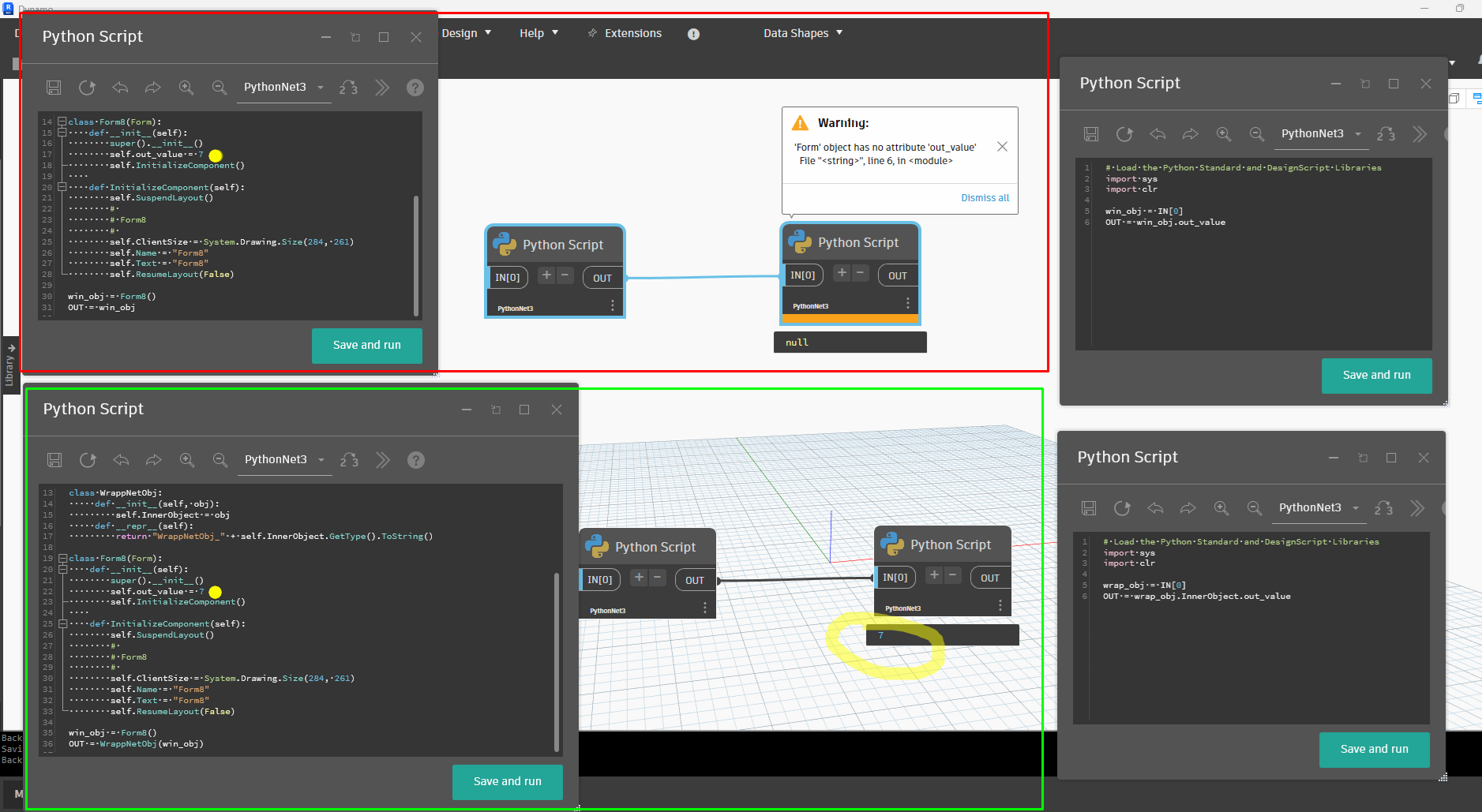
Missing error line
In rare cases, the error line number in the Python node error message may be missing.
Here are some solutions while waiting for a fix:
- Implement a try-except block with the
tracebacklibrary and print the error. - Implement a try-except block with a
loggerand write the error. - Implement a debugger, for example, using
sys.settrace().
Conclusion
PythonNet3 establishes itself not only as the current standard but as the only sustainable path forward for development in Dynamo. I hope this migration guide has served as a helpful resource as you prepare to enter this new era of Python in Dynamo.