Welcome, friends of Dynamo, to another exciting release: version 4.0! This release packs a punch with multiple performance improvements, a selection of quality-of-life improvements, and several bug fixes. Important changes also include migration to .NET 10 and a default Python engine change, so don’t miss the details below.
This release is lighter on new features, but for a few good reasons. First, we put significant effort on behind-the-scenes updates including the .NET 10 migration and PythonNet3 update to ensure Dynamo’s stability and future readiness. In addition, the team has been hard at work building an agentic AI future for Dynamo. These features are now available as part of an alpha, which you can sign up for today!
TL:DR
Dynamo Core 4.0 introduces enhanced performance for several nodes, improvements to groups, better uploading experience for packages with lots of files, paneling nodes out of experimental mode, sample graphs in Dynamo Sandbox, and more. This release also sees PythonNet3 becoming the default Python engine, API changes, and a default path change for Dynamo resources.
What is Dynamo and its flavors?
What is Dynamo Core?
Dynamo Core is a collection of bundled components that consist of the graphical interface, the compute engine, the scripting language DesignScript, and the out-of-the-box nodes that are not specific to another program like Revit or Civil 3D.
What is Dynamo for <INSERT HOST HERE>?
Dynamo for [Revit, Civil 3D, FormIt, Advance Steel, Alias or Robot Structural Analysis] is a collection of host-specific nodes that work with Dynamo Core and run inside of said host.
What is Dynamo Sandbox?
Dynamo Sandbox is for package developers and other folks working with Dynamo code who want to stay up to date with the latest and greatest stuff coming out. Sandbox is Dynamo’s “Core” functionality distributed in a way that doesn’t interfere with other Dynamo installations and doesn’t require any other applications (except for a few windows components and some optional extras). You can read more about this distinction here.
So, what’s dropping with Dynamo 4.0?
Getting even faster: Performance updates
Our previous release delivered significant performance gains, and in that blog post we hinted at continued improvements. Several of those have arrived today in the form of geometry handling, optimized Boolean nodes, and improved PolySurface.ByJoinedSurfaces and Point.Project nodes. Let’s dive into the details.
PolyCurve offset operations
We noted that the function PolyCurve::offset() was doing a complex check just to see if a shape was a single straight line. We’ve simplified this by counting components and performing geometry operations only when necessary.
Result with multiple PolyCurve nodes: 1.5x faster.
Boolean nodes
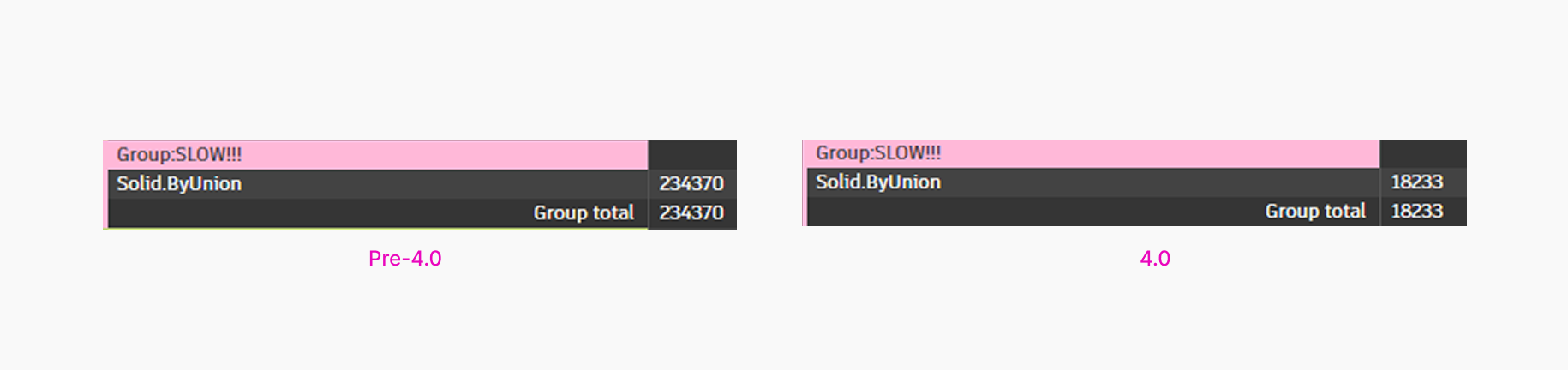
Boolean nodes that take in multiple input geometries are optimized. We made the process of handling multiple objects more efficient by no longer creating unnecessary duplicates during Boolean operations.
Result for Solid.ByUnion: about 10x faster.
Improved geometry intersect and geometry distance functions
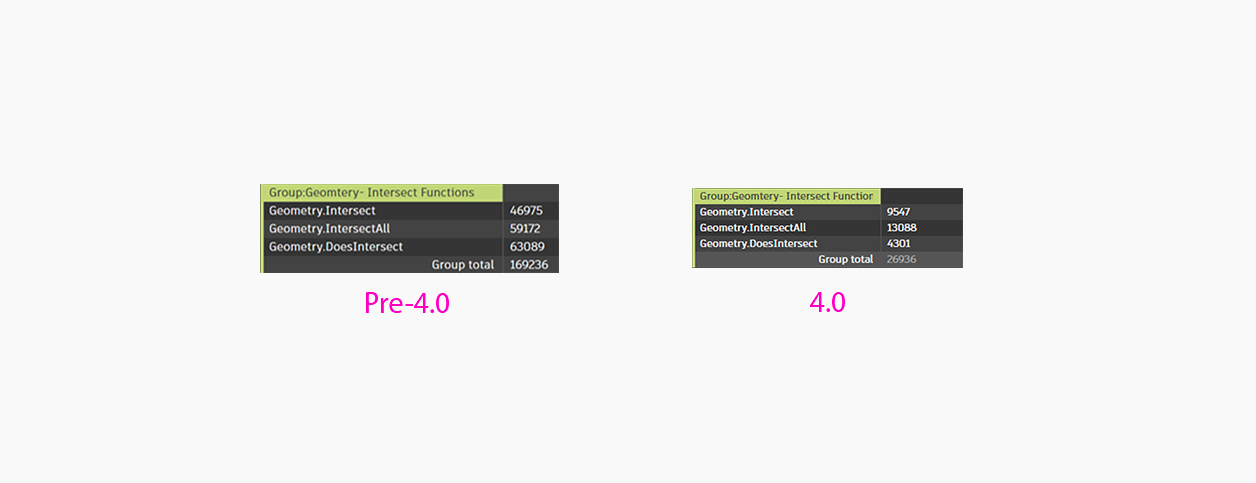
We’ve also improved performance of two of the top 100 most used nodes in Dynamo: Geometry.Intersect and Geometry.IntersectAll. Improvements for these nodes were tested on a graph with 1,600 faces (each a circular disk).
- Result for
Geometry.IntersectandGeometry.IntersectAll: 5-6x times faster. - Result for
Geometry.DoesIntersect: about 30x faster.
Surface join and projection operations
We’ve enhanced the way surfaces are joined together, significantly speeding up the process. What previously took 262 seconds to complete now completes in 2 seconds. This improvement is achieved by using a more efficient algorithm.
- Result for
PolySurface.ByJoinedSurfaces: 131x faster. Point.Projecthas also been improved. Result: 400x faster.
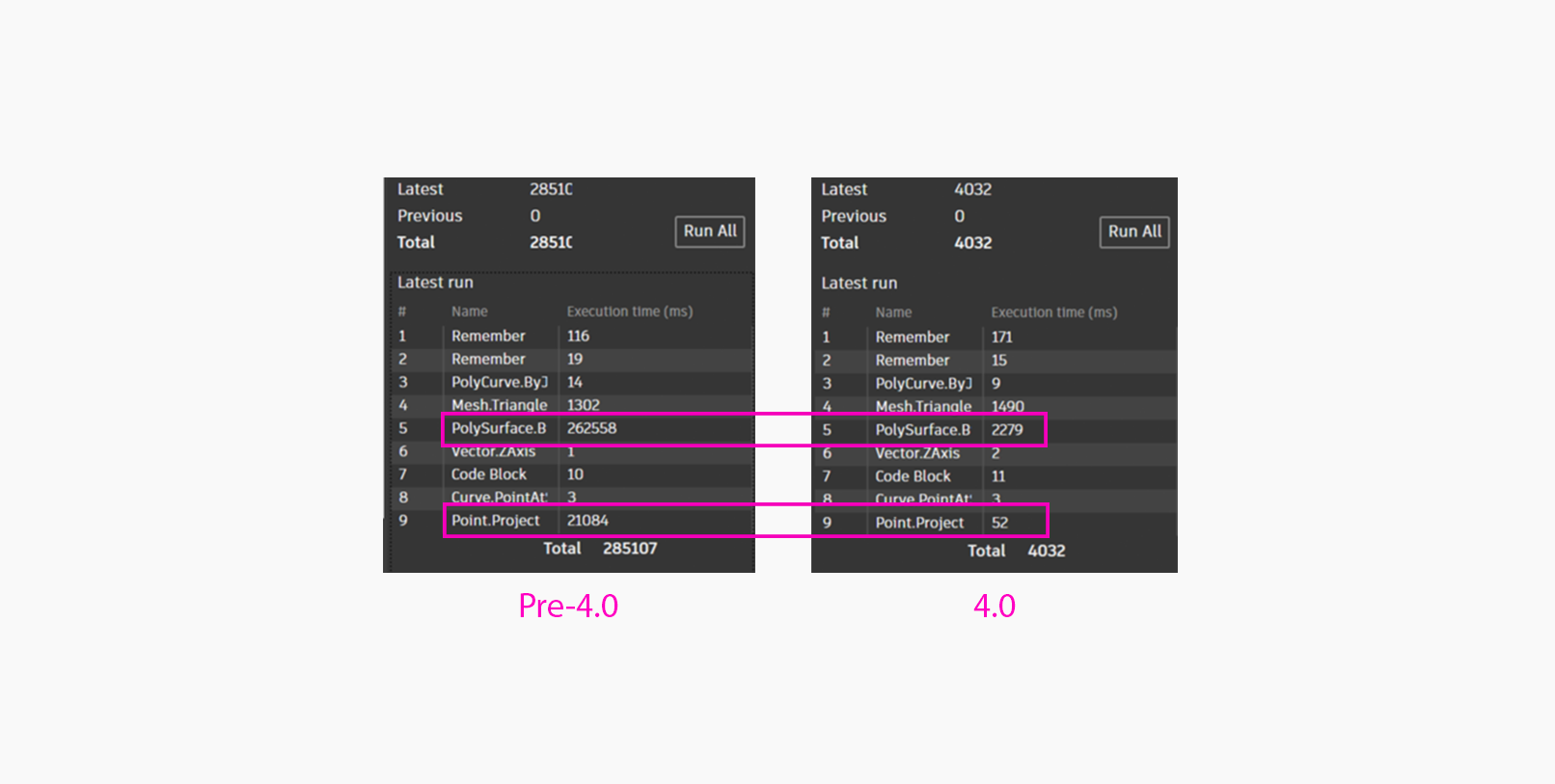
We hope you enjoy these efficiency gains. Tip: You can use the TuneUp extension (seen in the screenshots throughout this section) to monitor node execution times in your graphs.

PythonNet3 is now the default Python engine
With Dynamo 4.0, we’re thrilled to share a milestone that has been years in the making: PythonNet 3 is now the default Python engine for all new Python nodes. This change is a significant moment in the ongoing evolution of Python scripting in Dynamo.
Our team (and many of you in the community) have invested a huge amount of time closing the gaps between IronPython and CPython. We’ve worked hard to ensure that PythonNet 3 provides a modern, reliable, and sustainable path forward in Dynamo for all of you Python lovers. See this blog post for detailed information on how to migrate your graphs.
If you’re curious about the story behind this work, we shared a deep dive in our earlier blog post on PythonNet 3.
Why CPython is not moving forward as a Dynamo engine
As we worked to bring CPython in Dynamo, the team spent a lot of time closing the long-standing gap between the IronPython world and the broader .NET ecosystem that PythonNet connects to. This meant working with community members to dig into real workflows, smoothing out compatibility pain points, and making sure PythonNet 3 could stand confidently where both IronPython and CPython had previously served different needs.
Along the way, one thing became clear: PythonNet 3 now covers nearly all the scenarios where CPython had been helpful, without introducing another engine for you to manage. After reviewing migration data, community graphs, and real project behaviors, we found that only a very small number of cases behave differently when moving from CPython to PythonNet 3. At the same time, supporting CPython as another engine would make the ecosystem more fragmented and significantly increase testing and maintenance complexity for us and everyone. It would ultimately slow us down without meaningfully improving your scripting experience.
So, while CPython played an important part in this transition period, we’re choosing to focus on a single, modern Python engine that keeps Dynamo simpler, more maintainable, and easier for all of you to rely on.
And because we know change can still be disruptive, we’ve put a lot of care into making the migration experience feel gentle, predictable, and well-supported.
What you’ll see when using Python in Dynamo now
New graphs
All new Python nodes created in Dynamo 4.0+ start with PythonNet3. Don’t worry about backward compatibility: For those who work in multi-version shops (e.g., Revit or Civil 3D 2025/2026), install the PythonNet3 Engine package in Dynamo 3.3–3.6 to maintain compatibility.
Working with existing graphs using CPython 3
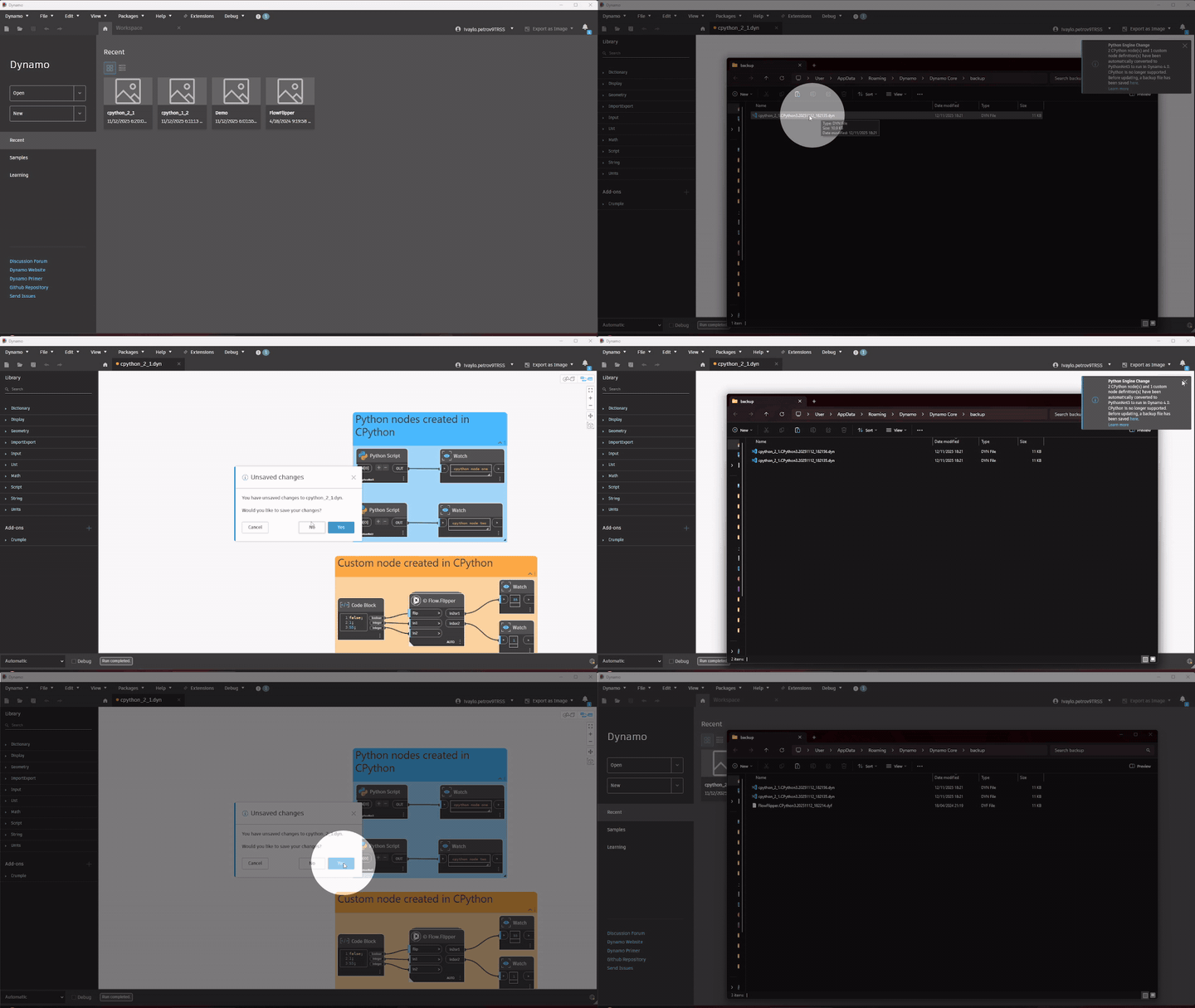
Because CPython is no longer supported, Dynamo will automatically migrate CPython nodes to PythonNet 3.
Here’s what happens:
- A backup copy of your original file is created automatically.
- All CPython nodes (including custom nodes that use CPython) are converted to PythonNet3.
- A toast notification lets you know how many nodes were migrated.
- When saving, you’ll see a reminder that your Python nodes will now use PythonNet3.
Again, don’t worry about backward computability: For those who work in multi-version shops (e.g., Revit or Civil 3D 2025/2026), install the PythonNet3 Engine package in Dynamo 3.3–3.6 to maintain compatibility.
Working with existing graphs using IronPython 2.7 or IronPython 3
If your graph uses an IronPython engine, there’s no auto-migration.
- If the matching IronPython package is installed, your graph runs normally.
- If it’s missing, you’ll see a dependency warning in the Workspace References extension asking you to download the package.
You can continue using IronPython by reinstalling the package. But because IronPython hasn’t been updated in years and Dynamo hasn’t been actively supporting these engines in Dynamo for quite some time, we strongly recommend migrating to PythonNet3 to ensure your graphs keep working reliably going forward. While DynamoIronPython2.7 and DynamoIronPython3 will continue to remain available as packages on the Dynamo Package Manager they will no longer be maintained by the Dynamo team.
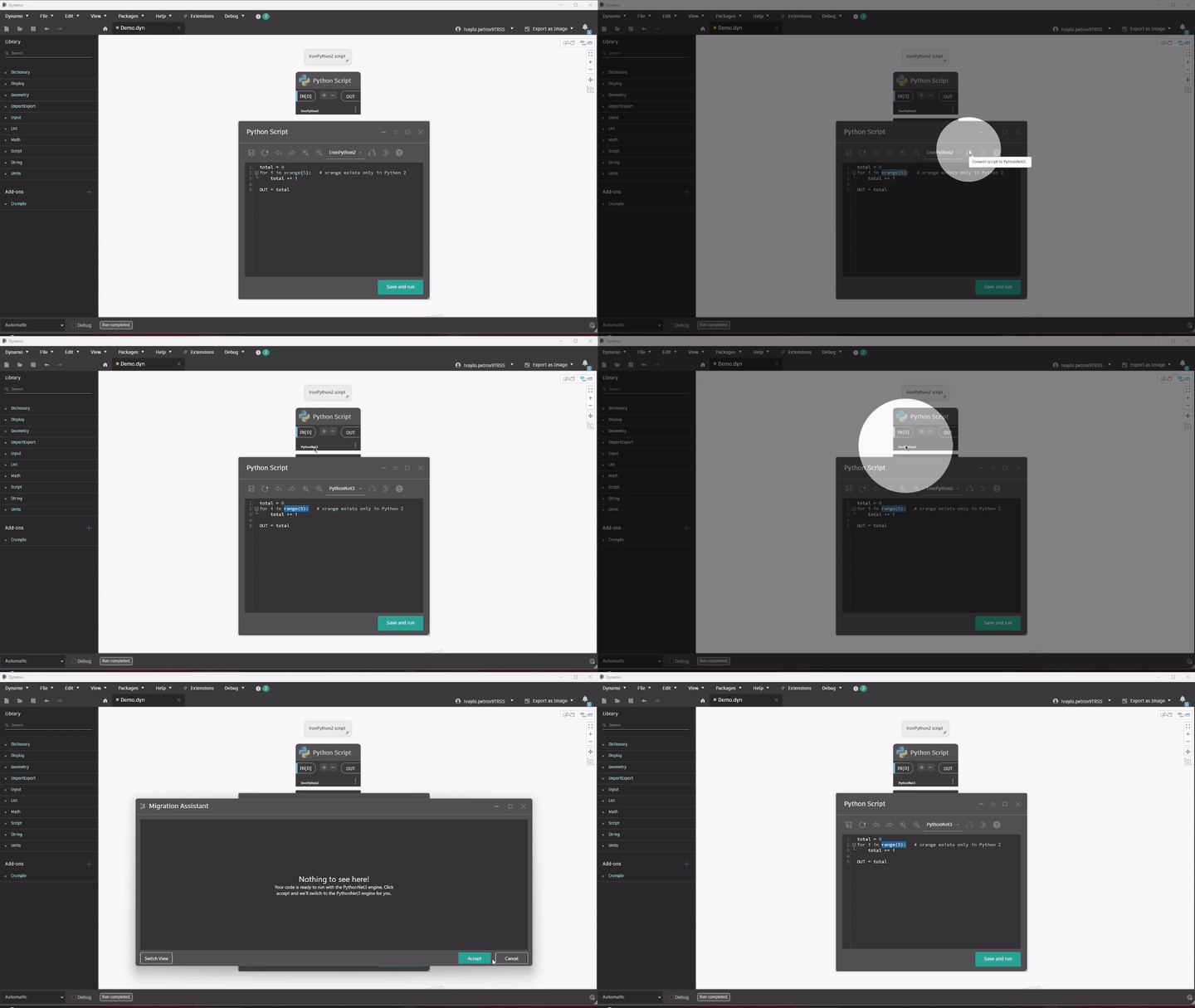
In this case, the migration option available to you is node-by-node migration utilizing the Migration Assistant available within the Python Editor.
We’ll also publish a detailed migration guide soon with tips, gotchas, and recommendations to help you convert CPython and IronPython code with confidence.
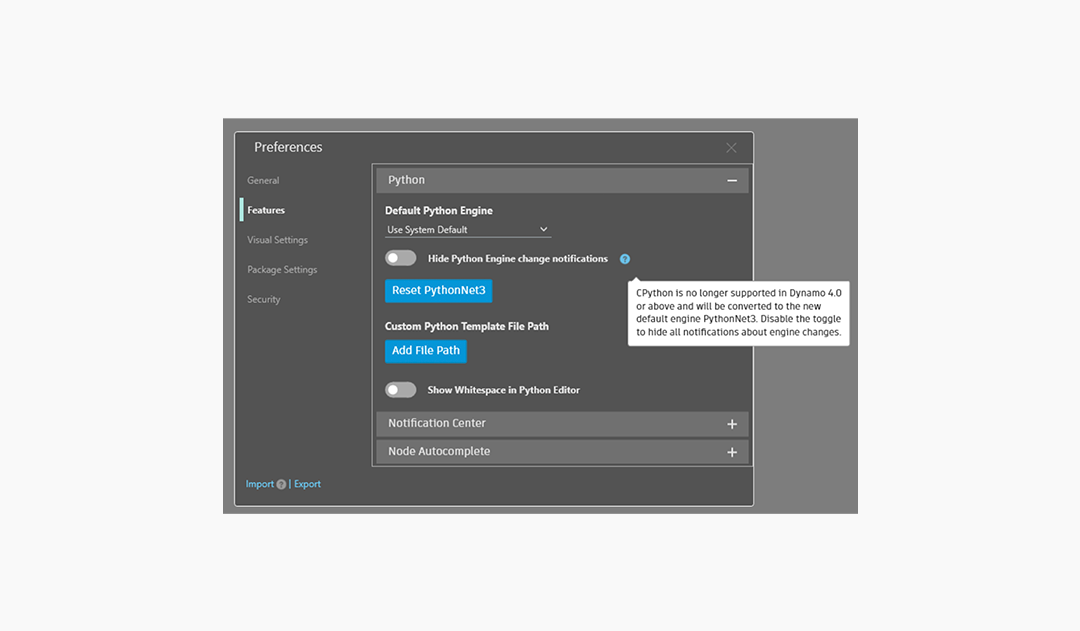
Notification Preferences
If you prefer fewer reminders, you can turn off Python-related toast notifications in Preferences > Features > Python.
A note for package authors
If your package includes Python nodes, we’d love for you to update them to PythonNet3 so the community can keep relying on your work. We’ve tried to make this as easy as possible with the Migration Assistant (and automatic migrations for CPython). Thank you for everything you share with Dynamo users!
Better collapsed groups to keep your graphs clean
Ever since Dynamo 3.5 and 3.6, we’ve been steadily improving groups—freezing them, searching inside them, adding smarter context menus… and listening closely to your feedback along the way. Many of you (especially our Grasshopper-loving friends!) told us how much you rely on groups and clusters to simplify complex scripts and how you’d love something similar in Dynamo. While we’re not fully at parity yet, these improvements is another meaningful step in that direction.
In the past, collapsing a group hid all the nodes inside but maintained the size of the group. That meant you still had to zoom and pan around your large graphs to navigate them, which wasn’t ideal.

Now, collapsed groups can shrink to a minimal, node-like footprint, so you can simplify your graph visually and move around much more easily.
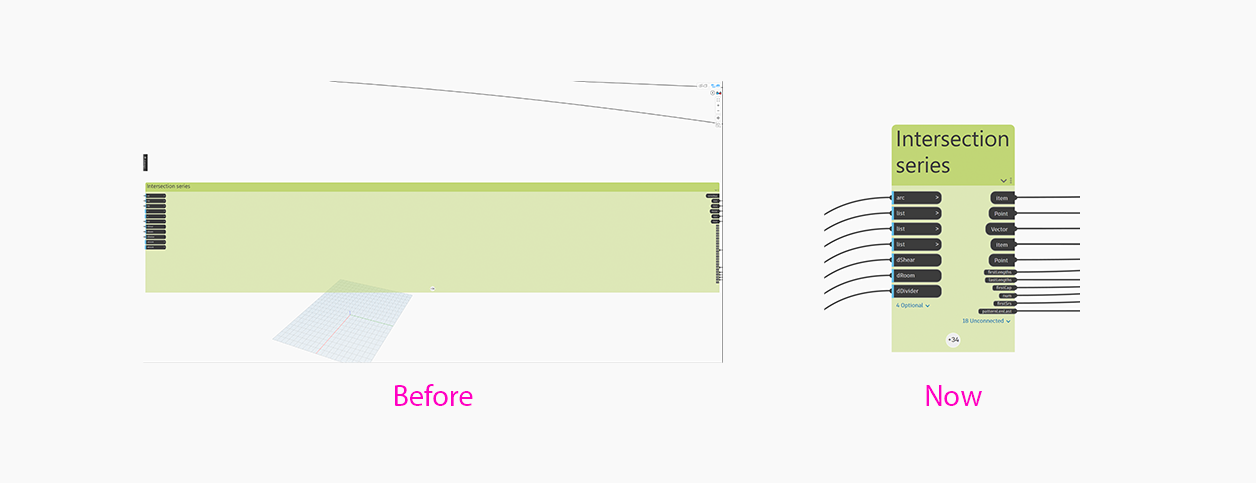
If you build large or intricate graphs and just want things to simple and organized, collapsed groups now help you simplify your workspace without losing clarity or control. You can collapse them down and choose to show only the ports that matter.
Previously, when code blocks were placed within a collapsed group, it was challenging to determine the representation of the output port; tooltips provided the only means of identification, which was not always sufficient. Some of you even discovered our little hidden Easter egg in the previous release already. With this release, we’ve continued and expanded that improvement to collapsed groups, making it official: now code block output ports inside collapsed groups show the variable name or type, so you can instantly understand what you’re connecting together without having to hover or guess.
- New settings under Preferences > Visual Settings > Groups let you collapse groups into a minimal, node-like footprint—perfect for decluttering dense graphs.
- Hide optional or unconnected ports in collapsed groups to keep things tidy.
- And if you later connect to a hidden port, the group updates automatically to show it.
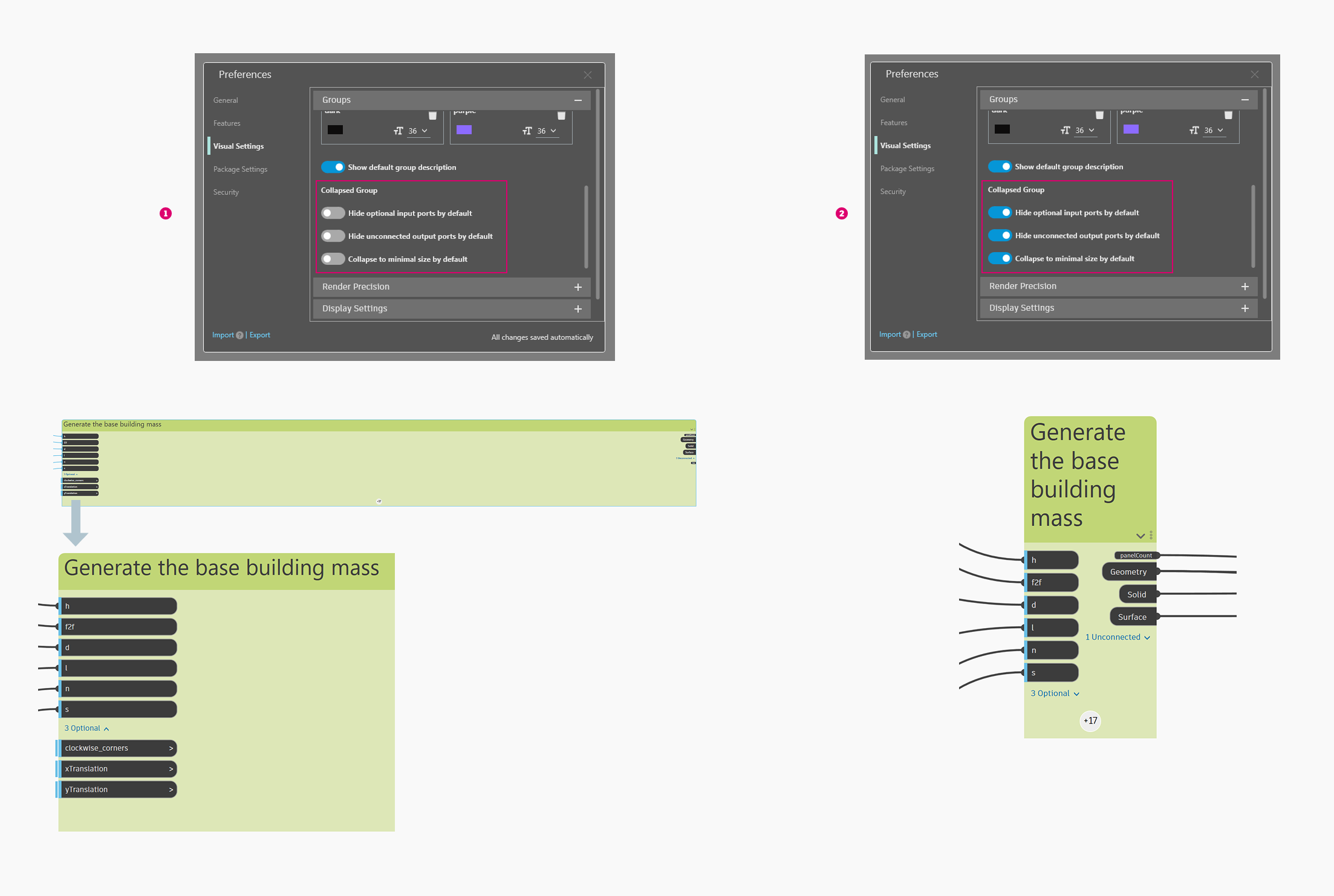
- When you maximize a collapsed group, other nodes and groups move aside to avoid overlapping, thanks to auto-layout.
Other group updates
- Node Autocomplete now correctly adds the node inside the triggering node’s group.
- We also fixed an issue where custom group styles were duplicated when closing and reopening Dynamo for Revit and Civil 3D. Group styles will no longer be duplicated.
New PolyCurve behavior
In Dynamo 4.0, we have enabled new PolyCurve behavior to make it more predictable. PolyCurve direction is now consistently determined by the direction of the first curve from the input curves array that belongs to it. This may lead to breaking behavior in old graphs in favor of consistency and predictability. If you wish to preserve old directionality, you can set “DefaultEnableLegacyPolyCurveBehavior” to “true” in your DynamoPreferences.xml.
API changes
API and nodes that were marked as obsolete in 1.x have been removed in Dynamo 4.0. You can reference the full list of changes here.
Going forward, we will continue pruning obsolete API and nodes. For example, in release 5.0, we are planning to remove those API and nodes that were marked as obsolete in 2.x. This waiting period gives users time to update their graphs and extensions. Nothing is being marked as obsolete in 4.0, but we will notify you of any potential changes in upcoming point releases.
Dynamo migrated to .NET10
When you launch Dynamo 4.0, you’ll be asked to update to .NET10 if you haven’t already. The .NET10 migration effort ensures Dynamo remains aligned with Microsoft’s technology roadmap, well ahead of the end of support for .NET 8 in November 2026. The user-facing impact of this migration is minimal; primarily, icons for custom nodes will break, and package authors will need to update them.
For assistance, see Updating Your Packages and Libraries for Dynamo 4.0 and the “Adding Custom Icons to Zero Touch Nodes” section of Advanced Dynamo Node Customization.
Default path update
Dynamo has moved to using AppData and Program Files instead of loading resources from Program Data as the default location for packages, samples, templates, and other items. Program Data is shared between multiple users on Windows, so if a user were to install something malicious there, it would be available for all users on that machine. The new default path helps avoid this issue.
Quality-of-life improvements
- A new splash screen image lets you know you’ve entered a new world of Dynamo goodness.
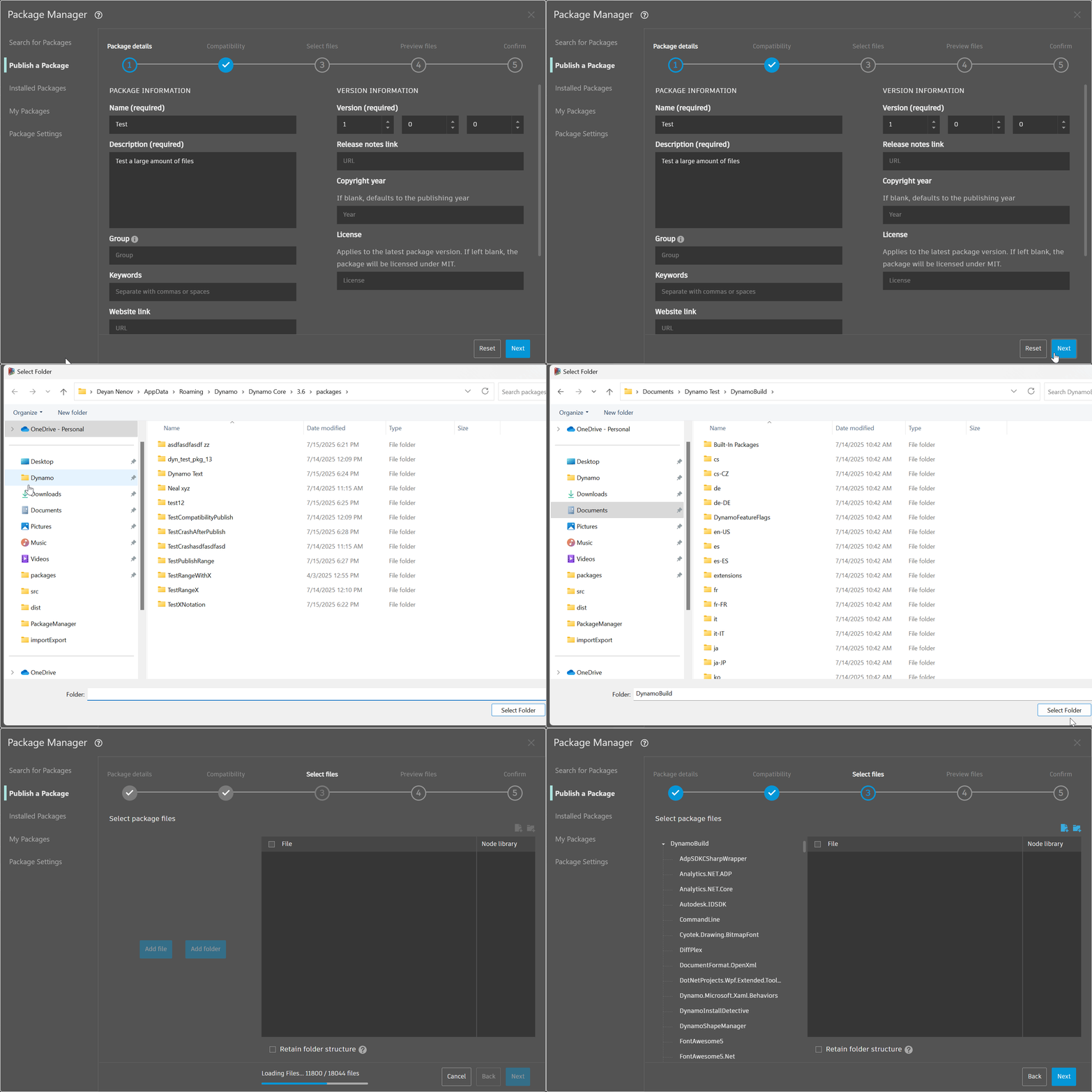
- Package Manager is now better able to handle package uploads with a large number of files with the introduction of asynchronous processing and upload progress information.
- Paneling nodes were introduced in release 3.1 in experimental mode and allow you to create panels on surfaces. Now, paneling nodes are out of experimental mode and part of the standard node library, so you no longer need to enable them in settings to be able to use them.
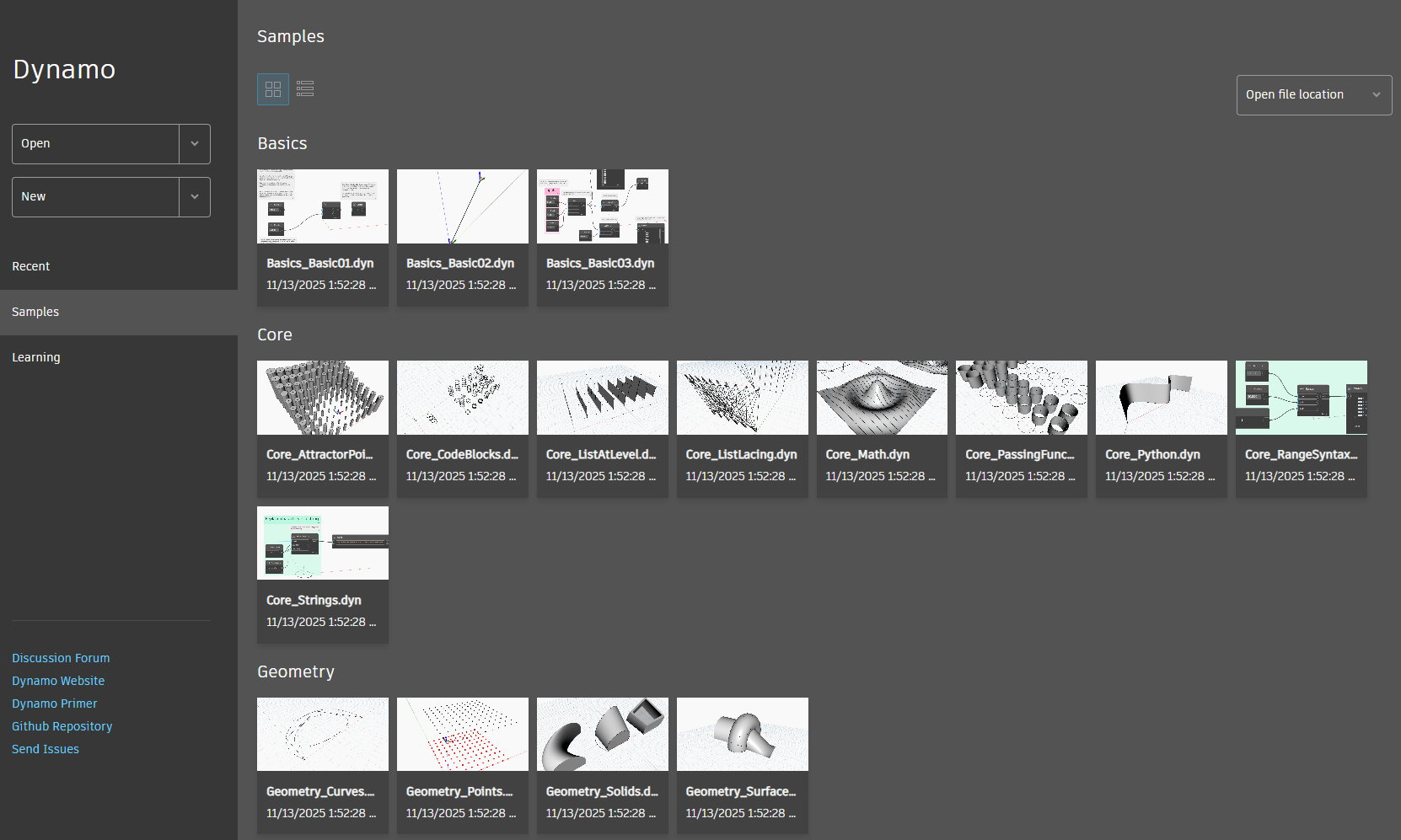
- Sample graphs are now available for Dynamo Sandbox, and you can find them in the top menu under Help > Samples, or on the home screen in the left Samples tab. Previously, these were only available when running Dynamo under a host application.
- The Graph Properties panel has moved from the Extensions menu to the File menu.
- The purple syntax highlighting in Python nodes has been replaced with red so that purple can be reserved for AI features.
Bug fixes
- We ensured that sign-in functionality and data collection agreements no longer appear while in no-network mode.
- We fixed an issue where the pan tool would deactivate after panning once. Now, the pan tool will remain active until the user deactivates it.
- We fixed a rendering issue with the Color Range node.
I like what I see! How can I get my hands on Dynamo 4.0?
Dynamo 4.0 will be made available in our host integrations at a future date and can be explored right now through the dynamobuilds.com website or the GitHub build page – available in the Sandbox version of Dynamo. Then, drop us a line on the forum!
Want more detail? Check out the release notes
For more information on other minor features, bug fixes, and known issues in Dynamo 4.0, take a look at the release notes!
With each release, Dynamo grows more and more powerful, and we’re so grateful to have you along for the ride. Every improvement we make is for our community members, and we rely on your ideas, feedback, and inspiration to continue growing! Curious to see what else we’re working on? Visit Dynamo Roadmap, where you can take a look at current and upcoming work, express your support for features you want to see, and let us know what you think by adding a comment.