Hello, Dynamo people!
The weather may be cooling down here in New England, but we are bringing the heat with our latest release, Dynamo 2.16. Below, we’ll highlight some of the fantastic additions, improvements, and performance enhancements available in this release. Once you’re done learning about our fabulous new features, download Dynamo Core 2.16 and tell us what you think on the forum!
TL:DR
Dynamo 2.16 brings powerful improvements to PolyCurves, helps you stay up to date with the latest Dynamo news with the Notification Center, and introduces a new Custom Selection node. It enables you to work faster and more seamlessly with groups, wires, and Watch nodes, and adds polish and improvements to the Graph Node Manager. We’ve added detailed error reporting and a safer Package Manager experience. As always, we’ve also taken performance up a notch, with boosts to workspace references, Package Manager, and Graph Node Manager + custom nodes.
For full details on this release, check out the release notes!
What is Dynamo and its flavors?
What is Dynamo Core?
Dynamo Core is a collection of bundled components that consist of the graphical interface, the compute engine, the scripting language DesignScript, and the out-of-the-box nodes that are not specific to another program like Revit or Civil 3d.
What is Dynamo for <INSERT HOST HERE>?
Dynamo for [Revit, Civil 3d, FormIt, Advance Steel, Alias or Robot Structural Analysis] is a collection of host-specific nodes that work with Dynamo Core and runs inside of said host.
What is Dynamo Sandbox?
Dynamo Sandbox is for package developers and other folks working with Dynamo code who want to stay up to date with the latest and greatest stuff coming out. Sandbox is Dynamo’s “Core” functionality distributed in a way that doesn’t interfere with other Dynamo installations and doesn’t require any other applications (except for a few windows components and some optional extras). You can read more about this distinction here.
So, what’s dropping with Dynamo 2.16?
Curve your enthusiasm: Geometry improvements
Note: Dynamo 2.16 requires a new version of Dynamo’s geometry kernel to support the introduction of natively supported PolyCurves. This means that unlike previous versions, Dynamo 2.16 only supports access to geometry in host applications with this new version. This will be Revit 2023.1 and similar for all other hosts.
This release unlocks higher-fidelity geometry for Dynamo users, empowering you to work more swiftly with geometry, create and heal broken geometry with precision and speed, and correctly map the extends of geometry. We have many amazing updates to PolyCurves in store, so let’s take a closer look.
- [ 1 ] Existing
PolyCurve and Curve nodes now more closely align with ASM, playing nice with the rest of the Geometry library. - [ 2 ]
New PolyCurves are tightly coupled with Dynamo's geometry kernel, making them native, robust, and fully supported. ThePolyCurve.OffsetManynode will create as many unique offset closed PolyCurves as needed, resolving the self-intersecting geometry problems of the past! - [ 3 ] New
oriented and minimum volume bounding boxesunlock precise workflows and limit false positives. Where the old nodes were axis aligned, the new nodes “shrinkwrap” the geometry to thesmallest possible bounding box. - [ 4 ] More granular control of desired units when
importing geometry from SAT and SAB. - [ 5 ] Repair and Heal nodes help
resolve broken geometry.


PolyCurve.OffsetMany node in action, showing internal and external offsets and rounding
Catch the latest Dynamo news in the Notification Center
Stay plugged in to latest happenings the Dynamo community… from within Dynamo! You’ll be able to explore blog posts, be informed of important messages (such as the hot-fix extension Dynamo Future File), and more. In the future, we plan to extend this functionality so that you can also send your own messages to your team!
A new bell icon in the top right corner of Dynamo displays the number of new notifications. Click the icon, and you’ll open the Notification Center, where you’ll see the latest notification content. You can dismiss notifications one by one, or mark all as read to clear the notification counter (until new notifications appear).
And if you’re looking for some peace and quiet, you can disable notifications by going to the Dynamo > Preferences > Features menu and turning off the toggle under Notification Center. Once you’re ready to resume notifications, simply re-enable the toggle.
- [ 1 ] The
Notification Center bell iconshows the number of unread notifications available to you (1 through 9+). Click it to access the Notification Center. Currently, notifications display for 6 months if not dismissed or replaced with newer notifications. - [ 2 ]
Dismiss a notificationby hovering over it and clicking the X icon. If you accidentally dismiss a notification, you can restore all notifications by going to your Dynamo.Settings.XML file underC:\Users\<username>\AppData\Roaming\Dynamo\<Host or Core>\<Dynamo Version>and deleting the content between<ReadNotificationIds>and</ReadNotificationIds>. - [ 3 ] The notifications may include a
link for more information. This could be a website, a download link, etc. - [ 4 ] The timer shows
when the notification was posted. - [ 5 ] The blue notification band indicates
unread notifications. - [ 6 ]
Mark all notifications readand clear the notification counter from the bell icon by clicking Mark All As Read. This also turns all blue notification bands [ 5 ] gray.

Improving the nodal landscape
Have it your way with the Custom Selection node
Have you ever wished you could define custom labels and values for your drop-down selection node? We are putting the power in your hands with the new Custom Selection node. This node, available in the Input > Basic library, allows you to create a drop-down selection input with custom labels and values.
Click the drop-down arrow on the node to access and edit the Display and Value fields. You can remove or add rows using the + and – buttons. If all values are numbers, the output will be a double, and if all values are integers, the output will be an integer. Otherwise, the output will be a string. Imagine the possibilities!
- [ 1 ] Click the drop-down to access the
customization options. - [ 2 ] Enter
custom labelsin the Display field andvaluesin the Value field. - [ 3 ]
Remove unneeded rowswith the – button. - [ 4 ]
Add a new rowwith the + button. - [ 5 ] Click the drop-down to see your
customized selection options.

The anatomy of the Custom Selection node
A more consistent File Path node
In the past, the File Path node could be a little bit forgetful. Now, when you click Browse in the node, the file path currently set in the node will open in the dialog. It’s the little things!

File Path node in action, retaining the currently set path in the Browse dialog.
Getting faster and more responsive
We are always working tirelessly to improve Dynamo performance, and this release is no exception. Let’s dive in to a few enhancements in more detail.
The Dynamo Engine was unnecessarily calling the Type statistic (what the data type is), which simply resulted in a performance hit… oops. So, we’ve now refactored the code to use the type from the first call rather than doing it twice, and can fall back on common based types where possible, all resulting in a performance increase. Hurrah for faster graph execution!
We’ve optimized how workspace references are computed. Now, workspace references are only recalculated if the workspace has unsaved changes, streamlining performance.
We’ve also improved performance in the Package Manager. The Package Manager now checks if you’re the package author and only shows the Deprecate/Undeprecate option to the package author, reducing the need for repeated API calls and speeding things up in the process.
Finally, the Graph Node Manager’s performance with custom nodes (including Spring and Clockwork) has been improved. No more laggy behavior!
Got a crash? Let us know through streamlined error reporting
Crashes happen–and it sucks, I know. That’s why we want to make it easy for you to report problematic crashes in detail and help us get a head start on troubleshooting the issue and preventing future crashes. When a crash occurs, you’ll see an error report form that will allow you to fill in steps to reproduce the problem. It also generates detailed information to help us take action faster.
Whenever needed, please submit these error reports in as much detail as you can to help us make Dynamo as amazing as it can be! Your support is a crucial piece in our effort to improve Dynamo for all users.
- [ 1 ] In the
Comments box, include as much detail as possible about the crash you’re encountering, including steps to reproduce the problem. - [ 2 ] You can include your email address in the report if you’d like to be
notified of a solution or contacted in case we have questionsabout your report. Note that even if you don’t include your email address, your contact information may be present in your error files. We’ve included a link to the Autodesk Privacy Statement for more information about how your data is used. - [ 3 ] To see more detail about exactly what’s included in your error report, click Report Details. You’ll find
detailed information about the error,as well as alist of the files included in the report.

A safer package experience with Package Manager anti-virus scans
We’ve added a new layer of protection against known viruses to our package experience. To provide a more secure environment to all Dynamo package users, we have introduced anti-virus scans for new packages. This scan will happen asynchronously and will not add any meaningful time to the usual upload duration. Once the package is cleared, it will become available in Package Manager. If viruses are found, the Package Manager will quarantine and block download of the infected package. If you’re the author, you’ll be notified of the infected package so you can reupload a clean version. For more information, we’ve added help documentation around the anti-virus scan, which you can access through the Publish a Package dialog.
Though we have not yet seen any serious virus threats in Package Manager, we added this protective layer out of an abundance of caution to pre-emptively counter potential malicious actors who might seek to use packages as an attack vector. While our initial scan did flag and block a few things, we are mindful that this was most likely unintended and not malicious. That being said, as per the Package Manager Terms of Service, please use packages at your own risk and be mindful of potential security risks by only using packages that you know and trust.
- [ 1 ]
Access documentation about packagesby clicking the help icon next to Publish a Package. - [ 2 ]
The documentation browserwill open, featuring detailed information about publishing a package. - [ 3 ] To see the
new section about anti-virus scans, scroll to the bottom. - [ 4 ] A
warning will pop upwhen a package author attempts to upload an infected package, and others won’t be able to download the package. Make sure the package is clean, then try uploading it again.

Package authors attempting to upload an infected package will now see a warning about the infected package. To read more information about the anti-virus scan in the documentation browser, click the help icon next to Publish a Package.
Improving the quality of Dynamo life
Get ready for a smoother experience when working with groups, wires, Watch nodes, and more. Building on John Pierson’s awesome community contribution from 2.14–remove nodes and notes from the current group with Alt + Click–we’ve extended Alt + Click to also remove the currently selected group from its parent group. We love making your workflows faster!
You also have a new way to pin a wire: Simply right-click a wire and select Pin Wire in the context menu. If you want to show or hide all wires, that’s easy too: Select a group of nodes, right click, then select Hide All Wires or Show All Wires.
We’ve also given Watch nodes a bit of a glow-up: They now have a minimum height when displaying a list, preventing your valuable data from being hidden, and you can resize a Watch node whose input is a single dictionary with multiple (5+) items. And finally, most DesignScript primitive types were shown in different colors in a code block, but nulls were feeling a bit left out. Now, nulls too show up as colored in the Preview and Watch nodes.
-

- Show/hide all wires by selecting a group of wires, right-clicking, and going to Node Connections.

-
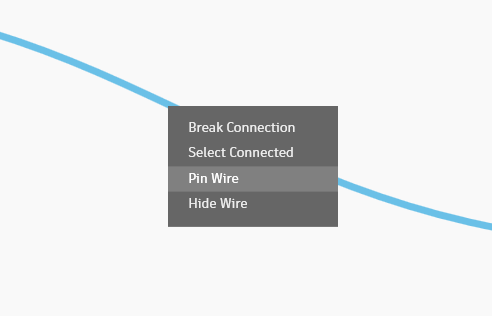
- Pin a wire by right clicking and selecting Pin Wire in the context menu.
-

- Null color in a Watch node

We’re also pleased to let you know about the updates we’ve made to Graph Node Manager, which helps you more easily navigate your graph. In addition to visual polish, we’ve added icons to filters, helping you identify them at a glance, added a blue dot next to a renamed node’s name in the Graph Node Manager list, and improved the color contrast for warning and error text in the Graph Node Manager, making it easier to read. Many of these updates originated in the feedback that you–our users–gave us. Thank you for being active members of the Dynamo community and helping us get better with every release!
- [ 1 ]
Each filter now features an icon, enabling you to find the ones you’re looking for through both image and text. - [ 2 ]
Renamed nodesnow display a blue dot next to their name. Clicking the name will take you to that node in the workspace, where you can look up its original name as needed. - [ 3 ]
Improved color contrastin the help/error text makes reading it easier on the eyes.

Making the Graph Node Manager even easier to interpret with filter icons, renamed node indicators, and higher-contrast text
Epic stuff! So where can I grab Dynamo 2.16?
Dynamo 2.16 will be made available in our host integrations at a future date and can be explored right now through the dynamobuilds.com website or the Github build page – available in the Sandbox version of Dynamo.
If you’re curious, you can also read our Release Notes
For more information on other minor features, bug fixes, and known issues in Dynamo 2.16, go check out our release notes!
A big shout-out to everyone who contributed to the release and the entire Dynamo community for continuing to support our work. As always, please let us know if you have any feedback or suggestions.
The Dynamo Team