Hello, Dynamo world! Our latest release, Dynamo 4.3, focuses on Autodesk Assistant and DynamoMCP, which now give you more control over what Assistant changes in your graphs. It also includes geometry updates, everyday workflow enhancements, and bug fixes.
TL;DR
- Review Autodesk Assistant changes to Python Script nodes before you accept them.
- DynamoMCP adds tools that let Assistant move nodes, read your graph, switch the Python engine, and undo its own Python edits.
- Dynamo now uses ASM 233 for geometry and stays compatible with ASM 232.
- Number and slider nodes keep your last valid value when you type something invalid.
- Many bug fixes, including window placement, Code Block warnings, and template handling.
What is Dynamo and its flavors?
What is Dynamo Core?
Dynamo Core is a collection of bundled components that consist of the graphical interface, the compute engine, the scripting language DesignScript, and the out-of-the-box nodes that are not specific to another program like Revit or Civil 3D.
What is Dynamo for <INSERT HOST HERE>?
Dynamo for [Revit, Civil 3D, FormIt, Advance Steel, Alias or Robot Structural Analysis] is a collection of host-specific nodes that work with Dynamo Core and run inside of said host.
What is Dynamo Sandbox?
Dynamo Sandbox is for package developers and other folks working with Dynamo code who want to stay up to date with the latest and greatest stuff coming out. Sandbox is Dynamo’s “Core” functionality distributed in a way that doesn’t interfere with other Dynamo installations and doesn’t require any other applications (except for a few windows components and some optional extras). You can read more about this distinction here.
So, what’s dropping in Dynamo 4.3?
Review Autodesk Assistant changes to Python scripts
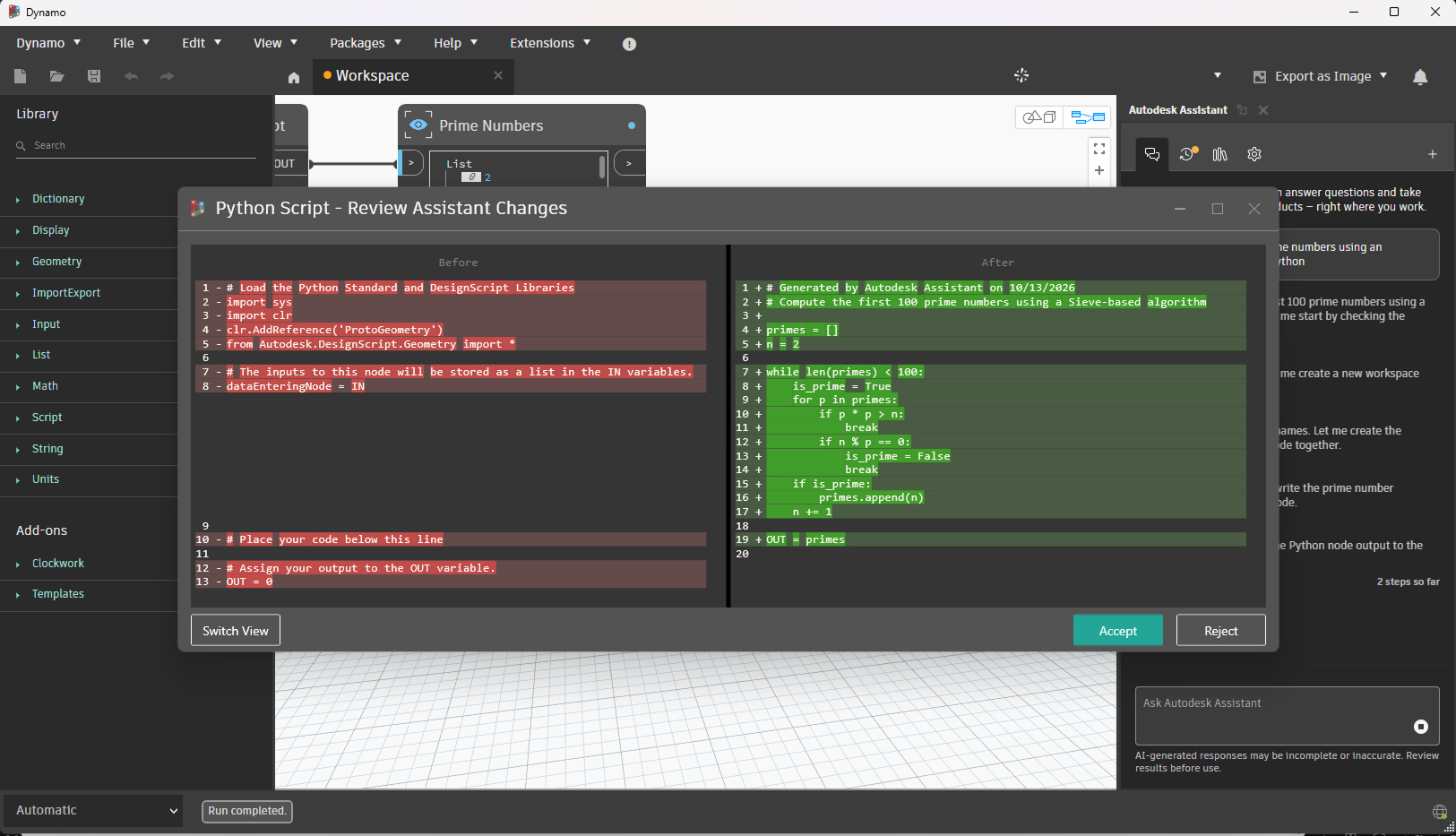
When Autodesk Assistant changes a Python Script node, you no longer have to guess what changed. Dynamo now opens a review window that shows the script before and after the change. You choose whether to accept or reject it. The Python editor also stays in sync with Assistant’s edits, so what you see in the editor matches what Assistant did.
New DynamoMCP tools for Autodesk Assistant
DynamoMCP is the package that lets Autodesk Assistant work with your graph. In 4.3, it includes four new tools:
- Move nodes. Assistant can place nodes at specific positions on the canvas.
- Read the graph. Assistant can read the current graph as JSON.
- Switch the Python engine. Assistant can change the engine of a Python Script node, and Dynamo validates the engine name.
- Reject its own edit. Assistant can restore the previous script after editing a Python Script node.
The built-in DynamoMCP package moves from version 0.6.2 to 0.6.6, and the built-in Autodesk Assistant package moves from 0.3.8 to 0.4.0.
Build with more confidence when working with Assistant
Several smaller changes make Assistant more reliable to work with:
- It asks a short clarifying question when your request is ambiguous, instead of guessing.
- It edits an existing Code Block in place when inputs change, instead of recreating it.
- It keeps your graph in Manual run mode while it builds, then returns to the run mode you had before.
- All edits from a single prompt undo together as one step.
- In Civil 3D, Dynamo’s tools are now registered with Assistant.
Updated geometry: ASM 233
Dynamo now uses ASM 233, the geometry modeling kernel, while keeping compatibility with ASM 232. We also removed unused libraries from the Dynamo Core runtime package to keep it leaner.
Quality-of-life improvements
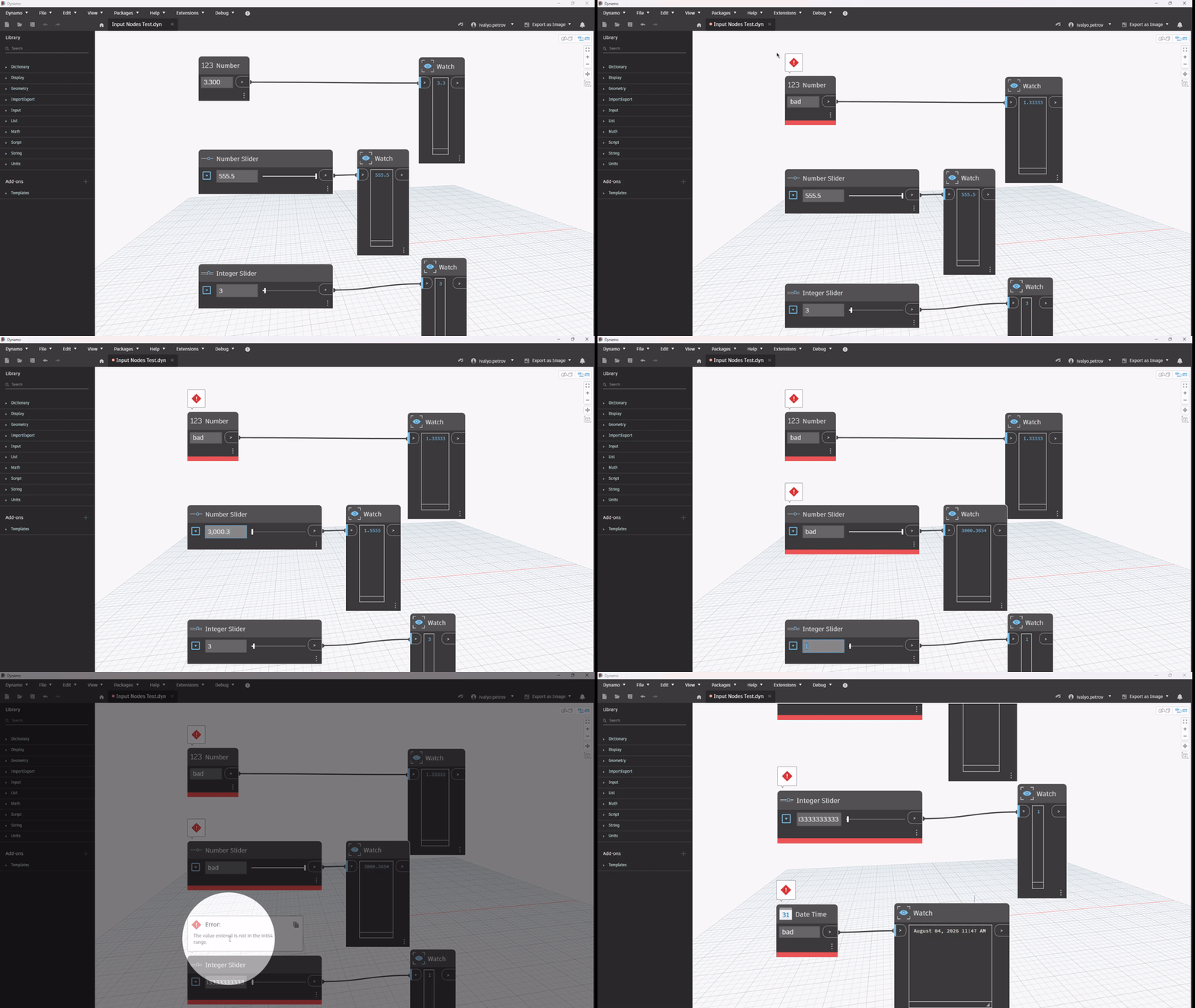
- Safer number input. If you type an invalid input into Number, Number Slider, Integer Slider, and DateTime nodes, they now show an error and keep the last valid value.
- Fewer interruptions. The Remove Port confirmation no longer appears for a Python Script input port that has no custom name or description.
- Smoother publishing. Package Manager returns to Installed Packages after you publish a new version of an existing package.
Bug fixes
A few highlights:
- The Dynamo window no longer opens off-screen when the monitor it last used is disconnected or rearranged.
- A Code Block that calls a function that doesn’t exist now shows a “function not found” warning instead of silently returning null. The “Method not found” warning also stays visible after you edit the node and run again.
- The Custom Selection node keeps its items and selection after you delete the node and undo the delete.
- New Code Block nodes no longer become part of a collapsed group when you double-click the group.
- Home screen templates and File > New > From Template no longer come up empty or point to the wrong folder after Dynamo is moved or upgraded. Saving also no longer fails when the configured template location is unavailable.
- PolyCurve intersections with surfaces, and across the PolyCurve seam, return correct results.
- Autodesk Assistant no longer goes blank in Revit after Dynamo closes. It also no longer asks whether to run a graph it already ran.
For the full list, see the release notes.
I like what I see! How can I get my hands on Dynamo 4.3?
Dynamo 4.3 will be made available in our host integrations at a future date. You can explore it right now through the dynamobuilds.com website or the GitHub build page, available in the Sandbox version of Dynamo. Then, drop us a line on the forum!
Want more detail? Check out the release notes
For more information on other minor features, bug fixes, and known issues in Dynamo 4.3, take a look at the release notes. Thank you to everyone who filed an issue, tested a build, or shared a graph on the forum. Our releases reflect what you’ve shared with us.
If you want to see what’s coming or weigh in, the Dynamo Roadmap is the place to vote for the features you need and leave a comment. Until next time!
The Dynamo Team