Introduction
Muqarnas, also known in Iranian architecture as Ahoopay, is a form of three-dimensional decoration in Islamic architecture in which rows or tiers of niche-like elements are projected over others below.
Ahoopay in Persian literally translates to “deer’s foot”. This term is used to describe the intricate, delicate, and branching pattern of Muqarnas, which might resemble the shape or form of a deer’s hoof or foot in its elegance and complexity.
The comparison to a deer’s foot highlights the organic, graceful, and sometimes asymmetrical nature of Muqarnas designs, which feature a series of interlocking, three-dimensional elements that resemble natural patterns. This association between the aesthetic qualities of Muqarnas and the beauty of nature, such as the deer’s foot, reflects the poetic and symbolic aspects of Persian architecture.
At ARTsBIM, we were inspired by the intricate beauty and complexity of Muqarnas forms, such as those in the Isfahan Royal Mosque, a UNESCO World Heritage Site. This sparked our curiosity about the potential of modeling them within HBIM (Heritage Building Information Modeling) and Revit. While we found detailed Muqarnas models in Rhino, we noticed a lack of comprehensive HBIM representations. We took on this voluntary project, and thanks to the versatility of Revit adaptive component families and, as always, the power of Dynamo, we ultimately conquered this challenging yet rewarding task.
Our model is entirely developed in Revit, supported by Dynamo and Python scripting, and complemented by tools like 3DS Max, MaxScript, ChatGPT, and Adobe Creative Suite. While certain aspects of the workflow, such as photogrammetry, Autodesk Platform Services (APS), and 4D simulations, are still in progress, our adaptive model and Dynamo scripts enable us to update the entire model with the latest point cloud data in under an hour.
The Muqarnas perspective, with its intricate geometry and timeless beauty, offers a profound sense of unity—a harmonious connection between art, architecture, and spirituality. This project beautifully demonstrates how a historical art form like Muqarnas, rooted in Iran, can be reimagined using modern software, particularly Autodesk tools, all while working from the inspiring city of Istanbul.
The Need for Detailed HBIM
An HBIM model serves as a valuable tool for the preservation and renovation of world heritage sites, and, in some cases, for recreating demolished parts after disasters. A powerful example of this is the story of Notre-Dame. After the fire, a highly detailed BIM model of Notre-Dame was created by combining existing scans with Autodesk software. Autodesk was honored to play a role in bringing Notre-Dame de Paris back to life. This story underscores the critical need for an HBIM model, which can also be referred to as a digital twin. A more precise and detailed model allows for better rehabilitation and, in the case of a catastrophe, a more effective restoration and recovery. In addition to being a digital gift for the future, it also serves as a gift to our present selves—a window into history, allowing us to reconnect with the past as it once was. The HBIM model bridges the past, present, and future, fostering a deeper understanding of timeless construction practices.
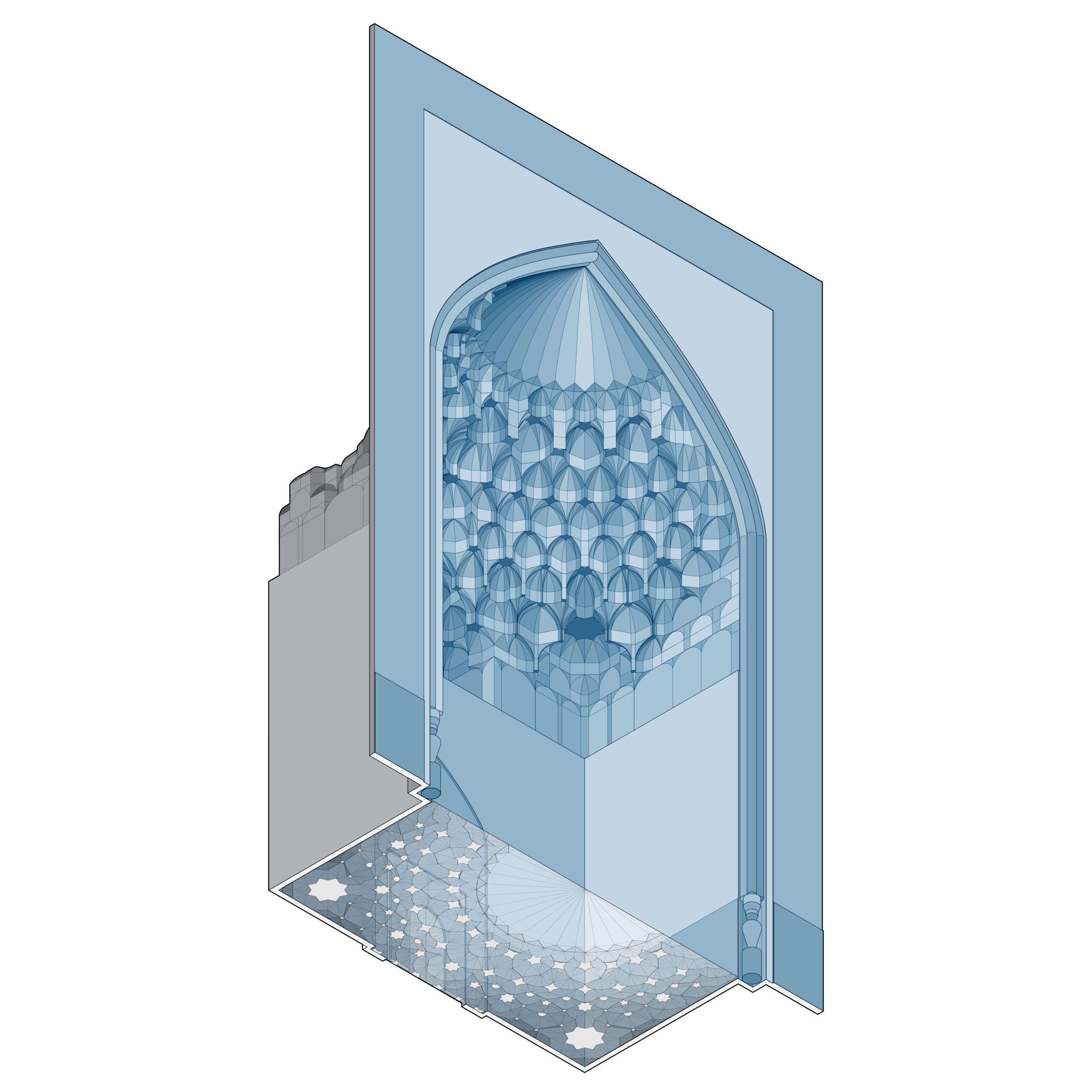
Computational BIM challenges:
The following list outlines some of the computational BIM challenges we faced:
- Automating the workflow from point cloud data to Revit families
- Creating a precise model of historical decorations
- Developing a complex model using native Revit geometries
- Recognizing and classifying patterns so the system can automatically identify predefined ones
- Creating complex Revit families that automatically adjust to point cloud data
- Placing families into the main model
- Take advantage of 4D modeling in four keyways: first, by creating a 4D HBIM model that visually demonstrates the sequence of part installations; second, by extending the timeline to showcase changes across different historical eras; third, by enhancing the model’s presentation with music to elevate its aesthetic value; and fourth, by showing the adaptability of the model.
- Create an interactive web-based model through APS that allows people to learn from it, while also enhancing the digital twin with their thoughts and knowledge, creating a mutually beneficial relationship.
While we have successfully addressed some of these challenges, others are still in progress.
HBIM Workflows
Our entire workflow is outlined in the diagram below, consisting of five crucial steps:
- Photogrammetry & Texture Mapping
- Revit Modeling and Documentation
- Web-based HBIM with Autodesk APS
- 4DHBIM
- Presentation

We have successfully completed the second step, which centers on the detailed HBIM modeling of the Muqarnas. We are now advancing through the remaining sections of the project.
Leveraging Dynamo in the Workflow
By utilizing adaptive component families in Revit and Dynamo scripts, we’ve streamlined the workflow for more efficient updates. The adaptable model is engineered to synchronize seamlessly with the latest horizontal lines from point cloud data, enabling real-time adjustments. This approach allows us to update the model with both precision and speed, cutting down update times to under an hour.
The first and second steps of the workflow involve various subsections, in which we have effectively utilized Dynamo and Python scripting to address HBIM challenges, including:
- Performing horizontal cuts of the point cloud at different levels
- Modeling curves in different line styles based on horizontal cuts
- Creating complex adaptive component families (Semi-Automated)
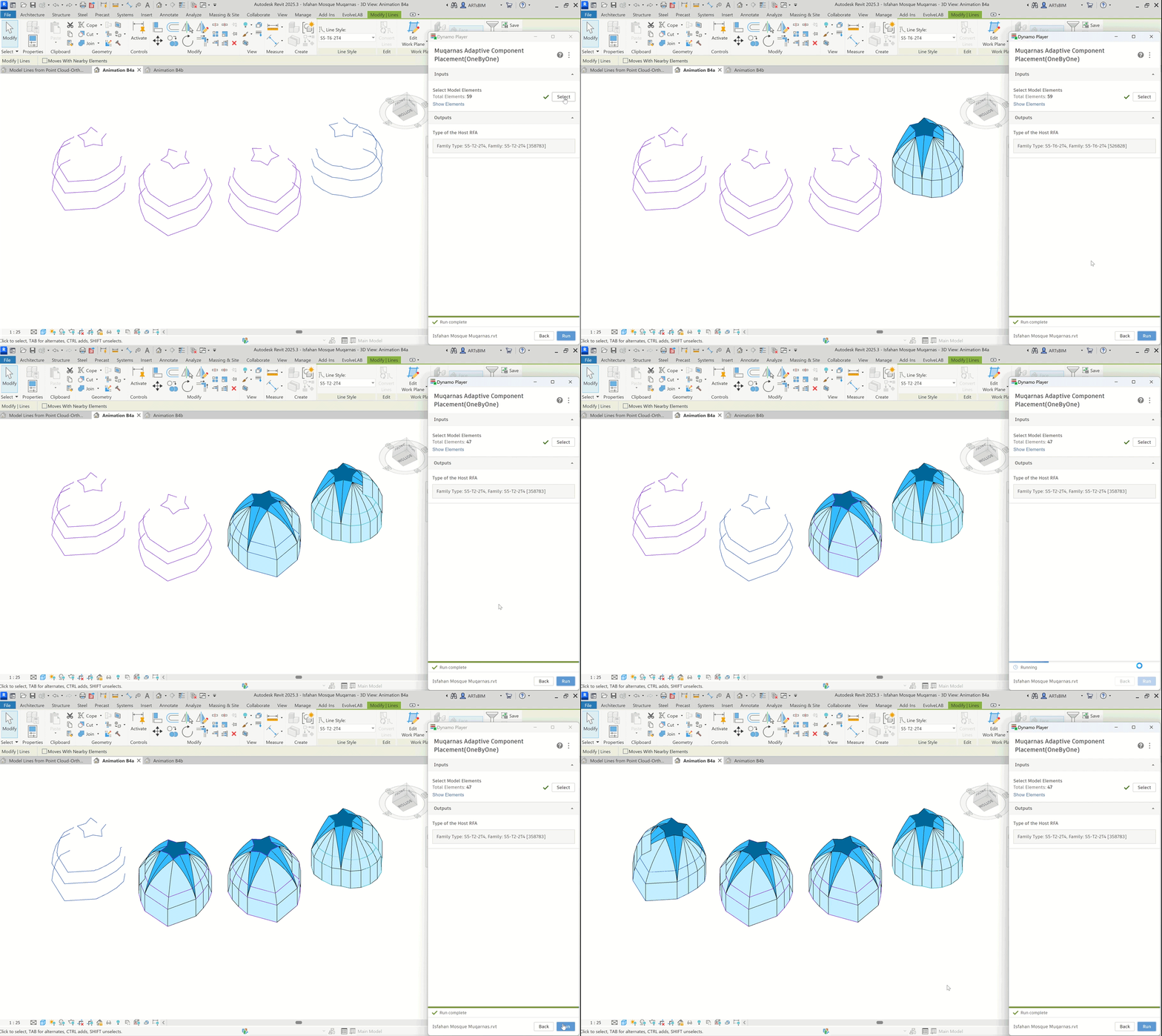
- Automatically instantiating hosted RFAs either individually or all together simultaneously
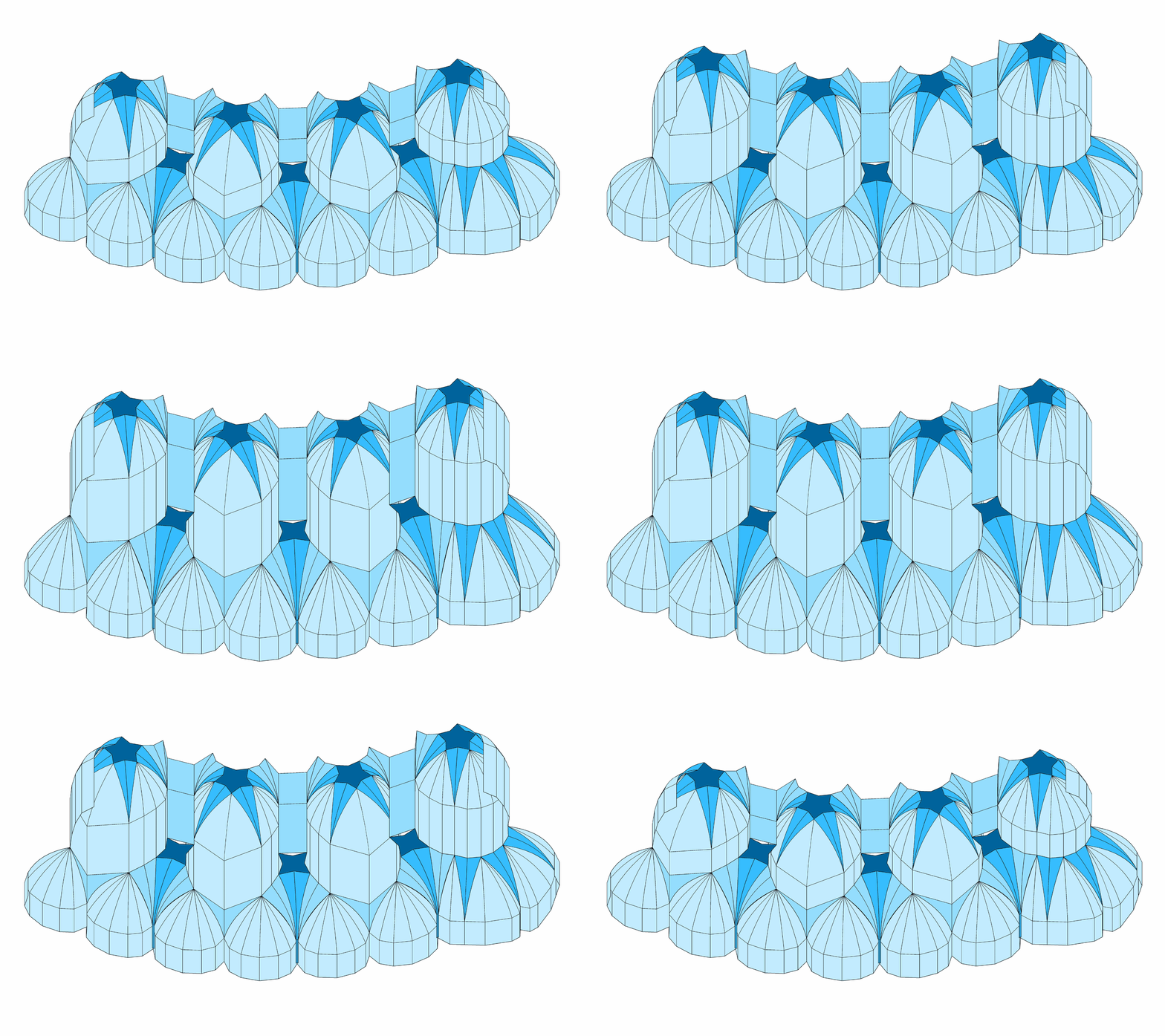
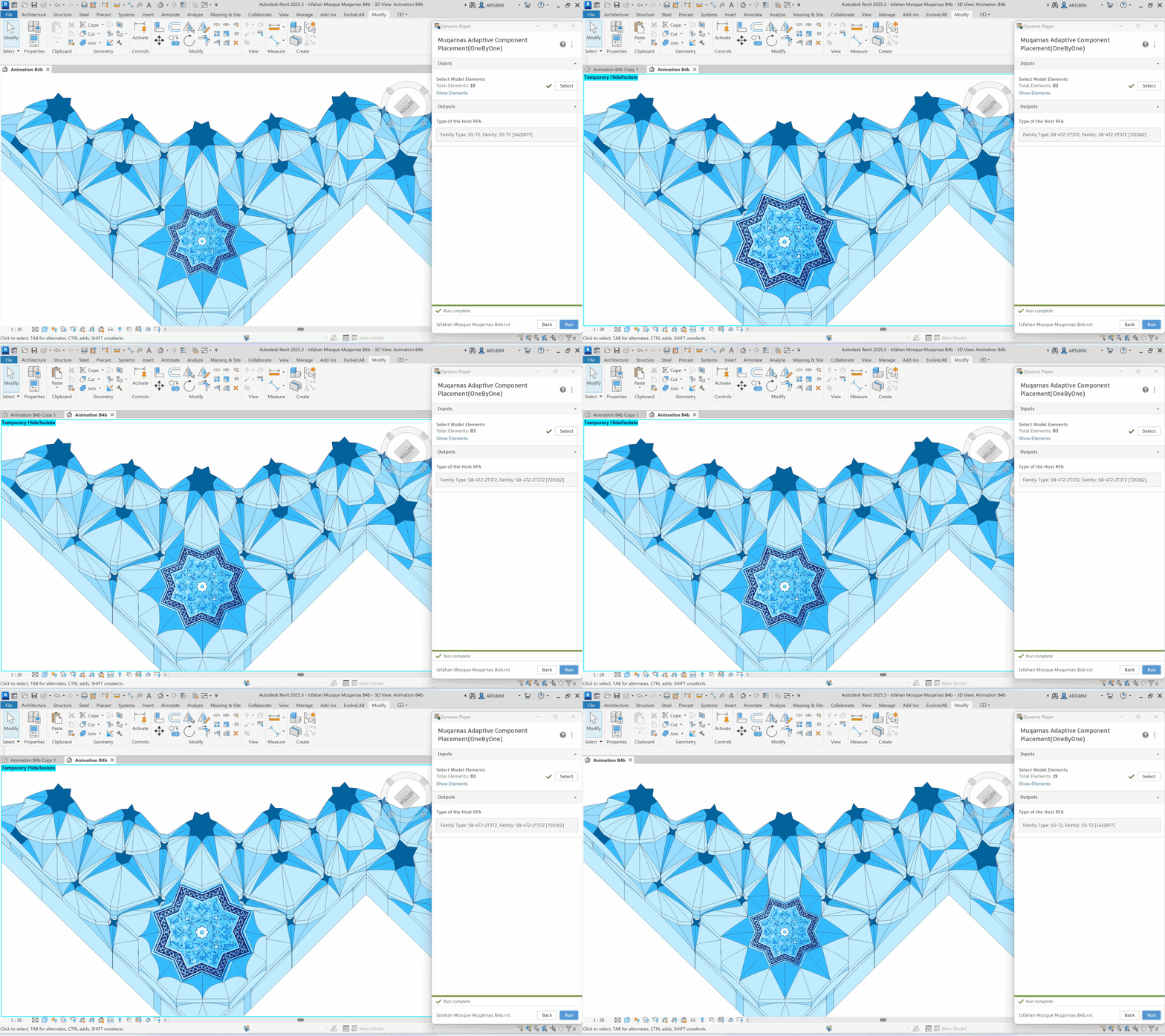
- Demonstrating the adaptability of different parts of the model
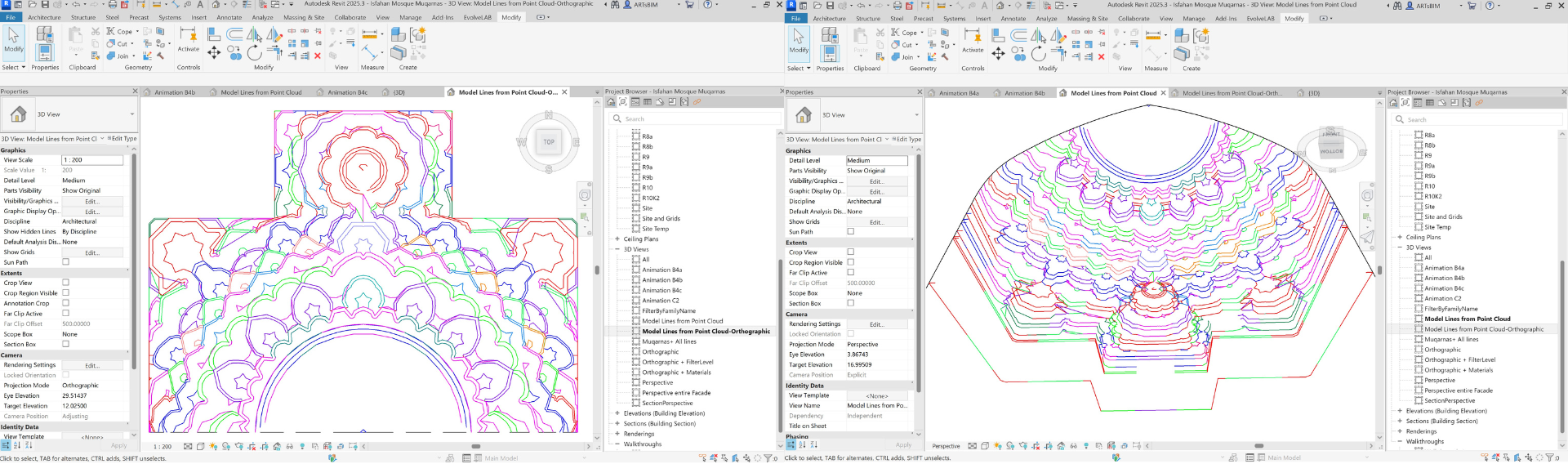
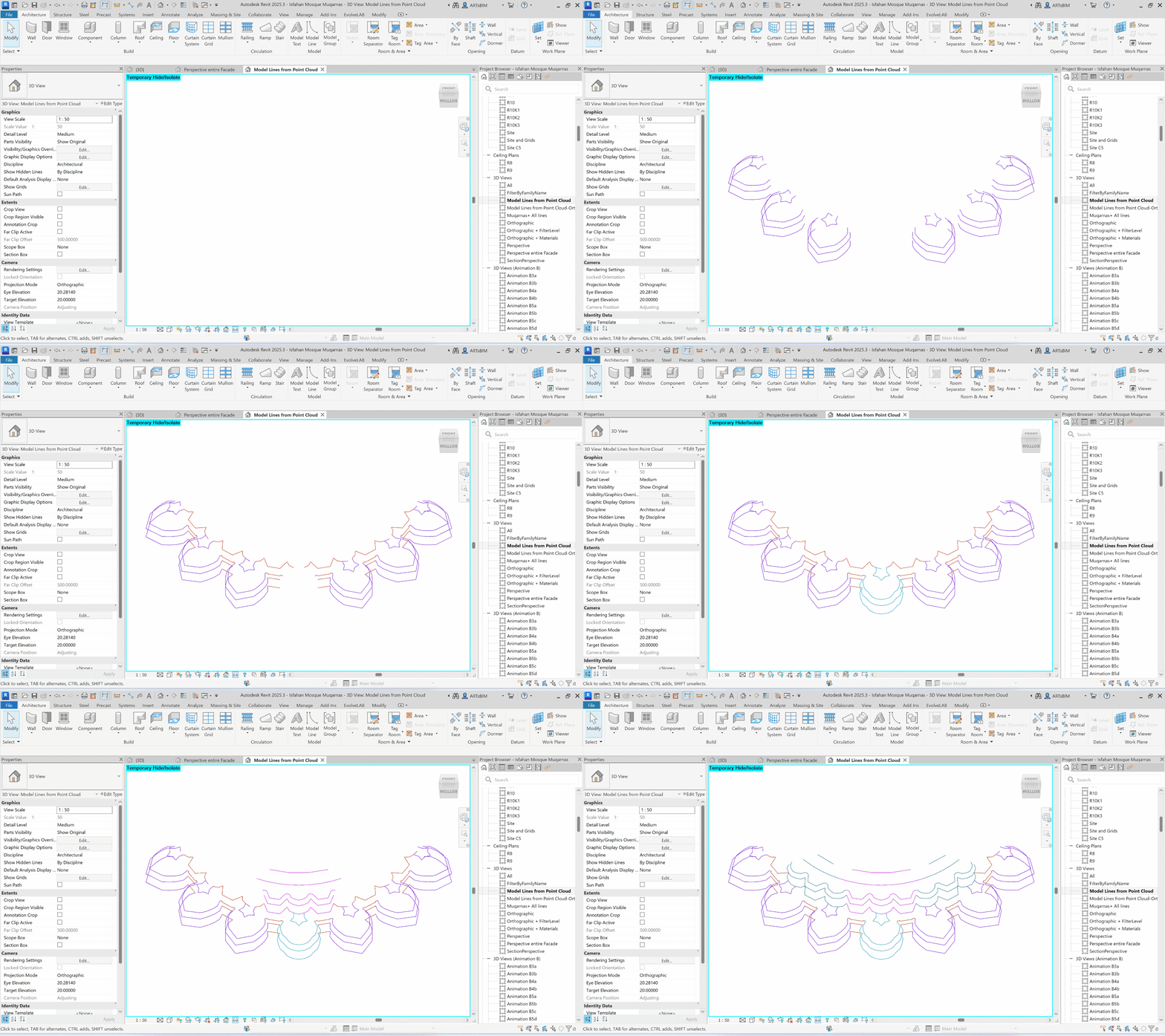
Performing horizontal cuts of the point cloud at different levels:
We are still progressing with the enhancement of photogrammetry and point clouds. However, with the primary point cloud, we utilized Dynamo to generate horizontal cuts at various levels of the project. First, the levels were adjusted, followed by the sequential creation of the horizontal cuts. While some manual adjustments were made in the final stage, we plan to fully automate this process in the upcoming steps.
Modeling curves in different line styles based on horizontal cuts:
We classified the horizontal lines based on the family classifications detailed later in this article. This step posed a challenge, as the Dynamo and Python scripts needed to accurately associate each line with its corresponding family. While some manual adjustments were made during this process, our goal is to fully automate this step in the upcoming stages.
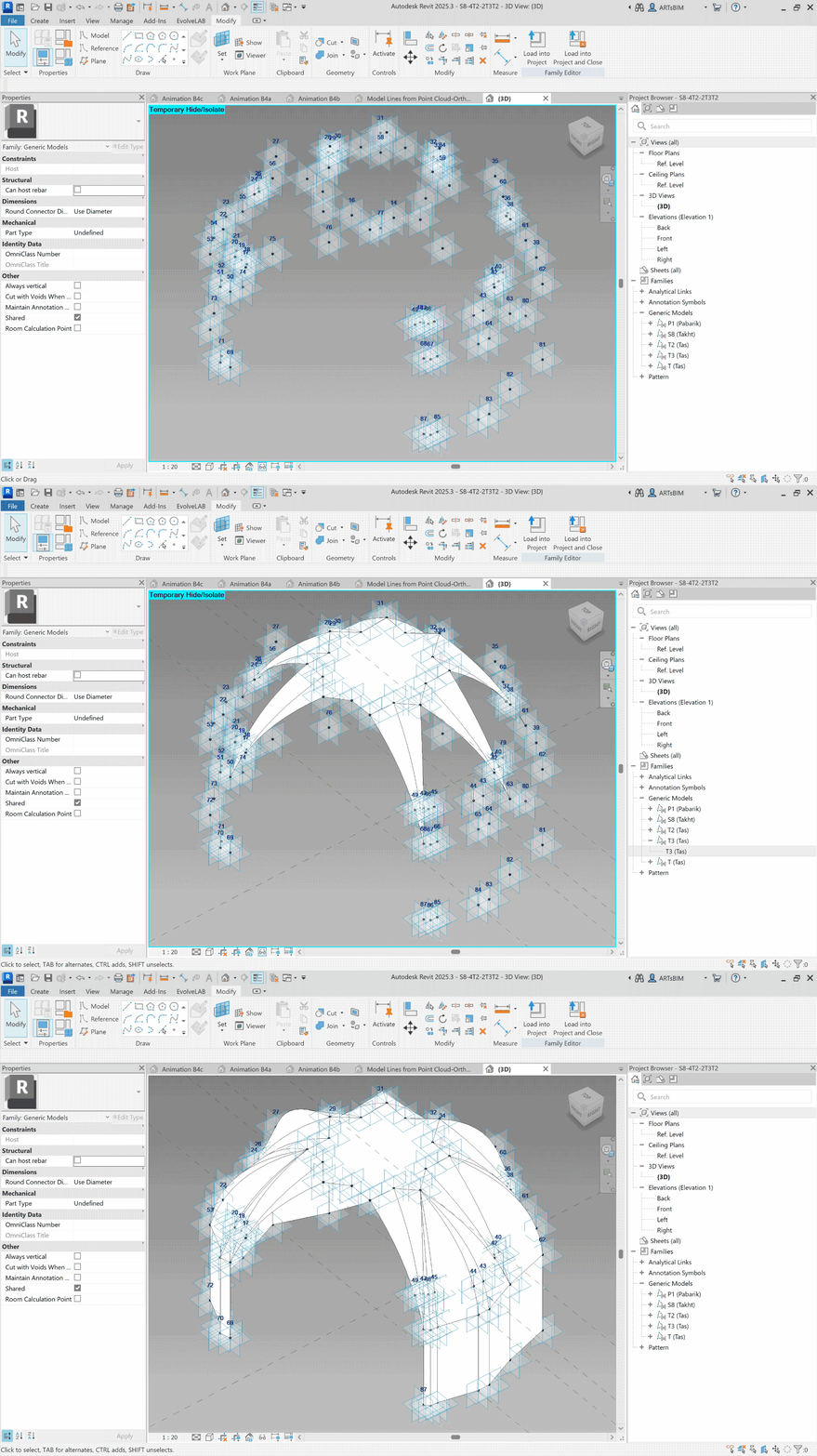
Creating complex adaptive component families (Semi-Automated):
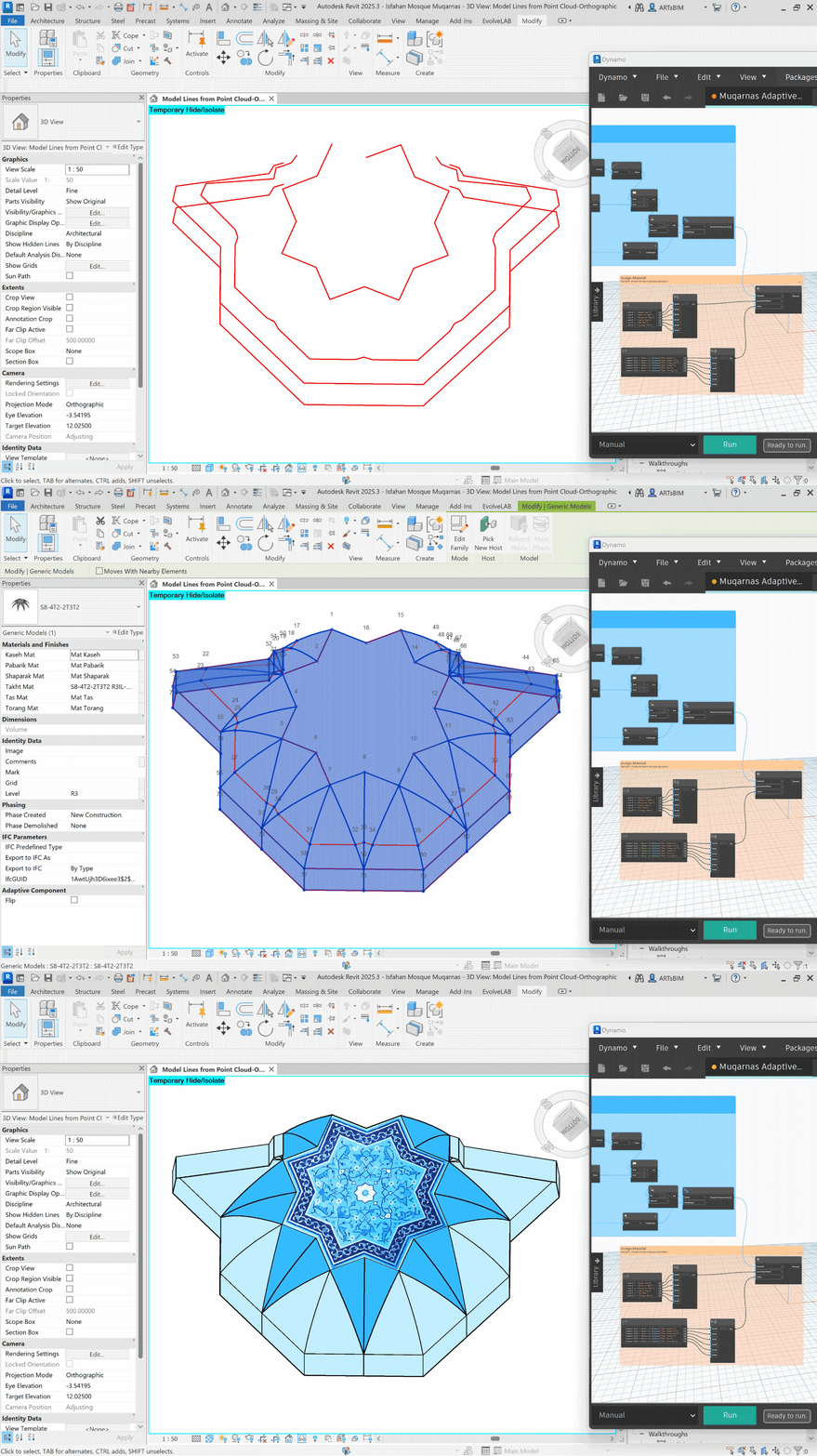
We developed complex Revit adaptive families, which include nested families, with some of the nested RFAs hosting additional nested families, and so on. For a more detailed understanding of Element Classification and Hierarchy, please refer to the relevant section later in this article. Some of the host RFAs contained over 200 adaptive points that had to be placed within the family, and integrating the nested families presented another challenge, which Dynamo helped us overcome. Despite these advancements, significant manual adjustments were still required. Full automation of this process in the near future is not practical for us; therefore, a semi-automated approach remains the most effective and efficient solution.
Automatically instantiating hosted RFAs either individually or all together simultaneously:
In the first approach, we select the relevant model lines for the desired family, and then the family is placed and adapted to the surveyed points. These families can be placed sequentially using Dynamo or Dynamo Player, as demonstrated in the GIFs and video. In the second approach, all families are placed simultaneously, with dozens of RFAs automatically adapted to thousands of surveyed points. In both cases, the Dynamo script identifies the appropriate families from the cumulative library.
Demonstrating the adaptability of the model
Demonstrating the adaptability of different parts of the model in z direction.
Demonstrating the adaptability of different parts of the model in X and Y directions.
Element Classification and Hierarchy
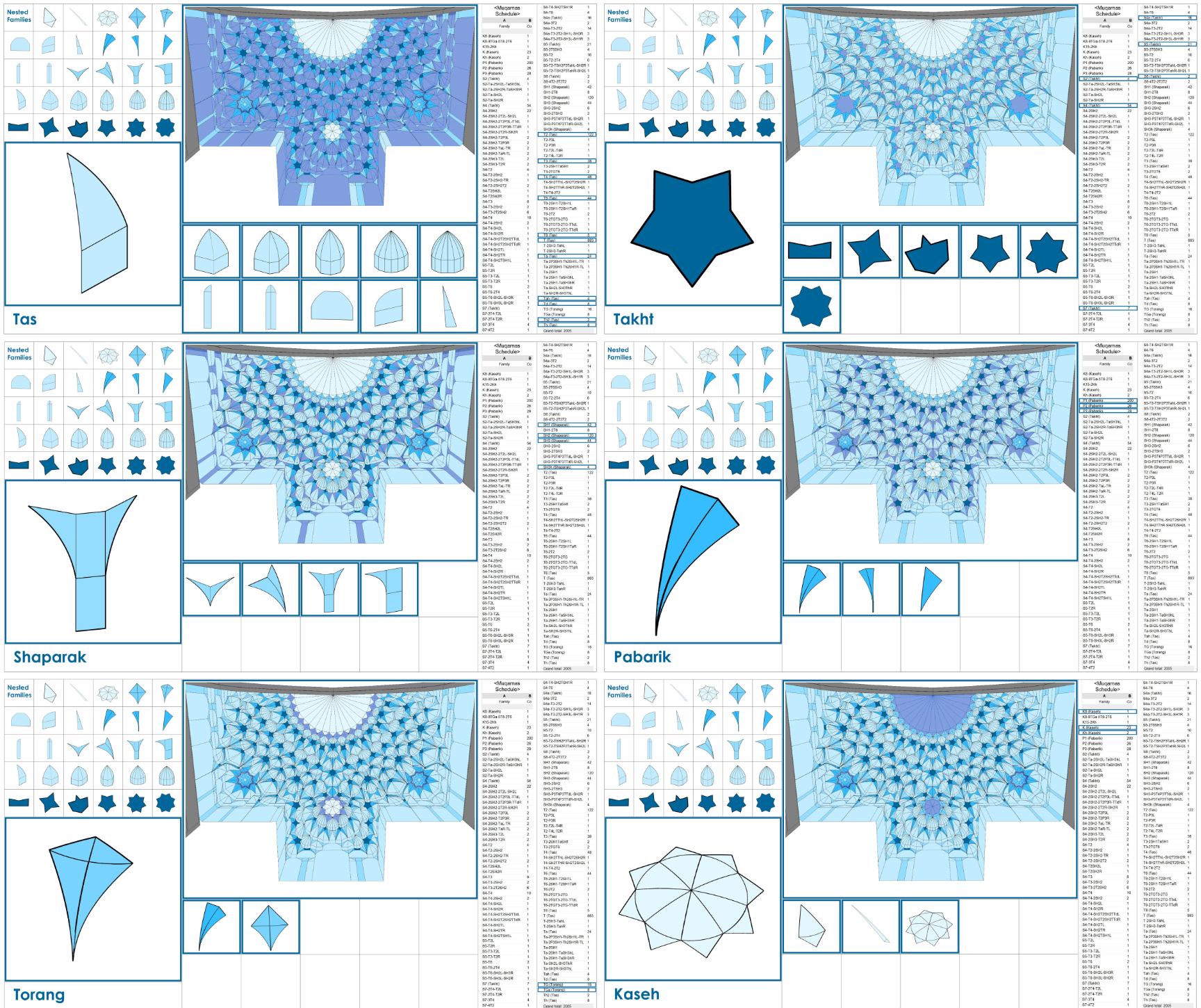
Nested RFAs: Using nested adaptive families to establish proper element classification and hierarchy. All elements are derived from six basic forms: Tas, Takht, Shaparak, Pabarik, Torange, and Kaseh, each of which is further subdivided into similar variations. We have defined nested families for each form, which will be integrated into the host families. The illustrations below show all six basic nested families along with their distribution map across the entire model.
Host RFAs: In host RFAs, both nested RFAs and other host RFAs can be incorporated, depending on the patterns identified throughout the model based on typological analysis. We established a special naming convention for all hosted families, ensuring that the names clearly reflect the contents of these families. As examples, the illustrations below show six hosted families, their distribution map across the model, their nested RFAs, and the corresponding Revit schedules for all host RFAs.
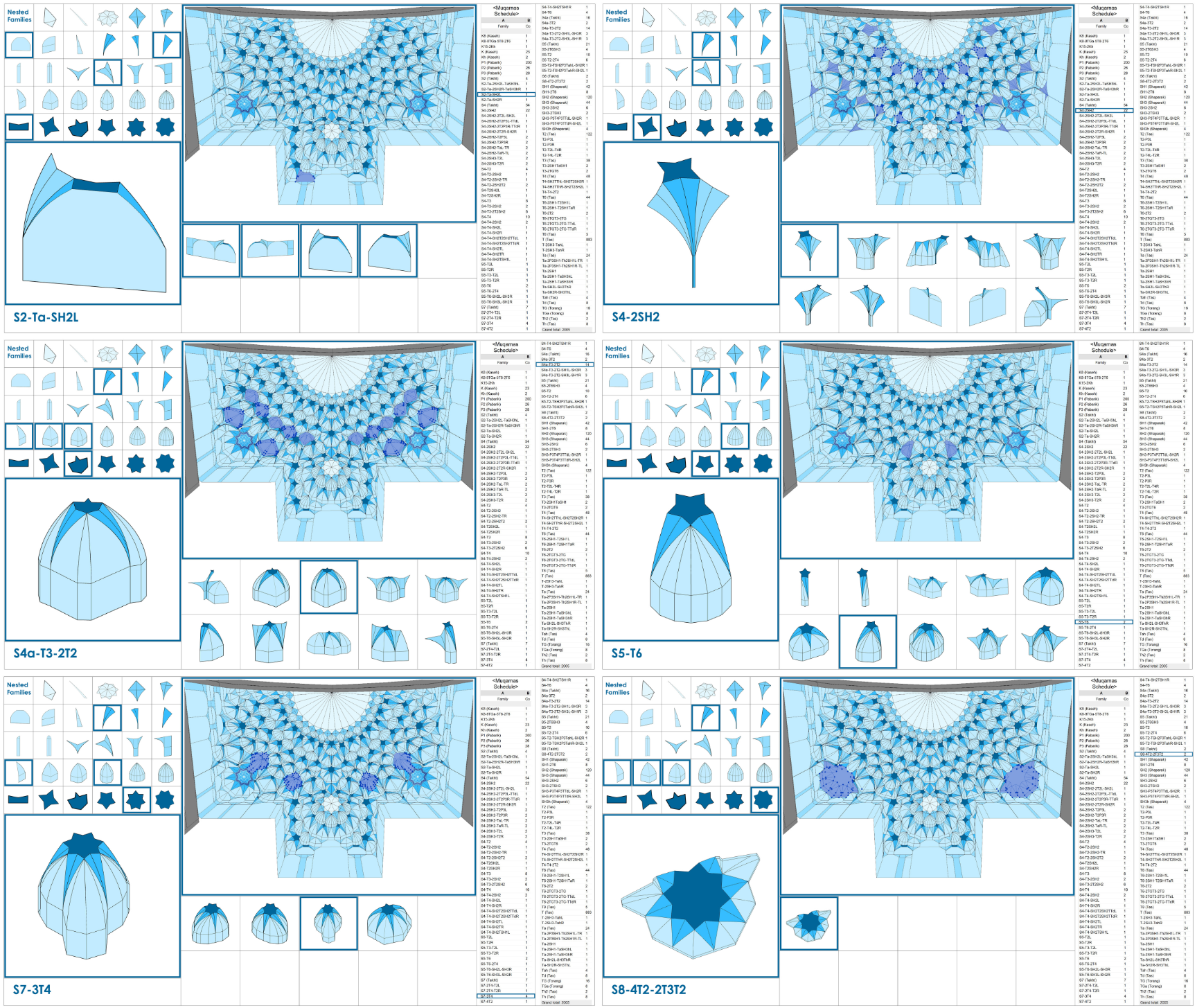
Revit and Dynamo: Decoding the Language of Muqarnas Patterns
Overall, the entire Muqarnas can be likened to a harmonious composition of arts, much like a piece of music or a poem. The hosted RFAs serve as the words of the poem, while the nested RFAs function as the letters. In essence, it’s a language, and with the help of Revit and Dynamo, we have been able to decode and understand the intricate patterns of this harmonic language.
Without utilizing adaptive component families and Dynamo, creating such a complex model in Revit with this level of detail and accuracy would have been impossible. Without these tools, we would not have been able to understand the language. The entire model is adaptive, enabling it to update automatically with the latest surveyed data in under an hour—whereas manually updating thousands of adaptive points would take days.
While our first project demanded hundreds of hours, requiring immense time, effort, and trial and error, future projects will proceed much faster. By incorporating additional Muqarnas RFAs from other projects into our growing family library, we enrich our dictionary. This not only allows us to recognize new language patterns more efficiently, but it also enables us to read and speak the language with greater fluency. Most importantly, the workarounds we’ve developed in this project can now be applied to some other complex HBIM or BIM models.
Video Presentation:
Please use this link to view the video presentation of HBIM for Muqarnas.
To complement this fusion of culture and technology, the video is synchronized to a flamenco piece from Málaga by Juan Martín, itself a nod to another World Heritage tradition. This blend of global influences reinforces the unity of art, architecture, and innovation. We have experience integrating BIM animations with music using Dynamo in previous projects, and we may apply Dynamo for this purpose in the future stages of this project. Please watch the video and join us on this journey of reinterpreting historical art through the lens of technology, HBIM, and the timeless sense of unity that Muqarnas embodies.

Future Steps
We will continue advancing this project, addressing several computational BIM challenges, some of which will once again be supported by Dynamo. These challenges include:
- Completing the photogrammetry process and automating the workflow from photogrammetry to RFA instances.
- Creating a texture-mapped model from photogrammetry to 3DS Max to showcase Moarraq tiling patterns.
- Implementing 4D BIM to visualize construction stages and model status across different historical periods using Revit, Navisworks, Dynamo, and 3DS Max.
- Developing a web-based HBIM model utilizing Autodesk Platform Services (APS).