Welcome to 2021 Dynamites,
Today we release our first release of the new year, and it’s pretty epic: A new year, a new Dynamo and 2.11 is a banger! This release continues our steady improvement of performance, improvement of geometry tools, as well as continues our in-product documentation story.
TL:DR
Nodal improvements including resizing the watch node, a slew of massive performance and stability improvements to combat memory leaks, with a particular focus on geometry, and general graph usage problems, a huge push on nodal documentation, including a review of all Core node descriptions and port details, the addition of package author documentation via the documentation browser and geometry clarity improvements. As usual, there is a whole bunch more so please do check out the release notes!
What is Dynamo and its flavours?
What is Dynamo Core?
Dynamo Core is a collection of bundled components that consist of the graphical interface, the compute engine, the scripting language DesignScript and the out-of-the-box nodes that are not specific to another program like Revit or Civil 3d.
What is Dynamo for <INSERT HOST HERE>?
Dynamo for [Revit, Civil 3d, FormIt, Advance Steel, or Alias] is a collection of host specific nodes that work with Dynamo Core and runs inside of said host.
What is Dynamo Sandbox?
Dynamo Sandbox is for package developers and other folks working with Dynamo code who want to stay up to date with the latest and greatest stuff coming out. Sandbox is Dynamo’s “Core” functionality distributed in a way that doesn’t interfere with other Dynamo installations and doesn’t require any other applications (except for a few windows components and some optional extras). You can read more about this distinction here.
So, what’s dropping with Dynamo 2.11?
Doubling down on Documentation
Dynamo 2.11 brings with it an awesome new way for the Package Author to leverage the Documentation Browser to provide per-node documentation! We are extremely excited to give Package Authors a cohesive way to build in expansive and verbose documentation to explain what their nodes do in-depth as an expansion of functionality to the Documentation Browser, introduced in Dynamo 2.6.
You access this information via the Help menu which will pop open the Documentation Browser. By default, or in the situation where user-added documentation is lacking, it will contain node level information akin to the hover interactions and a field below that has lack of documentation message, and a link to the wiki for how to create and add custom documentation to nodes. This is also the default state for all out-of-the-box Dynamo Core nodes too! As a sneak peak, we are going to use the same framework to bring the Dynamo Dictionary content natively into Dynamo to cover all Core node cases soon(tm).
- [ 1 ] Access by
right-clickingon your desired custom node, and selectingHelp...to pop open the Documentation Browser in the Sidebar Panel for each node. - [ 2 ] Automagically generated content from the node level information; Node name, fully qualified name, and Node information including description, inputs and outputs.
- [ 3 ] Further documentation zone, in this case… nothing is listed! So it contains a link on how to rectify the situation. Hurrah for helpful stuff.
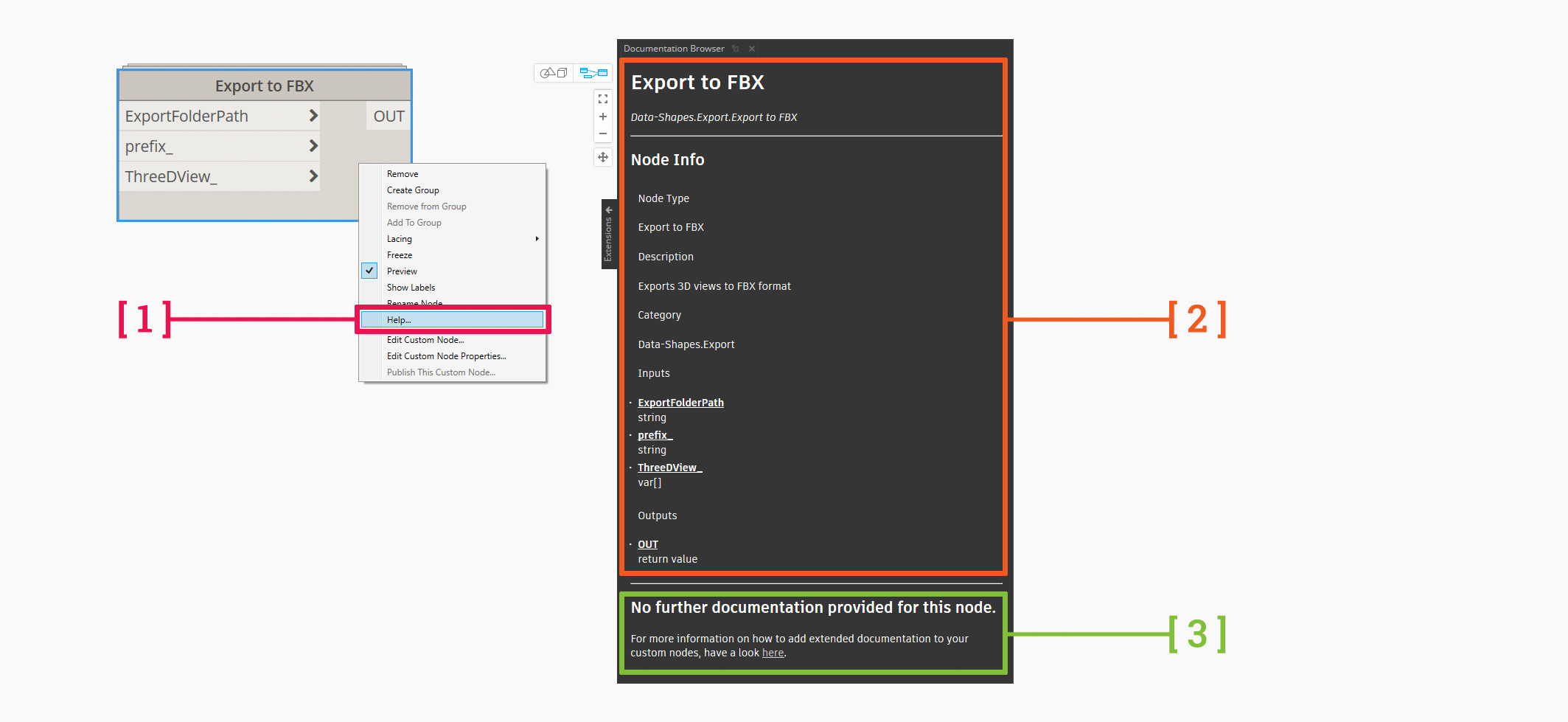
Entry point and missing Node Documentation
Package Authors can go explore how to create and add custom documentation to nodes on our wiki to get the low down on how to create and add their own text, images and gifs to the sidebar panel. Dynamo users who interact with a package that contains this documentation will see additional documentation under the automagically generated node level information. This additional documentation comes from a markdown file, named to the node in question and which lives in a newly minted /doc folder in a Dynamo package, and which is automatically sanitized and converted to HTML to express itself in the sidebar panel when you seek nodal help. Basically, the package author can create custom documentation and you, as a user can use it. Pretty cool eh!
- [ 4 ] Package authors can add a new
/docfolder to the Package contents directory - [ 5 ] Inside of this directory, package authors can put their markdown files and any images or gifs
- [ 6 ] The node user can access this new extended documentation via the
Help...item in the right-click menu - [ 7 ] And voila… new documentation shows up! One cool note for package authors is that if you update the markdown file on the fly, it will auto-update in Dynamo while it’s running. Fancy!

Extended Documentation from a Package
As we continue to refine Dynamo’s ability to give you in-depth information when you need it, we have made sweeping updates to Nodal information with all ~700 out of the box Core nodes having their on-node information reviewed and updated. The focus of this work was to demystify nodes that were either lacking information, were too technical in nature, or were confusing to the user base.
- Descriptions were updated to be more verbose and, ironically, descriptive!
- Input port hover descriptions were updated to better show what kind of data is required to wire in
- Output port hover descriptions to better reflect either the kind of data returned, or the descriptor of such
- Names were updated in rare cases to better reflect what the node actually does and reduce confusion
At times, brevity is not best so we have remove confusing terminology, while technically accurate, in lieu of consistency and simpler language (As shown in the example below with the term predicate), textual descriptions were improved and hover information was expanded. We feel that now the Dynamo Core nodal experience should speak for itself and enable you, our user, to use them with more confidence and efficacy!

Node information improvement pass on all Dynamo Core Nodes
And for all you Package Authors, the Publish New Package dialog has been spruced up with an improved select node binaries experience (Where each DLL is marked as either a Node Binary or dependency) for the Package Author that now enables checkboxes in lieu of the previously hidden right-click entry point and extensive new documentation on what each entry field means, available in the Documentation Browser.
- [ 8 ] Node binary checkbox column and title for package authors to specify what attached DLL’s are node binaries
- [ 9 ] Entry point to the documentation on all Publish New Package dialog fields
- [ 10 ] Documentation Browser containing verbose information on what each specific field means
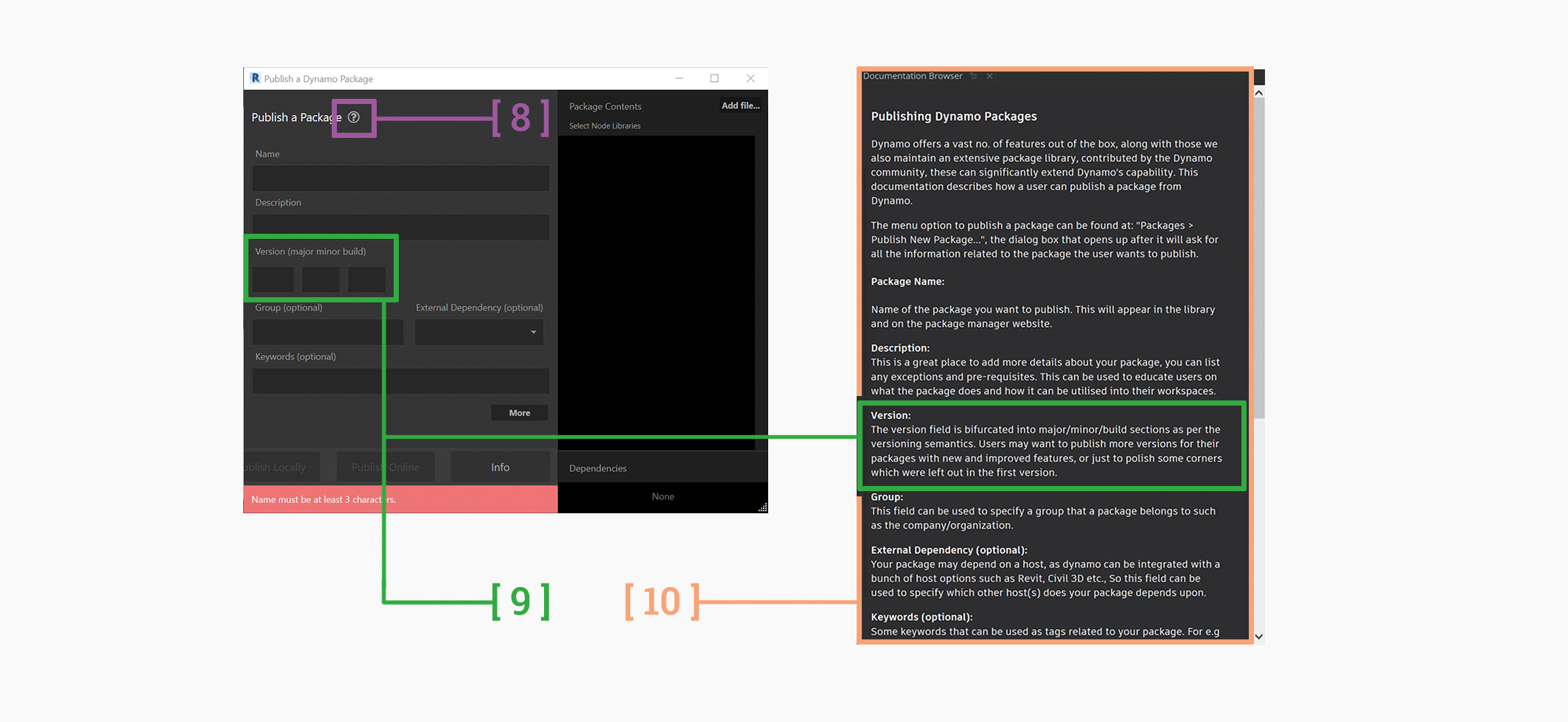
Package Creation documentation
Improving the Nodal Landscape
After a series of requests over the years, we have finally made the watch node resizable! For all your visual purity and data access needs, you can now use a button toggle to resize the standard watch node in a similar fashion the watch 3d node. Huzzah! Note, currently it will not serialize during sessions back to the .DYN file, but that work is in the backlog of things to do.
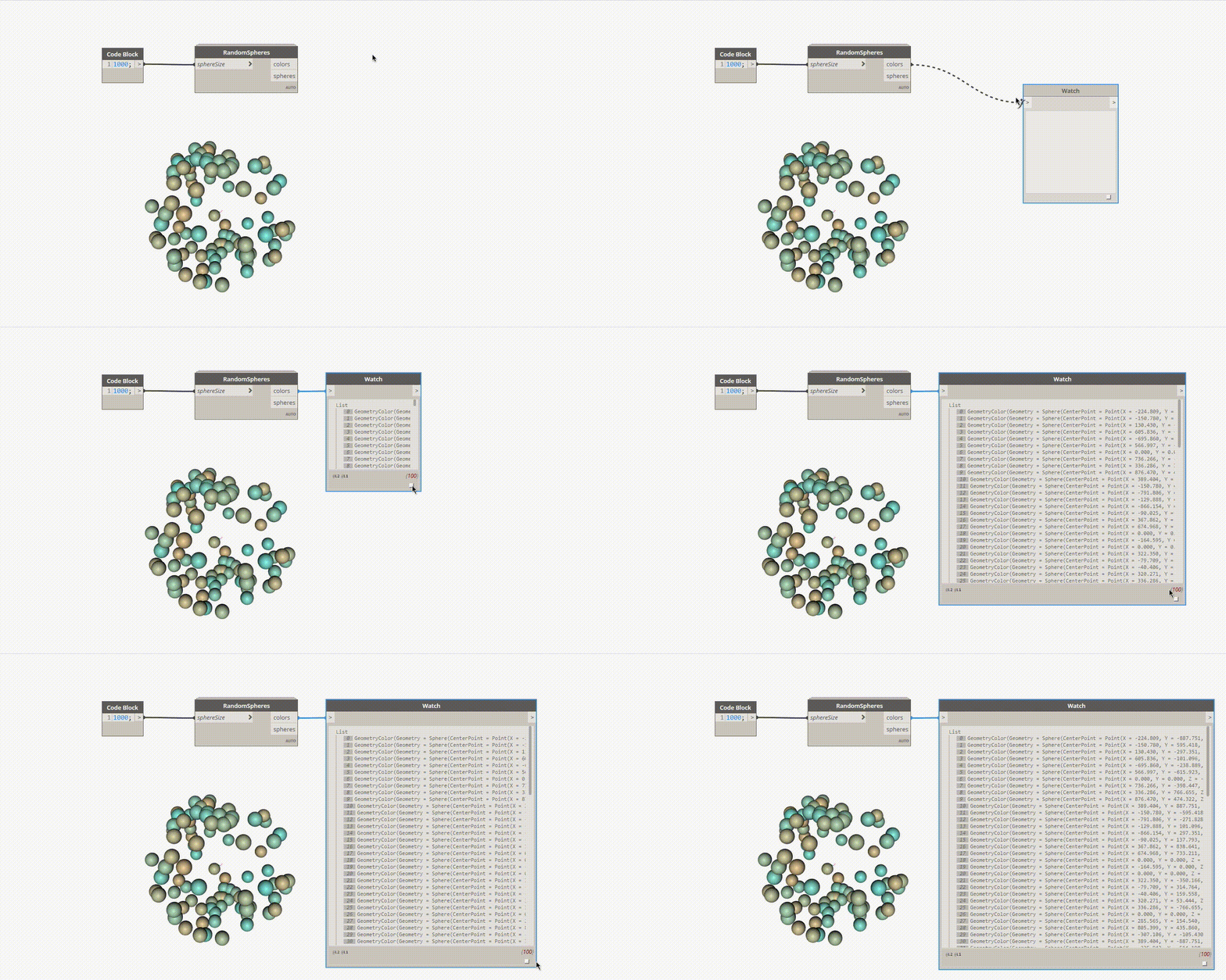
Resizable Watch Node
For those of you that excel at Dynamo (Well, for everyone else too … my pun is just bad) you can now write as string to the Excel export node. No longer will you have to manually change the way that Excel views your data. Mmm time savings. We also updated the description on the Surface.ProjectInputOnto and Solid.ProjectInputOnto nodes to explicitly state that they only accept points or curves as inputs, rather than all geometry types. Apologies for the confusion on this one team!
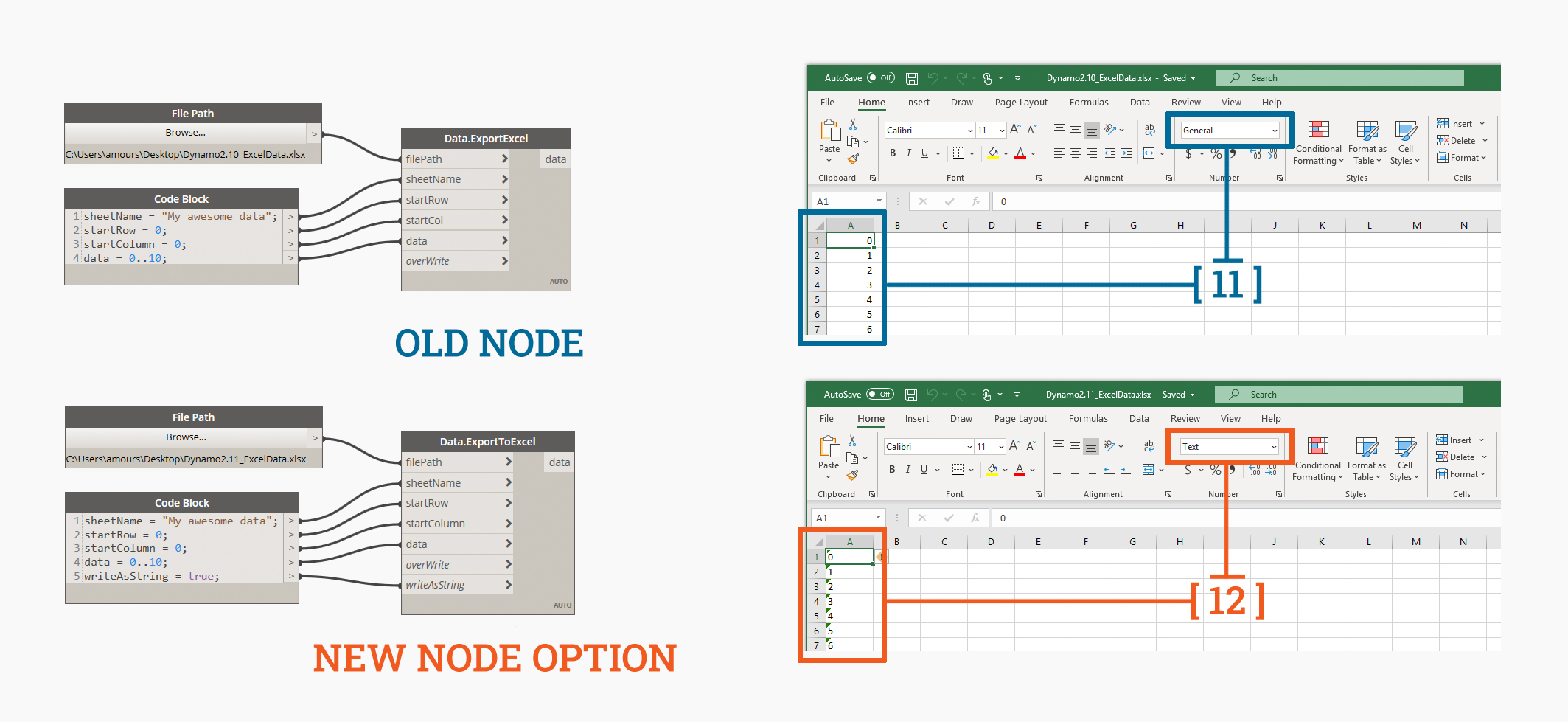
New Data.ExportToExcel nodal input
Performance and Stability Improvements
We are super excited to share a bunch of epic improvements to the performance and stability of Dynamo, generally and also with a big focus on Geometry. Firstly, multi node graph modifications should be much faster as we’ve dramatically improved actions such as Node2Code, undo, copy and paste which might have triggered graph re-runs as you navigate and modified your Dynamo graph. This goes hand in hand with an improvement to the performance of undo and redo which now no longer triggers graph re-runs if you haven’t materially changed anything except the location of a node.
Secondly, we’ve put a bunch of effort into fixing memory leaks, specifically reducing the the memory use and leak of lofting solids, PolyCurve workflows and instances where exceptions or warnings occur when failing to create geometry. All around geometry improvement goodness with more to come in future releases!
Thirdly, Dynamo should no longer crash after being idle for many hours. Previously, if you left Dynamo open on your machine it would lose the background preview and simply clicking on the canvas would cause a Dynamo to crash. Now, if you are like me and use a Parallels Virtual Machine or like to keep your programs open for days on end you will be cooking with gas.
Fourthly, point to point distance calculations are now twice as fast in most cases (For example, Geometry.DistanceTo), and passing an empty list into the Point.PruneDuplicates node will no longer cause a crash.
Smaller Buckets of Work
We have a few smaller, targeted fixes at Geometry in this release that allow NurbsSurface operations should return exact types in more cases, enabling more seamless workflows as well as fixing an issue where scaling a trimmed surface non uniformly would untrim the surface during conversion to NurbsSurface and using non utf-8 characters in paths to the Geometry library during startup should now no longer cause crashes. Yay!
Now that we have CPython3 natively in Dynamo, we have introduced Python2/IronPython2 engine warnings that will be now be displayed if graphs use IronPython2 or packages which use IronPython2. As a user, you can choose to keep IronPython2 (Available on the Package Manager) and suppress these warnings if you so wish – the messages are there to inform you that IronPython2 is no longer supported by the Iron Languages organization. Practically speaking, this means there won’t be any further security updates to IronPython2. We officially support CPython3 going forward and this will become the default Python version in most hosts moving into the near future.
Crash reports from Dynamo will now automatically include loaded packages when posting a crash to Github, so that you no longer have to copy and paste it yourself! This helps us to better debug the problem and help you solve your issues.
For all you hardcore Extension authors out there, we now support an api for saving and loading data (Awesomeness!) and now use a static ID for the docking and undocking of View Extensions, raising a warning should that not occur.
In incremental improvements to our Node Autocomplete feature, we have also improved the way that Node Autocomplete places new nodes to better reflect visual awesomeness and cater to folk like me who very much want their graph to look a certain way, and we have also fixed a bug where Node Autocomplete may have closed by itself to alleviate simple frustrations at using the feature.
You’ve sold me, so where can I grab Dynamo 2.11?
Dynamo 2.11 will be made available in our host integrations at a future date and can be explored right now through the dynamobuilds.com website or the Github build page – available in the Sandbox version of Dynamo.
If you’re curious, you can also read our ‘Release Notes’
In order to keep a semblance of propriety to this blog post we’ve skipped a few things! For more information on other minor features, bug fixes, and known issues in Dynamo 2.11, go check out our release notes: this particular set contains a bunch more, including binary changes, bug fixes, API changes and known issues. Well worth a read!
A big shout-out to everyone who contributed to the release and the entire Dynamo community for continuing to support our work. As always, please let us know if you have any feedback or suggestions!
The Dynamo Team